Anymoji - Emoji Face Recorder
Aktualisiert
Aktuelle Version
1.2.1
Angeboten von

Machen Sie sich keine Sorgen mehr über überhöhte Gebühren, wenn Sie Anymoji - Emoji Face Recorder auf Ihrem Mobiltelefon verwenden, befreien Sie sich von dem winzigen Bildschirm und genießen Sie die Nutzung der App auf einem viel größeren Display. Von nun an können Sie Ihre App mit Tastatur und Maus im Vollbildmodus nutzen. MEmu bietet Ihnen all die überraschenden Funktionen, die Sie erwartet haben: schnelle Installation und einfache Einrichtung, intuitive Steuerung, keine Einschränkungen mehr durch Batterie, mobile Daten und störende Anrufe. Der brandneue MEmu 9 ist die beste Wahl für die Nutzung von Anymoji - Emoji Face Recorder auf Ihrem Computer. Mit unserer Absorption kodiert, ermöglicht der Multi-Instanz-Manager die Eröffnung von 2 oder mehr Konten zur gleichen Zeit. Und das Wichtigste, unsere exklusive Emulations-Engine kann das volle Potenzial Ihres PCs freisetzen und alles reibungslos und angenehm gestalten.
Mehr anzeigen
Laden Sie Play Anymoji - Emoji Face Recorder auf dem PC mit MEmu Android Emulator. Viel Spaß beim Spielen auf großmundieren. Anymoji is the animoji maker for Android.
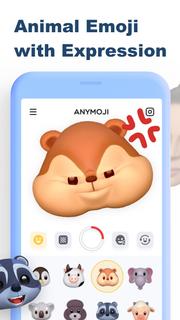
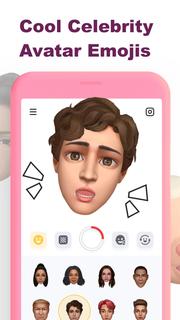
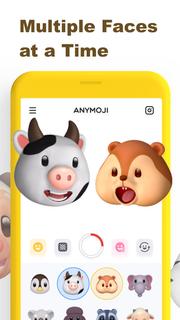
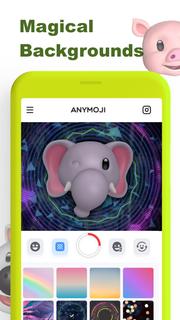
Anymoji is the animoji maker for Android. It has tons of 3D animal emoji and celebrity avatar emoji that can follow your facial expression. You can use Anymoji to create cool post or story for social media like TikTok, Instagram, Snapchat and YouTube. Let it get you more likes for your posts and stories, and get more fans & followers on Instagram, Tik Tok, Snapchat, YouTube, etc.Key Features:• Cute Animal Emoji (Animoji)• Celebrity Avatar Emojis• Multiple Faces at a Time• Magical Backgrounds* Animal Emoji (Animoji)Great variety of cute 3D animal emoji including monkey, pig, lion and so on. It rings emoji to life in a fun new way by combining your own expressions with your favorite emoji. It uses the TrueDepth camera to capture and analyze over 50 different facial muscle movements, including smiles, frowns, and more to make those animoji follow your expression.* Celebrity Avatar EmojiBesides animal emoji (animoji), Anymoji also got 3D avatar emoji of celebrities. You can use those celebrity emojis to do the lip sync of famous songs or famous scenes. That’ll be trending or viral on social media.* Multiple Faces at a TimeAnymoji can capture and analyze more than one face at a time. You can use it with your friends together to create wonderful videos. * Magical BackgroundsYou can choose to change the background when you record the video to match your style and preference or just add some edge to your video.———————————————————————————————————————Upgrade to Anymoji Premium for more awesome features:* Unlimited Cute Animal Emojis* Multiple Faces to Play Together* Huge Library of Magic Backgrounds* Remove Watermark Only For PremiumIf you want to cancel subscriptions, please go to Google Play Store and follow the related guidelines.More details can be found here:Privacy Policy: https://get.anymoji.app/support/privacy.htm Terms of Use: https://get.anymoji.app/support/terms.htmNote: If you have any questions, please feel free to contact us: Email: [email protected]
Mehr anzeigen

1. Laden das MEmu-Installationsprogramm herunter und beenden die Installation

2. MEmu starten und Google Play auf der Homepage öffnen

3. Suchen Anymoji - Emoji Face Recorder in Google Play
Install
4. Herunterladen und Installieren Anymoji - Emoji Face Recorder
5. Klicken nach Abschluss der Installation auf das Symbol, um es zu starten

6. Verwenden Sie MEmu, um Anymoji - Emoji Face Recorder auf Ihrem PC zu nutzen
MEmu Play ist aktuell der beste kostenlose Android-Emulator und bietet 50 Millionen Nutzern ein überragendes Android-App-Erlebnis. Dank der Virtualisierungstechnologie von MEmu können Sie Tausende von Android-Apps problemlos auf Ihrem Computer nutzen, selbst solche mit hohen Grafikanforderungen.
BGrößeres Bild mit besserer Grafik; Keine unterbrechungen, keine sorgen um Akku
Komplette Tastenbelegung unterstützt mit Maus und Tastatur oder Controller
Mit dem „Multi-Instance-Manager“ können Sie mehrere Spielkonten oder Spiele gleichzeitig auf einem PC ausführen.
Use Anymoji - Emoji Face Recorder on PC by following steps: