Anymoji - Emoji Face Recorder
更新日
現在のバージョン
1.2.1
提供元

スマートフォンは不要!パソコンと同じようにキーボードとマウスで操作できます。MEmu Playは、あなたが待ち望んでいたすべての楽しみをお届けします。バッテリー残量や小さな画面を気にすることなく、Anymoji - Emoji Face Recorderをご利用ください。最新のMEmu 9は、Anymoji - Emoji Face RecorderをPCで体験するのに最適です!完璧なキーマッピングシステムにより、PCのようなスムーズな操作性を実現します。マルチインスタンス機能により、複数のアプリケーションを同時に実行できます。独自の仮想化エンジンがPCのパフォーマンスを最大限に引き出します。アプリを使用するだけでなく、高品質な体験を得ることができます。
もっと見る
Anymoji - Emoji Face RecorderをPCでダウンロード!大画面でより楽しむ。電源が落ちてしまうとか通信料が足りないとかの問題を心配する必要がなく、PCの大画面でより快適にゲームを楽しましょう! Anymoji is the animoji maker for Android.
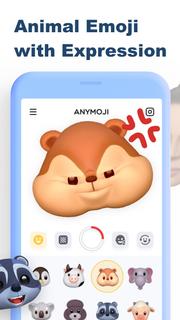
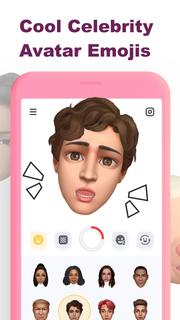
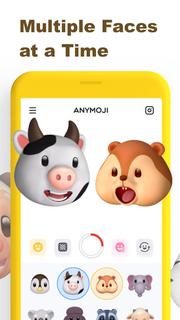
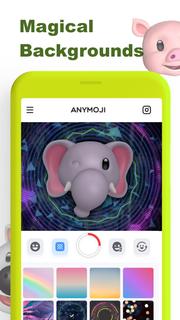
Anymoji is the animoji maker for Android. It has tons of 3D animal emoji and celebrity avatar emoji that can follow your facial expression. You can use Anymoji to create cool post or story for social media like TikTok, Instagram, Snapchat and YouTube. Let it get you more likes for your posts and stories, and get more fans & followers on Instagram, Tik Tok, Snapchat, YouTube, etc.Key Features:• Cute Animal Emoji (Animoji)• Celebrity Avatar Emojis• Multiple Faces at a Time• Magical Backgrounds* Animal Emoji (Animoji)Great variety of cute 3D animal emoji including monkey, pig, lion and so on. It rings emoji to life in a fun new way by combining your own expressions with your favorite emoji. It uses the TrueDepth camera to capture and analyze over 50 different facial muscle movements, including smiles, frowns, and more to make those animoji follow your expression.* Celebrity Avatar EmojiBesides animal emoji (animoji), Anymoji also got 3D avatar emoji of celebrities. You can use those celebrity emojis to do the lip sync of famous songs or famous scenes. That’ll be trending or viral on social media.* Multiple Faces at a TimeAnymoji can capture and analyze more than one face at a time. You can use it with your friends together to create wonderful videos. * Magical BackgroundsYou can choose to change the background when you record the video to match your style and preference or just add some edge to your video.———————————————————————————————————————Upgrade to Anymoji Premium for more awesome features:* Unlimited Cute Animal Emojis* Multiple Faces to Play Together* Huge Library of Magic Backgrounds* Remove Watermark Only For PremiumIf you want to cancel subscriptions, please go to Google Play Store and follow the related guidelines.More details can be found here:Privacy Policy: https://get.anymoji.app/support/privacy.htm Terms of Use: https://get.anymoji.app/support/terms.htmNote: If you have any questions, please feel free to contact us: Email: [email protected]
もっと見る

1. MEmuインストーラーをダウンロードしてセットアップを完了する

2. MEmuを起動し、デスクトップでのPlayストアを開く

3. PlayストアでAnymoji - Emoji Face Recorderを検索する
Install
4. Anymoji - Emoji Face Recorderをダウンロードしてインストールする
5. インストールが完了したら、アイコンをクリックしてスタート

6. MEmuを使ってパソコンでAnymoji - Emoji Face Recorderを体験する
MEmu Playは現在、最高の無料Androidエミュレーターであり、5,000万人のユーザーが優れたAndroidアプリ体験を楽しんでいます。MEmuの仮想化テクノロジーにより、数千ものAndroidアプリをコンピューターでスムーズに実行できます。
大画面でより精細;無限の待機、電池とドラフィックの極限を超え
キーボード・マウス・コントローラーを全力でサポート、より快適
マルチインスタンスで複数のゲームを同時に実行
Use Anymoji - Emoji Face Recorder on PC by following steps: