Huion Sketch - Draw & Paint
تازہ کاری
موجودہ ورژن
V3.4.3
پیشکش بذریعہ

اپنے موبائل فون پر Huion Sketch - Draw & Paint کا استعمال کرتے وقت زیادہ چارج ہونے کی فکر نہ کریں، خود کو چھوٹی اسکرین سے آزاد کریں اور ایپ کو زیادہ بڑے ڈسپلے پر استعمال کرنے کا لطف اٹھائیں۔ اس کے بعد سے کی بورڈ اور ماؤس کے ساتھ اپنے ایپ کا فل اسکرین کا تجربہ حاصل کریں۔ MEmu آپ کو وہ تمام حیران کن خصوصیات پیش کرتا ہے جن کی آپ کو توقع کرتے ہیں: فوری انسٹال اور آسان سیٹ اپ، وجدانی کنٹرول، مزید بیٹری، موبائل ڈیٹا کی کوئی حد نہیں اور اب مزید پریشان کن کالز نہیں۔ نئے برانڈ کا MEmu 9 آپ کے کمپیوٹر پر Huion Sketch - Draw & Paint استعمال کرنے کے لیے بہترین اختیار ہے۔ MEmu کثیر نظیری منیجر بیک وقت 2 یا اس سے زیادہ اکاؤنٹس کھولنا ممکن بناتا ہے۔ اور سب اہم بات، ہمارا خصوصی ایمولیشن انجن آپ کے پی سی کی پوری طاقت ریلیز کرتے ہوئے ہر چیز ہموار اور قابل تفریح بناتا ہے۔
مزید دکھائیں
Download Huion Sketch - Draw & Paint on PC with MEmu Android Emulator. Enjoy playing on big screen. Huion Sketch 3.
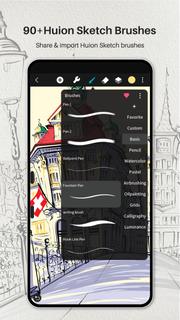
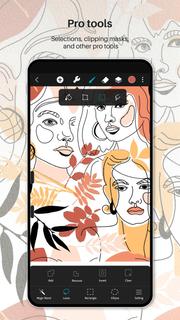
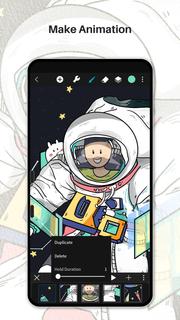
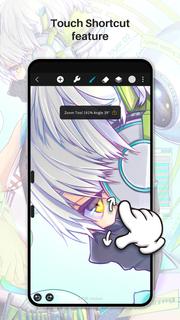
Huion Sketch 3.0 is here !Huion Sketch is a free drawing and painting app that gives you professional art tools organized user-friendly, which allows artists to create excellent sketches, paintings, illustrations. As an drawing app, it has some great features built especially for pen tablet users like cursor for Samsung Smart phone.Huion Sketch is becoming a complete pocket art studio with these powerful drawing features and more:「Cursor support for Samsung smart phone」 · For better drawing and painting experiencing with tablet on Samsung smart phone, we specially added cursor support, you can go "Sketching setting" and enable it.「Animate & Make animation」 · Be a animator through the " Create Animation" function · Export your animation art work to Gif format and share it on Instagram TikTok Youtube Facebook「Light User Interface」 · A simple user interface to gives larger space to think and create, and allows you to focus on the creation itself. · Quick sliders that allow you to quickly adjust brush thickness and opacity. · Brand new dark UI interface, simpler and more powerful「Brushes Features」 · 41+ kinds of common and delicate brushes qualified for most of your art work · 37 customizable brush settings for better drawing effect · Brush Studio - design your own custom brushes 「Color Features」 · Pick the perfect color with Eyedropper · Paint Bucket Tool · Previous Color and Color Palette. · 7 kinds of colors you used recently, easy to switch to color you used. 「Layer Features」 · Well-organized layer function interface · Up to 100 layers supported to make your creation efficient · Multiple layer parameters · Access over 20 layer blend modes for industry grade composition「Other important painting tools」 · Stabilizer smooths and perfects your strokes in real time · Insert shape like line, rectangle, and oval · Canvas Flip horizontally and vertically, Symmetry visual guides · import your picture to edit or copy an artwork「Dramatic finishing effects」 · Gaussian filters, HSB , RGB adjustment · Adjust Hue, Saturation, or Brightness in real-time · Sketch filter that helps you to extract line from a art work·Gaussian and Motion Blur filters for depth and movement, or Sharpen for perfect clarity「Multi-touch gestures Features」 · two finger tap to undo · two-finger pinch to zoom in/out and rotate your canvas · three-finger tap to redo · long press the screen to activate Eyedropper tool · create the perfect circle, square and straight line at specific angle with another finger tap 「Undo and Redo」 · Quickly undo and redo through the quick button or press keys of graphic tablet「 Count your stroke」 · Witness every step you turn your ideas into reality. Every stroke you draw will be recorded and counted precisely.「 Save, export, and share」 · Share your creativity with friends and families, and export your art work to continue creating on computer. · Multiple file format availale, such as JPG/PNG GIF PSD and HuionSketch · Export to PSD formate and continue your art creation on PC Photoshop Sai Clip Studio Paint(CSP)program · Export your animation/cartoon work to Gif「 Support for Huion pen tablets and digital pens perfectly」 · Considering many of you may love to draw on Huion pen tablets, we added support for Huion pen tablets and digital pens. · 19 kinds of features available for you to program the press keys on Huion digital pens and pen tablets.
مزید دکھائیں

1. MEmu انسٹالر ڈاؤن لوڈ کریں اور سیٹ اپ مکمل کریں

2. MEmu شروع کریں اسکے بعد ڈیسکٹاپ پر Google Play کھولیں

3. Google Play میں Huion Sketch - Draw & Paint تلاش کریں
Install
4. Huion Sketch - Draw & Paint ڈاؤن لوڈ کریں اور انسٹال کریں
5. انسٹال مکمل ہونے کے بعد سٹارٹ کرنے کے لیے آئیکن پر کلک کریں

6. MEmu کے ساتھ پی سی پر Huion Sketch - Draw & Paint کھیلنے کا لطف لیں
MEmu پلے بہترین اینڈرائڈ ایمولیٹر ہے اور 100 ملین لوگ اس کے زبردست اینڈرائڈ گیمنگ تجربہ سے لطف اندوز ہو رہے ہیں۔ MEmu کی ورچولائزیشن ٹیکنالوجی آپ کو اپنے PC پر ہزاروں اینڈرائڈ گیمز یہاں تک کہ انتہائی گرافک والے گیمز باسہولت کھیلنے کی طاقت دیتی ہے۔
بہتر گرافکس کے ساتھ بڑی اسکرین؛ طویل دورانیہ، بیٹری یا لامحدود موبائل ڈیٹا کے بغیر۔
کی بورڈ اور ماؤس یا گیم پیڈ کے عین مطابق کنٹرول کے لیے کی میپنگ کا پورا سپورٹ۔
کثیر مثالی منیجر کے ساتھ بیک وقت ایک پی سی پر متعدد گیم اکاؤنٹس یا ٹاسکس۔
پی سی پر درج ذیل مراحل پر عمل کرتے ہوئے پر Huion Sketch - Draw & Paint استعمال کریں: u003c/p>