Huion Sketch - Draw & Paint
Đã cập nhật
Phiên bản hiện tại
V3.4.3
Cung cấp bởi

Bạn không cần phải lo lắng về việc sạc quá mức khi sử dụng Huion Sketch - Draw & Paint trên điện thoại của bạn, không phải sử dụng trên màn hình nhỏ bé và tận hưởng ứng dụng trên màn hình lớn hơn rất nhiều. Từ bây giờ, bạn hãy trải nghiệm ứng dụng của bạn toàn màn hình bằng bàn phím và chuột. MEmu cung cấp cho bạn tất cả các tính năng đáng ngạc nhiên mà bạn mong đợi: cài đặt nhanh, cài đặt dễ dàng, điều khiển trực quan, không còn giới hạn về pin, dữ liệu di động và các cuộc gọi làm phiền. MEmu 9 hoàn toàn mới là sự lựa chọn tốt nhất để sử dụng Huion Sketch - Draw & Paint trên máy tính của bạn. Được mã hóa với sự hợp nhất của chúng tôi, trình quản lý multi-instance giúp mở 2 tài khoản trở lên cùng một lúc. Và điều quan trọng nhất là, công cụ mô phỏng độc quyền của chúng tôi có thể tận dụng hết toàn bộ tiềm năng trên PC của bạn, giúp mọi thứ vận hành trơn tru và thú vị.
Nhiều hơn
Tải Huion Sketch - Draw & Paint trên PC với Trình giả lập Android MEmu. Tận hưởng trải nghiệm chơi game trên màn hình lớn Huion Sketch 3.
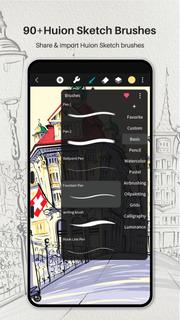
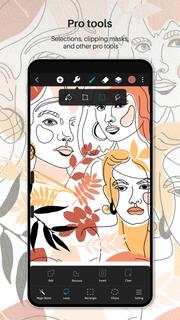
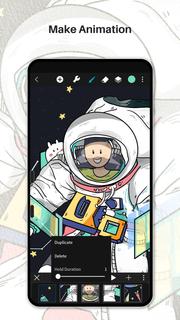
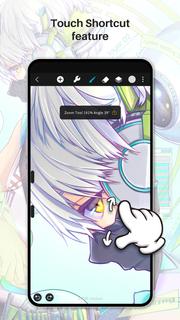
Huion Sketch 3.0 is here !Huion Sketch is a free drawing and painting app that gives you professional art tools organized user-friendly, which allows artists to create excellent sketches, paintings, illustrations. As an drawing app, it has some great features built especially for pen tablet users like cursor for Samsung Smart phone.Huion Sketch is becoming a complete pocket art studio with these powerful drawing features and more:「Cursor support for Samsung smart phone」 · For better drawing and painting experiencing with tablet on Samsung smart phone, we specially added cursor support, you can go "Sketching setting" and enable it.「Animate & Make animation」 · Be a animator through the " Create Animation" function · Export your animation art work to Gif format and share it on Instagram TikTok Youtube Facebook「Light User Interface」 · A simple user interface to gives larger space to think and create, and allows you to focus on the creation itself. · Quick sliders that allow you to quickly adjust brush thickness and opacity. · Brand new dark UI interface, simpler and more powerful「Brushes Features」 · 41+ kinds of common and delicate brushes qualified for most of your art work · 37 customizable brush settings for better drawing effect · Brush Studio - design your own custom brushes 「Color Features」 · Pick the perfect color with Eyedropper · Paint Bucket Tool · Previous Color and Color Palette. · 7 kinds of colors you used recently, easy to switch to color you used. 「Layer Features」 · Well-organized layer function interface · Up to 100 layers supported to make your creation efficient · Multiple layer parameters · Access over 20 layer blend modes for industry grade composition「Other important painting tools」 · Stabilizer smooths and perfects your strokes in real time · Insert shape like line, rectangle, and oval · Canvas Flip horizontally and vertically, Symmetry visual guides · import your picture to edit or copy an artwork「Dramatic finishing effects」 · Gaussian filters, HSB , RGB adjustment · Adjust Hue, Saturation, or Brightness in real-time · Sketch filter that helps you to extract line from a art work·Gaussian and Motion Blur filters for depth and movement, or Sharpen for perfect clarity「Multi-touch gestures Features」 · two finger tap to undo · two-finger pinch to zoom in/out and rotate your canvas · three-finger tap to redo · long press the screen to activate Eyedropper tool · create the perfect circle, square and straight line at specific angle with another finger tap 「Undo and Redo」 · Quickly undo and redo through the quick button or press keys of graphic tablet「 Count your stroke」 · Witness every step you turn your ideas into reality. Every stroke you draw will be recorded and counted precisely.「 Save, export, and share」 · Share your creativity with friends and families, and export your art work to continue creating on computer. · Multiple file format availale, such as JPG/PNG GIF PSD and HuionSketch · Export to PSD formate and continue your art creation on PC Photoshop Sai Clip Studio Paint(CSP)program · Export your animation/cartoon work to Gif「 Support for Huion pen tablets and digital pens perfectly」 · Considering many of you may love to draw on Huion pen tablets, we added support for Huion pen tablets and digital pens. · 19 kinds of features available for you to program the press keys on Huion digital pens and pen tablets.
Nhiều hơn

1. Tải trình cài đặt MEmu và hoàn tất cài đặt

2. Khởi động MEmu, sau đó mở Google Play trên trang chủ

3. Tìm kiếm Huion Sketch - Draw & Paint trong Google Play
Install
4. Tải và Cài Đặt Huion Sketch - Draw & Paint
5. Khi cài đặt hoàn tất, nhấp vào biểu tượng để bắt đầu

6. Trải nghiệm Huion Sketch - Draw & Paint trên PC của bạn bằng MEmu
MEmu Play là trình giả lập Android miễn phí tốt nhất, với 50 triệu người dùng trải nghiệm ứng dụng Android tuyệt vời. Công nghệ ảo hóa của MEmu cho phép bạn chạy mượt mà hàng ngàn ứng dụng Android trên máy tính, ngay cả những ứng dụng đòi hỏi cấu hình cao nhất.
Màn hình lớn hơn cùng với đồ hoạ tốt hơn; thời lượng dài, không giới hạn về pin hoặc dữ liệu di động
Hỗ trợ đầy đủ Keymapping cho việc kiểm soát chính xác bàn phím và chuột hoặc gamepad
Nhiều tài khoản trò chơi hoặc tác vụ cùng lúc trên một PC với Quản lý Đa năng
Use Huion Sketch - Draw & Paint on PC by following steps: