Aged Color
Đã cập nhật
Phiên bản hiện tại
1.2.067
Cung cấp bởi

Với tất cả niềm đam mê chơi Aged Color, đôi tay của bạn sẽ không còn bị giới hạn trên một màn hình nhỏ của điện thoại. Trải nghiệm chơi như một người chuyên nghiệp và kiểm soát hoàn toàn trò chơi của bạn bằng bàn phím và chuột. MEmu cung cấp cho bạn tất cả những điều mà bạn đang mong đợi. Tải xuống và chơi Aged Color trên PC. Miễn là bạn muốn chơi, bởi nó không còn giới hạn về pin, dữ liệu di động và các cuộc gọi làm phiền. MEmu 9 hoàn toàn là sự lựa chọn tốt nhất để chơi Aged Color trên PC. Với sự chuẩn bị về chuyên môn của chúng tôi, hệ thống sơ đồ bàn phím tinh tế làm cho Aged Color trở thành một trò chơi thực sự trên PC. Trình Quản lý đa năng, đã được chăm chút bởi sự tiếp thu của chúng tôi, có thể phát 2 hoặc nhiều tài khoản trên cùng một thiết bị. Và điều quan trọng nhất, công cụ mô phỏng độc quyền của chúng tôi có thể phát huy toàn bộ tiềm năng PC của bạn, giúp mọi thứ hoạt động trơn tru nhất có thể. Chúng tôi biết rằng quá trình tận hưởng hạnh phúc ở mỗi trò chơi cũng là mong muốn của mỗi game thủ, vì vậy các bạn chỉ cần chơi thôi hãy để chúng tôi quan tâm đến tất cả trải nghiệm đó.
Nhiều hơn
Tải Aged Color trên PC với Trình giả lập Android MEmu. Tận hưởng trải nghiệm chơi game trên màn hình lớn Aged Color is a free color by number game for people of all ages and lifestyles.
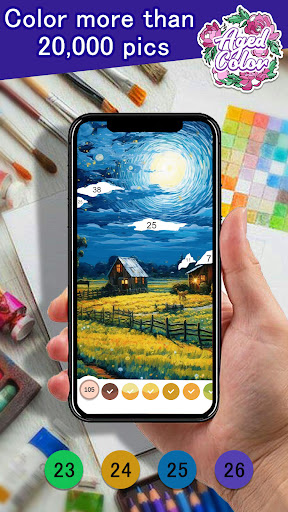
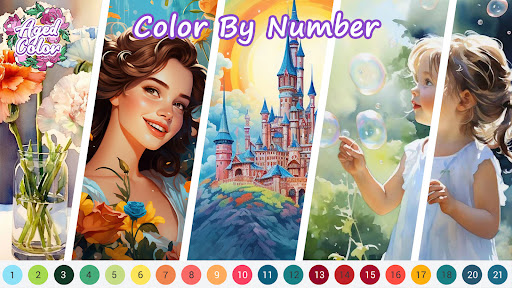
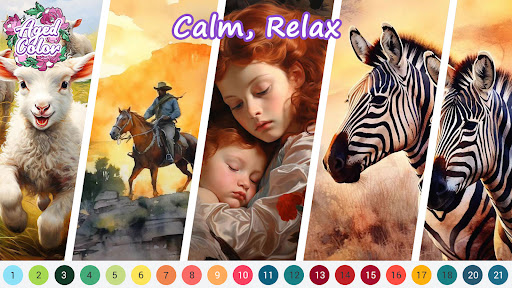
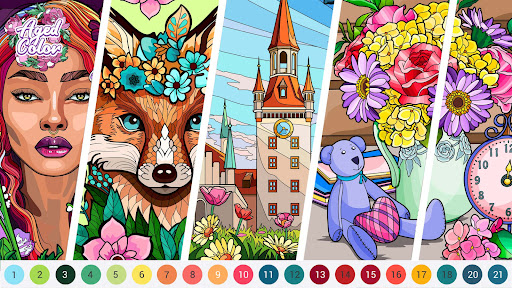
Aged Color is a free color by number game for people of all ages and lifestyles. Featuring tons of inspiring pictures, you will enjoy a relaxing and interesting experience.
What to Color?
Our app offers thousands of exquisite pictures produced by professional artists worldwide and beautiful images are updated every day for you to color them and relax your mind!
There are more than 30 categories for your choice, such as
- Animal: You can find cute pets, lovely animals you can only see in zoos, and various animals in the wild.
- People: There are attractive and interesting people here.
- Flower: You can see beautiful flowers which can relieve your stress and make you happy physically and mentally.
- Place: Like travelling over the world, you can see various and impressive styles of architecture.
- Nature: You can feel like you are in the splendid nature and witness the beauty of nature.
Mandalas, ️Hearts, Fashion, Pattern, Vehicle, Holidays, Food and many surprises await you!
How to Color?
Super easy! Just follow the numbers and tap to color. You can create an incredible masterpiece and bring it to life in a short time!
Key Features:
Convenient and user-friendly: Start to color painting anytime and anywhere. No pencil or paper is needed, and no specific skills are required!
Fascinating pictures and daily updated: A large range of pictures to choose from and unique coloring images updated every day!
Various themes for all tastes: Animals, Places, Nature, Mandalas, People, Fashion, Foods, Pattern and many more!
Save as favorite and color later: When you explore to find pics you love, you can save them as favorites first, and color them later when you are available.
Tell others your thoughts: After completing a picture, you can post your comment, like the pic, and reply to others’ comments to express your thoughts and feelings.
Share and save your artwork: You can share your completed pics on social media, like Facebook. Also, you can download and save them to your device.
Recommended coloring pages: Help you choose pictures that you may be interested in and start coloring easily.
Personal profile: Make more people know about you. Your profile will display your nickname, profile photo, bio, game achievements, statistics, and albums of paintings like Completed, Favorite, and Collected pictures. Also, you can check how many friends, followers, completed pictures and likes you have.
Chat with friends: Directly send texts, pics and videos to your friends in our app. You do not need to switch to other apps to chat with your friends. Besides, search function helps you quickly add friends and find the one you want to message. How convenient!
Meet new friends: Leave a message and share your experience with others, you can meet like-minded players all over the world. Also, “Suggested Friends” feature recommends lists of people you might want to add as friends.
Followings and Feeds: You can follow your friends and favorite players to keep track of your following's latest, such as their current coloring page and new achievement.
Stress relief and other benefits: Enjoy art therapy to reduce stress and anxiety. It's also a great way to enhance focus, motor skills and creativity.
Relax and entertain yourself with color therapy now! It's time to explore fabulous paintings and enjoy your coloring journey in Aged Color!
To ensure that you can save and share pictures successfully, we need to access photos, media and files on your device. To permanently save all your painting progresses, we would recommend you log in and bind your account. You can see more details of app permissions in App info of Google Play.
We do not sell any personal information you provide, nor do we share your private information without your consent. Thanks for your understanding and we are dedicated to a better coloring experience!
We are willing to hear your feedback: support@agedstudio.com
Nhiều hơn

1. Tải trình cài đặt MEmu và hoàn tất cài đặt

2. Khởi động MEmu, sau đó mở Google Play trên trang chủ

3. Tìm kiếm Aged Color trong Google Play
Install
4. Tải và Cài Đặt Aged Color
5. Khi cài đặt hoàn tất, nhấp vào biểu tượng để bắt đầu

6. Tận hưởng chơi Aged Color trên PC với MEmu
MEmu App Player là trình mô phỏng Android miễn phí tốt nhất và 50 triệu người đã tận hưởng trải nghiệm chơi trò chơi tuyệt vời trên Android của mình. Công nghệ ảo hóa MEmu trao quyền cho bạn để chơi hàng ngàn trò chơi Android mượt mà trên PC của bạn, ngay cả những trò chơi chuyên sâu nhất.
Màn hình lớn hơn cùng với đồ hoạ tốt hơn; thời lượng dài, không giới hạn về pin hoặc dữ liệu di động
Hỗ trợ đầy đủ Keymapping cho việc kiểm soát chính xác bàn phím và chuột hoặc gamepad
Nhiều tài khoản trò chơi hoặc tác vụ cùng lúc trên một PC với Quản lý Đa năng
Play Aged Color on PC by following steps: