AI Video Generator - Vezo AI
Đã cập nhật
Phiên bản hiện tại
5.6
Cung cấp bởi

Bạn không cần phải lo lắng về việc sạc quá mức khi sử dụng AI Video Generator - Vezo AI trên điện thoại của bạn, không phải sử dụng trên màn hình nhỏ bé và tận hưởng ứng dụng trên màn hình lớn hơn rất nhiều. Từ bây giờ, bạn hãy trải nghiệm ứng dụng của bạn toàn màn hình bằng bàn phím và chuột. MEmu cung cấp cho bạn tất cả các tính năng đáng ngạc nhiên mà bạn mong đợi: cài đặt nhanh, cài đặt dễ dàng, điều khiển trực quan, không còn giới hạn về pin, dữ liệu di động và các cuộc gọi làm phiền. MEmu 9 hoàn toàn mới là sự lựa chọn tốt nhất để sử dụng AI Video Generator - Vezo AI trên máy tính của bạn. Được mã hóa với sự hợp nhất của chúng tôi, trình quản lý multi-instance giúp mở 2 tài khoản trở lên cùng một lúc. Và điều quan trọng nhất là, công cụ mô phỏng độc quyền của chúng tôi có thể tận dụng hết toàn bộ tiềm năng trên PC của bạn, giúp mọi thứ vận hành trơn tru và thú vị.
Nhiều hơn
Tận hưởng trải nghiệm tuyệt vời khi sử dụng AI Video Generator - Vezo AI trên PC với MEmu Play. Đây là trình giả lập Android miễn phí mạnh mẽ, cung cấp cho bạn hàng ngàn ứng dụng Android trên máy tính. Thỏa sức kết nối với bạn bè và hoàn thiện công việc với hiệu suất cao hơn! ONE APP.
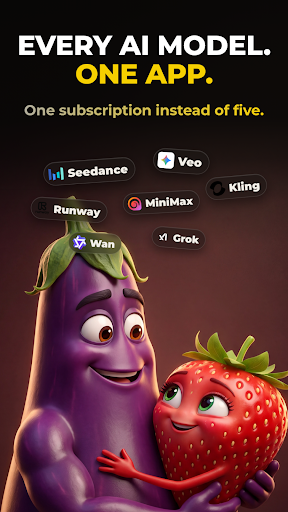


ONE APP. ALL THE AI.
Vezo brings the world's most powerful AI models together in a single app. Type an idea and watch it become a cinematic video, a stunning image, or a complete song with real vocals. There's nothing to learn — you describe, Vezo creates. Whether you're making content for TikTok, Reels and YouTube, designing visuals for your brand, or writing a song for someone you love, it all happens in one place, with one credit balance, in minutes.
Most AI apps lock you into a single model. Vezo gives you the full roster of today's leading AI engines — and when a new model drops, it lands in Vezo right away.
AI VIDEO — EVERY TOP MODEL
Turn plain text into cinematic video, or bring your photos to life:
• Seedance 2.5 — next-gen cinematic video with native audio, up to 15s
• Google Veo 3.1 — lifelike motion and rich sound
• OpenAI Sora 2 — hyper-realistic video with synced audio
• Kling 3 — fast, cinematic clips with lip-sync
• Wan 2.7 — Alibaba's model, up to 1080p
• Hailuo 2.3 — cinematic precision, emotional depth
• Grok Imagine — fast and creatively fearless
• P-Video — the quickest, most affordable way to test ideas
Choose your aspect ratio (9:16 for Shorts and Reels, 16:9 for YouTube, 1:1 for feeds), set the clip length, and in image-to-video mode decide how your photo is used: opening frame, first-and-last pair for seamless morphs, or a style reference the whole video follows.
AI IMAGE — ANY STYLE YOU CAN IMAGINE
Create images from text, or upload a photo and reshape it with a sentence:
• Nano Banana 2 — real-world knowledge, flawless multilingual text
• GPT Image 2 — near-perfect text and surgical edits
• Flux 2 Pro — uncompromising photorealism
• Reve v2 — layout-first design, beautiful typography
• Seedream 4.5 — cinematic detail, accurate text
• Grok Imagine — fast, stylized, less filtered
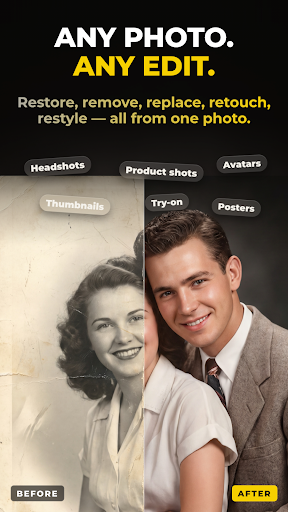
Restore old family photos. Remove strangers from the background. Turn a selfie into a professional headshot, or your pet into a 3D character. When an image turns out great, one tap animates it into video.
AI SONG — FROM A FEELING TO A FINISHED TRACK
Describe what the song is about and Vezo does the rest — lyrics, vocals, instruments, production:
• AI-written lyrics in any language — English, Turkish, Spanish and beyond
• Review and edit every lyric line before the music is made
• 40+ genres, from Pop, Hip-Hop and R&B to EDM and Orchestral
• 18 moods, auto length or 1–3 minutes
• Unique AI cover artwork and title for every song
• Real files: download the MP3 or share it anywhere
Write a birthday anthem for a friend, a lullaby in your grandmother's language, or the breakup ballad you never knew you needed.
AI TOOLS — RESCUE ANY FOOTAGE
• Object Removal — erase photobombers, logos or clutter from any video; the scene rebuilds seamlessly
• AI Extend — describe what happens next and extend any clip up to 15 seconds
▶ SEE WHAT OTHERS MADE
Open the community feed and scroll real creations with the exact prompts behind them. Steal the recipe, tweak it, make it yours.
WHY CREATORS CHOOSE VEZO
• Always current — new models added as soon as they release
• One balance — the same credits work across video, image, song and tools
• Fair by design — credits only charged when your generation succeeds
• Built for focus — fast, dark, clutter-free
Download Vezo and turn your next idea into something you can watch, post and share — before your coffee gets cold.
Nhiều hơn

1. Tải trình cài đặt MEmu và hoàn tất cài đặt

2. Khởi động MEmu, sau đó mở Google Play trên trang chủ

3. Tìm kiếm AI Video Generator - Vezo AI trong Google Play
Install
4. Tải và Cài Đặt AI Video Generator - Vezo AI
5. Khi cài đặt hoàn tất, nhấp vào biểu tượng để bắt đầu

6. Trải nghiệm AI Video Generator - Vezo AI trên PC của bạn bằng MEmu
MEmu Play là trình giả lập Android miễn phí tốt nhất, với 50 triệu người dùng trải nghiệm ứng dụng Android tuyệt vời. Công nghệ ảo hóa của MEmu cho phép bạn chạy mượt mà hàng ngàn ứng dụng Android trên máy tính, ngay cả những ứng dụng đòi hỏi cấu hình cao nhất.
Màn hình lớn hơn cùng với đồ hoạ tốt hơn; thời lượng dài, không giới hạn về pin hoặc dữ liệu di động
Hỗ trợ đầy đủ Keymapping cho việc kiểm soát chính xác bàn phím và chuột hoặc gamepad
Nhiều tài khoản trò chơi hoặc tác vụ cùng lúc trên một PC với Quản lý Đa năng
Use AI Video Generator - Vezo AI on PC by following steps: