DealDash - Bid & Save Auctions
Đã cập nhật
Phiên bản hiện tại
5.20.21
Cung cấp bởi

Bạn không cần phải lo lắng về việc sạc quá mức khi sử dụng DealDash - Bid & Save Auctions trên điện thoại của bạn, không phải sử dụng trên màn hình nhỏ bé và tận hưởng ứng dụng trên màn hình lớn hơn rất nhiều. Từ bây giờ, bạn hãy trải nghiệm ứng dụng của bạn toàn màn hình bằng bàn phím và chuột. MEmu cung cấp cho bạn tất cả các tính năng đáng ngạc nhiên mà bạn mong đợi: cài đặt nhanh, cài đặt dễ dàng, điều khiển trực quan, không còn giới hạn về pin, dữ liệu di động và các cuộc gọi làm phiền. MEmu 9 hoàn toàn mới là sự lựa chọn tốt nhất để sử dụng DealDash - Bid & Save Auctions trên máy tính của bạn. Được mã hóa với sự hợp nhất của chúng tôi, trình quản lý multi-instance giúp mở 2 tài khoản trở lên cùng một lúc. Và điều quan trọng nhất là, công cụ mô phỏng độc quyền của chúng tôi có thể tận dụng hết toàn bộ tiềm năng trên PC của bạn, giúp mọi thứ vận hành trơn tru và thú vị.
Nhiều hơn
Tải DealDash - Bid & Save Auctions trên PC với Trình giả lập Android MEmu. Tận hưởng trải nghiệm chơi game trên màn hình lớn Top 5 reasons to download the app & save money with Deal Dash.

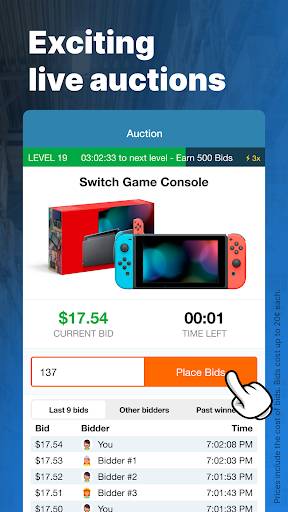
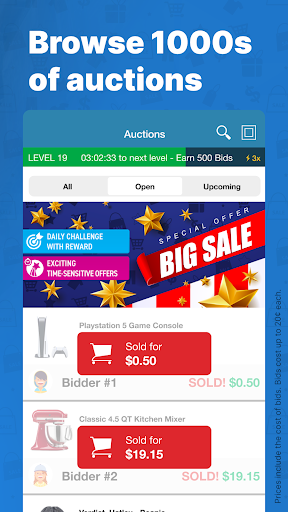
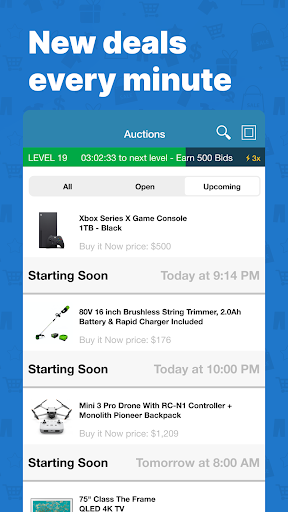
Top 5 reasons to download the app & save money with Deal Dash
1) Save up to 99% on your favorite brands & products
2) Win Electronics, Gift Cards, Home Items, Jewelry, Beauty, Apparel, Holiday Vacation Stays, Tools and more
3) Always free shipping, no reserve prices
4) Only brand new items with original manufacturer’s warranty
5) Everything sells from DealDash or trusted partner stock - untrusted third party sellers are NOT allowed to sell on DealDash
Bid & save on online auctions for warehouse deals, closeout auctions, manufacturer stock, overstock surplus, wholesale offers and more.
Upcoming featured Auctions:
Apple iPhone 13 Pro 5G 512GB Model
KitchenAid Mixers
Apple MacBooks
PlayStation 5 (PS5) Bundles
Gift Cards to Walmart, Target and more
… plus tens of thousands of other auctions every month!
DealDash has been in business for over 10 years, selling top name brands at deeply discounted prices.
We serve more than 20,000,000 registered shoppers and hold an A+ Rating at the Better Business Bureau.
How Does DealDash Work?
1. Browse Auctions - All items sold on DealDash are brand new and come with manufacturer warranties. DealDash works directly with leading retailers and brands and sells items from their own or their trusted partners' warehouse stock.
2. Buy Bids - Bids allow you to participate in the auctions that enable you to save money on best-selling brand name items. You’re can purchase bids in a variety of different pack sizes. Bids can be usually purchased for less than $0.20 each.
3. Start Bidding - All auctions start at $0.00. Each bid placed adds one penny to the final price of the item. Each bid restarts the timer to 10 seconds to allow a chance for someone else to place a bid. All items are guaranteed to sell! There are never reserve prices and the items can go for as low as 99% off.
4. Win & Save Up to 99% - When no more bids are placed, the last bidder wins the auction. The winner gets the item for the discounted price and shipping is always FREE. Just like in a regular auction with no reserves, the excitement comes from the fact that any bid can be the last one!
5. What Happens If You Don’t Win? - Don’t worry! When you don’t win you can get all your bids back if you buy the item at its ‘Buy It Now & Get Your Bids Back’ price listed in the auction.
DealDash has been featured in the Financial Times, CNBC, Huffington Post and holds the highest A+ Rating at the Better Business Bureau.
Need any help with our Auctions? We have 24/7 live customer support!
Get in touch with our customer service team at https://www.dealdash.com/support
Nhiều hơn

1. Tải trình cài đặt MEmu và hoàn tất cài đặt

2. Khởi động MEmu, sau đó mở Google Play trên trang chủ

3. Tìm kiếm DealDash - Bid & Save Auctions trong Google Play
Install
4. Tải và Cài Đặt DealDash - Bid & Save Auctions
5. Khi cài đặt hoàn tất, nhấp vào biểu tượng để bắt đầu

6. Trải nghiệm DealDash - Bid & Save Auctions trên PC của bạn bằng MEmu
MEmu Play là trình giả lập Android miễn phí tốt nhất, với 50 triệu người dùng trải nghiệm ứng dụng Android tuyệt vời. Công nghệ ảo hóa của MEmu cho phép bạn chạy mượt mà hàng ngàn ứng dụng Android trên máy tính, ngay cả những ứng dụng đòi hỏi cấu hình cao nhất.
Màn hình lớn hơn cùng với đồ hoạ tốt hơn; thời lượng dài, không giới hạn về pin hoặc dữ liệu di động
Hỗ trợ đầy đủ Keymapping cho việc kiểm soát chính xác bàn phím và chuột hoặc gamepad
Nhiều tài khoản trò chơi hoặc tác vụ cùng lúc trên một PC với Quản lý Đa năng
Use DealDash - Bid & Save Auctions on PC by following steps: