DeskIn Remote Desktop
Đã cập nhật
Phiên bản hiện tại
3.2.0
Cung cấp bởi

Bạn không cần phải lo lắng về việc sạc quá mức khi sử dụng DeskIn Remote Desktop trên điện thoại của bạn, không phải sử dụng trên màn hình nhỏ bé và tận hưởng ứng dụng trên màn hình lớn hơn rất nhiều. Từ bây giờ, bạn hãy trải nghiệm ứng dụng của bạn toàn màn hình bằng bàn phím và chuột. MEmu cung cấp cho bạn tất cả các tính năng đáng ngạc nhiên mà bạn mong đợi: cài đặt nhanh, cài đặt dễ dàng, điều khiển trực quan, không còn giới hạn về pin, dữ liệu di động và các cuộc gọi làm phiền. MEmu 9 hoàn toàn mới là sự lựa chọn tốt nhất để sử dụng DeskIn Remote Desktop trên máy tính của bạn. Được mã hóa với sự hợp nhất của chúng tôi, trình quản lý multi-instance giúp mở 2 tài khoản trở lên cùng một lúc. Và điều quan trọng nhất là, công cụ mô phỏng độc quyền của chúng tôi có thể tận dụng hết toàn bộ tiềm năng trên PC của bạn, giúp mọi thứ vận hành trơn tru và thú vị.
Nhiều hơn
Tải DeskIn Remote Desktop trên PC với Trình giả lập Android MEmu. Tận hưởng trải nghiệm chơi game trên màn hình lớn DeskIn is a free remote desktop app providing fast, secure and stable remote access service for personal use.
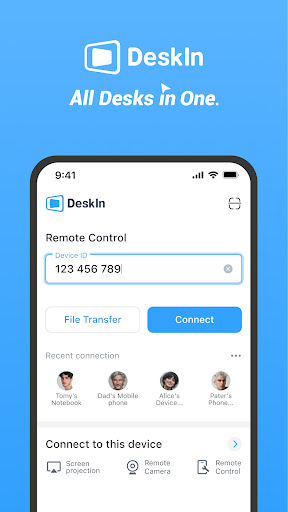
DeskIn is a free remote desktop app providing fast, secure and stable remote access service for personal use. You can control one or multiple remote devices from your mobile phone with a secure and stable connection. Whether you are in remote-working, IT support, designing, studying, or assisting your families and friends, DeskIn helps you become more efficient and productive.
Why DeskIn?
1. Excellent performance-Up to 4K60FPS quality and ultra-low latency
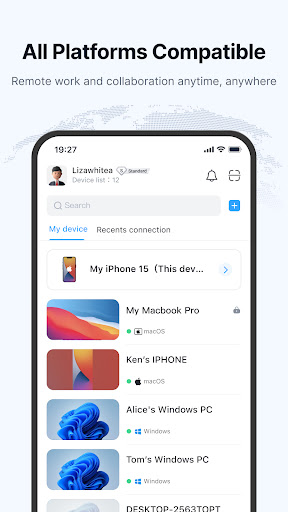
2. Cross-platform connectivity-Compatible with all operating systems and devices.
3. Simple-Easy and quick connection to other devices with just a few clicks
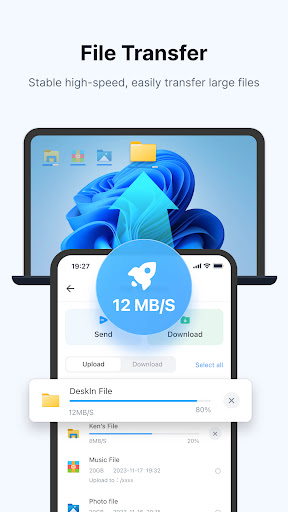
4. Stable-High-speed up to 12MB/s, smoother connection and transmission
5. Secure-Banking-standard end-to-end encryption
What you could do with DeskIn?
-File transfer
Quickly and easily transfer large files without format or storage limitation
-Remote work and collaboration
Access up to 100 devices with one account. Access, edit and print files from remote computer anytime and anywhere. Collaborate with your colleagues or teammates to work on the same remote desktop, share clipboard and annotate, which will make you work more efficiently and conveniently.
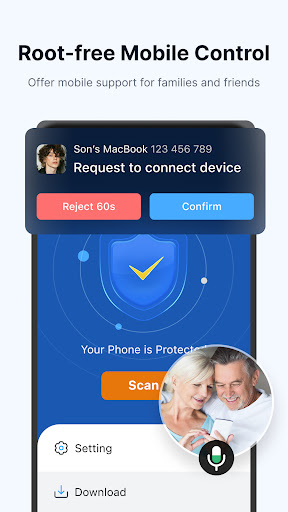
-Root Free Mobile Control
Use iphone/Adnroid to remotely control Android devices to offer mobile device support for families and friends like downloading apps or clean clash. Sharing screens remotely for presentations, showcasing, or simply sharing joy and fun time with the remote camera. You can send text message or start audio calls at the same time! Additionally, please note that we utilize the AccessibilityService feature for enhancing user accessibility.
-Remote design
True HD and 4:4:4 True color display. Precisely cover mainstream application software and compatible with 80% digital tablets. With 0.04s non-sensitive delay, you can enjoy an immersive remote design experience. Access high-performance computer to work as a professional designer.
-Extend screen
Double efficiency by turning your IPAD、PC or mobile phone into your second monitor
-Virtual screen
Generate and display multiple virtual screens at the same time in despite of remote hardware restriction to maximize productivity.
-Remote game
DeskIn supports PS and Xbox game controllers and customize gaming keyboards for mobile devices, allowing you to play PC games, Steam games on your iPhone, Android devices, Macbook or Ipad anytime and anywhere, and enjoy a smooth remote gaming experience
-Remote IT support
Switch on your computer remotely with Wake-on-LAN. You can also do things like shutdown, reboot, terminal(CMD), lock screen to your devices. Real-time audio call makes things more productive.
-Secure connection
All of your connections, activities and data will be safe and secure with our two-factor authentication and 256-bit AES encryption technology. You can also turn on private mode to protect your privacy during remote access.
With industrial leading technology and high-performance, DeskIn will give you the best remote access experience and is a app that you will never regret to download. Try it now!
Quick start guide:
1. Install and launch DeskIn on your devices.
2. Sign in and enter the DeskIn-ID and password of your remote device.
3. Done! Now control your remote device with all of our features.
DeskIn is free for personal use, but we also provide paid Enterprise Edition for businesses or companies, visit www.deskin.io for more information. If you notice any issue or have any suggestion for us, feel free to contact us by support@deskin.io.
Nhiều hơn

1. Tải trình cài đặt MEmu và hoàn tất cài đặt

2. Khởi động MEmu, sau đó mở Google Play trên trang chủ

3. Tìm kiếm DeskIn Remote Desktop trong Google Play
Install
4. Tải và Cài Đặt DeskIn Remote Desktop
5. Khi cài đặt hoàn tất, nhấp vào biểu tượng để bắt đầu

6. Trải nghiệm DeskIn Remote Desktop trên PC của bạn bằng MEmu
MEmu Play là trình giả lập Android miễn phí tốt nhất, với 50 triệu người dùng trải nghiệm ứng dụng Android tuyệt vời. Công nghệ ảo hóa của MEmu cho phép bạn chạy mượt mà hàng ngàn ứng dụng Android trên máy tính, ngay cả những ứng dụng đòi hỏi cấu hình cao nhất.
Màn hình lớn hơn cùng với đồ hoạ tốt hơn; thời lượng dài, không giới hạn về pin hoặc dữ liệu di động
Hỗ trợ đầy đủ Keymapping cho việc kiểm soát chính xác bàn phím và chuột hoặc gamepad
Nhiều tài khoản trò chơi hoặc tác vụ cùng lúc trên một PC với Quản lý Đa năng
Use DeskIn Remote Desktop on PC by following steps: