
MuseScore: sheet music
Đã cập nhật
Phiên bản hiện tại
2.13.51
Cung cấp bởi

Bạn không cần phải lo lắng về việc sạc quá mức khi sử dụng MuseScore: sheet music trên điện thoại của bạn, không phải sử dụng trên màn hình nhỏ bé và tận hưởng ứng dụng trên màn hình lớn hơn rất nhiều. Từ bây giờ, bạn hãy trải nghiệm ứng dụng của bạn toàn màn hình bằng bàn phím và chuột. MEmu cung cấp cho bạn tất cả các tính năng đáng ngạc nhiên mà bạn mong đợi: cài đặt nhanh, cài đặt dễ dàng, điều khiển trực quan, không còn giới hạn về pin, dữ liệu di động và các cuộc gọi làm phiền. MEmu 9 hoàn toàn mới là sự lựa chọn tốt nhất để sử dụng MuseScore: sheet music trên máy tính của bạn. Được mã hóa với sự hợp nhất của chúng tôi, trình quản lý multi-instance giúp mở 2 tài khoản trở lên cùng một lúc. Và điều quan trọng nhất là, công cụ mô phỏng độc quyền của chúng tôi có thể tận dụng hết toàn bộ tiềm năng trên PC của bạn, giúp mọi thứ vận hành trơn tru và thú vị.
Nhiều hơn
Tải MuseScore: sheet music trên PC với Trình giả lập Android MEmu. Tận hưởng trải nghiệm chơi game trên màn hình lớn Play FREE music scores.

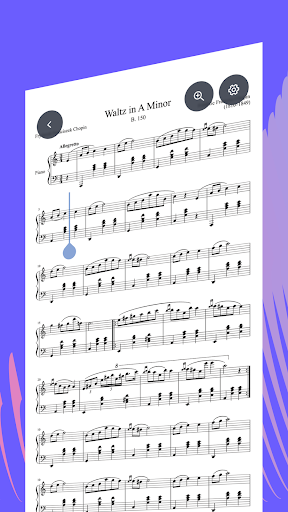

Play FREE music scores
Whatever instrument you play, whether it's a piano, trumpet, guitar, or harmonica, or kalimba, you will always find notes of excellent quality.
• Browse the most extensive sheet music collection from MuseScore.com.
• Access over 2 million pieces of FREE sheet music: piano notes, guitar tabs, and scores for most instruments.
• Play compositions that suit all tastes: from timeless classics or Christian tunes to anime music transcriptions, movies (OST), or songs from video games (soundtracks).
• View, practice, and perform scores on-the-go
• Search for scores with ease.
• Find something new to play - scores are added every day.
Access large sheet music archive
Searching for sheet music just got easier with MuseScore.com.
• Browse the catalog by instrument: piano, trumpet, violin, percussion, flute, etc.
• Filter catalog for suitable compositions, including solo, band, ensemble, or orchestra.
• Don't miss scores for the music of composers you know and love, from Bach and Mozart to Morricone, Zimmer, Joe Hisaishi, and Koji Kondo.
• Choose your favorite genres: Classical, Pop, Rock, Folk, Jazz, R&B, Funk & Soul, Hip Hop, New Age, World Music.
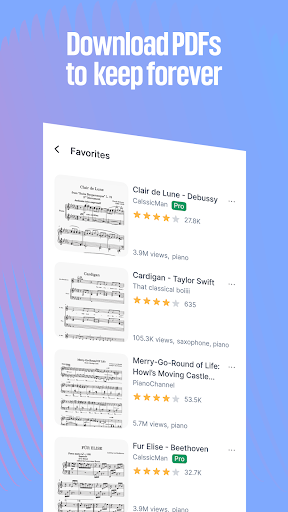
• Add scores to Favorites to easily access them online.
• Share the sheet music you love
With MuseScore PRO, you can download and keep your scores offline. Plus, now you can load scores from your device or cloud.
Practice with MuseScore
Boost your music reading skills and listen to how scores sound:
• Play over 1 million Official Scores from top publishers like Hal Leonard and Faber
• Play immediately with the interactive player.
• Set the tempo and loop to practice.
• Use dedicated Practice Mode to learn music score note-by-note.
• Zoom in to see every detail.
Boost your progress with MuseScore PRO:
• Adjust the volume and visibility of each instrument in every score.
• Transpose sheet music into any key.
• Locate notes on the piano keyboard much easier with the on-screen keyboard featuring key highlighting.
• Auto-scroll to make notes always visible while playing.
• Export sheet music to PDF, MIDI, and MP3.
• Play on time with metronome.
Listen to music scores with HQ sound.
Learn with video courses
Fulfil your musical passion by refining your skills on the go.
Tap into video lessons and reading materials from credible music tutors with a dedicated MuseScore LEARN subscription. Or bundle courses with premium practicing features with MuseScore ONE plan.
• Learn with courses from some of the world's best music instructors.
• Master how to play the piano, guitar, violin, trombone, and other instruments.
• Study music theory, music composition, and ear training.
• We cover all levels, from absolute beginners to advanced musicians.
Nhiều hơn

1. Tải trình cài đặt MEmu và hoàn tất cài đặt

2. Khởi động MEmu, sau đó mở Google Play trên trang chủ

3. Tìm kiếm MuseScore: sheet music trong Google Play
Install
4. Tải và Cài Đặt MuseScore: sheet music
5. Khi cài đặt hoàn tất, nhấp vào biểu tượng để bắt đầu

6. Trải nghiệm MuseScore: sheet music trên PC của bạn bằng MEmu
MEmu Play là trình giả lập Android miễn phí tốt nhất, với 50 triệu người dùng trải nghiệm ứng dụng Android tuyệt vời. Công nghệ ảo hóa của MEmu cho phép bạn chạy mượt mà hàng ngàn ứng dụng Android trên máy tính, ngay cả những ứng dụng đòi hỏi cấu hình cao nhất.
Màn hình lớn hơn cùng với đồ hoạ tốt hơn; thời lượng dài, không giới hạn về pin hoặc dữ liệu di động
Hỗ trợ đầy đủ Keymapping cho việc kiểm soát chính xác bàn phím và chuột hoặc gamepad
Nhiều tài khoản trò chơi hoặc tác vụ cùng lúc trên một PC với Quản lý Đa năng
Use MuseScore: sheet music on PC by following steps: