X AIR
Đã cập nhật
Phiên bản hiện tại
1.5.5
Cung cấp bởi

Bạn không cần phải lo lắng về việc sạc quá mức khi sử dụng X AIR trên điện thoại của bạn, không phải sử dụng trên màn hình nhỏ bé và tận hưởng ứng dụng trên màn hình lớn hơn rất nhiều. Từ bây giờ, bạn hãy trải nghiệm ứng dụng của bạn toàn màn hình bằng bàn phím và chuột. MEmu cung cấp cho bạn tất cả các tính năng đáng ngạc nhiên mà bạn mong đợi: cài đặt nhanh, cài đặt dễ dàng, điều khiển trực quan, không còn giới hạn về pin, dữ liệu di động và các cuộc gọi làm phiền. MEmu 9 hoàn toàn mới là sự lựa chọn tốt nhất để sử dụng X AIR trên máy tính của bạn. Được mã hóa với sự hợp nhất của chúng tôi, trình quản lý multi-instance giúp mở 2 tài khoản trở lên cùng một lúc. Và điều quan trọng nhất là, công cụ mô phỏng độc quyền của chúng tôi có thể tận dụng hết toàn bộ tiềm năng trên PC của bạn, giúp mọi thứ vận hành trơn tru và thú vị.
Nhiều hơn
Tải X AIR trên PC với Trình giả lập Android MEmu. Tận hưởng trải nghiệm chơi game trên màn hình lớn The X AIR Android® App allows you to control all mixing, processing and effects functions of BEHRINGER's X AIR digital mixer series right from your Android® tablet or smartphone.
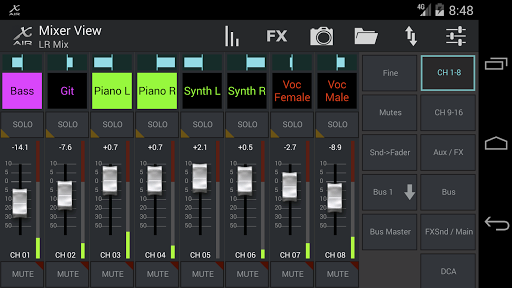
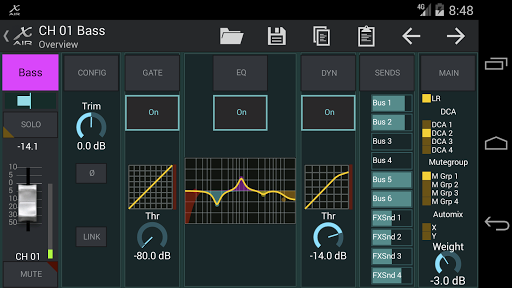
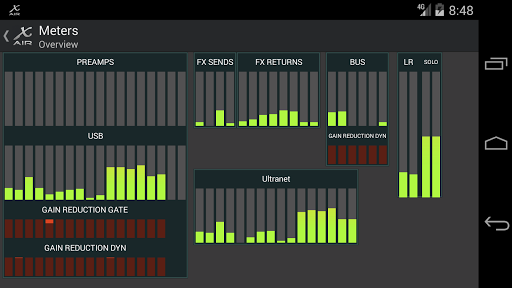
The X AIR Android® App allows you to control all mixing, processing and effects functions of BEHRINGER's X AIR digital mixer series right from your Android® tablet or smartphone.
X AIR for Android® delivers comprehensive control for the X18, XR18, XR16, and XR12 mixers. The user interface is configurable for either simplified access or expert level editing (S/E), for mixing 18 input channels to 12 buses. Control is also provided for the 4 internal stereo effects processors – all of which feature the critically-acclaimed BEHRINGER X32 audio processing engine.
The X AIR app provides the mobility to go where you need to get the most out of your system, enabling you to adjust your house mix from any seat or fine-tune monitor mixes from on-stage. Since all BEHRINGER's X AIR mixers feature internal access points, setting up the X AIR app couldn’t be simpler – just select the X AIR network and connect your Android® device to it. Upon opening the app, your X AIR mixer will show up as a controllable device, and will even allow you to lock your Android® device to that specific X AIR mixer. You can also run the X AIR app in demo mode without connecting to your BEHRINGER X AIR series mixer. Additional hardware is not required, making the X AIR Android® App the ideal solution for seamless remote mixing applications.
KEY FEATURES
- Control all Input Levels, incl. Preamp Gain, Low Cut, Phase, Phantom, Stereo Link
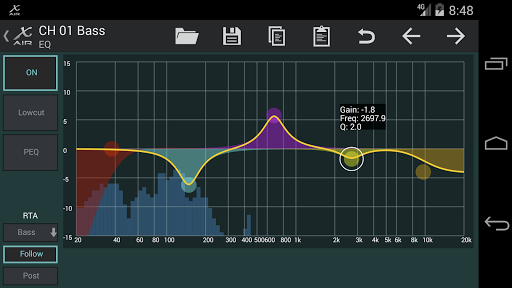
- Channel Parametric EQ Control – fine-tune EQ from anywhere in the room
- Configurable RTA overlay on the EQ editing screens, or separate large analyzer screen
- Metering Overview – whether you use the Android® tablet or smartphone remotely or at the console, all levels at a glance
- Control bus send levels of input channels conveniently from their channel faders
- Detailed Preamp/Configuration, Gate, Dynamics, EQ and Bus Sends pages
- 4 Full Effects editing screens for Hall Reverb, Vintage Room Reverb, Modulation Delay, and Dimensional Chorus, or more than 50 other studio quality effects
- Use single bus-send mode for personal monitoring application without risking to affect any other signal path
- All input channels can be assigned to one of two AutoMixing (gain sharing) groups for conferences or panel discussions
- 4 Mute Groups and 4 DCA Groups remote controllable from the app
- X AIR Mixer's 64 internal snapshots can be filtered and recalled instantaneously
- USB Return routing options to stereo Aux- and FX-Returns (X18/XR18 only)
KNOWN ISSUES
- NOTE: With version 1.5, we have dropped support of the former IDCA function in favor of the four new mixer-internal DCAs. The internal DCAs are causing way lower network traffic and improve the response of the app, especially when more remote control clients (e.g. for personal monitoring) are connected to the same mixer.
REQUIREMENTS
- Compatible with Android® devices running Android® 4.0 or higher, display sizes larger than 5" recommended
- X AIR 1.5 requires X AIR series mixer firmware V1.11 or higher, or can be used in demo mode
Nhiều hơn

1. Tải trình cài đặt MEmu và hoàn tất cài đặt

2. Khởi động MEmu, sau đó mở Google Play trên trang chủ

3. Tìm kiếm X AIR trong Google Play
Install
4. Tải và Cài Đặt X AIR
5. Khi cài đặt hoàn tất, nhấp vào biểu tượng để bắt đầu

6. Trải nghiệm X AIR trên PC của bạn bằng MEmu
MEmu Play là trình giả lập Android miễn phí tốt nhất, với 50 triệu người dùng trải nghiệm ứng dụng Android tuyệt vời. Công nghệ ảo hóa của MEmu cho phép bạn chạy mượt mà hàng ngàn ứng dụng Android trên máy tính, ngay cả những ứng dụng đòi hỏi cấu hình cao nhất.
Màn hình lớn hơn cùng với đồ hoạ tốt hơn; thời lượng dài, không giới hạn về pin hoặc dữ liệu di động
Hỗ trợ đầy đủ Keymapping cho việc kiểm soát chính xác bàn phím và chuột hoặc gamepad
Nhiều tài khoản trò chơi hoặc tác vụ cùng lúc trên một PC với Quản lý Đa năng
Use X AIR on PC by following steps: