Pixel Launcher
Đã cập nhật
Phiên bản hiện tại
2.11
Cung cấp bởi

Bạn không cần phải lo lắng về việc sạc quá mức khi sử dụng Pixel Launcher trên điện thoại của bạn, không phải sử dụng trên màn hình nhỏ bé và tận hưởng ứng dụng trên màn hình lớn hơn rất nhiều. Từ bây giờ, bạn hãy trải nghiệm ứng dụng của bạn toàn màn hình bằng bàn phím và chuột. MEmu cung cấp cho bạn tất cả các tính năng đáng ngạc nhiên mà bạn mong đợi: cài đặt nhanh, cài đặt dễ dàng, điều khiển trực quan, không còn giới hạn về pin, dữ liệu di động và các cuộc gọi làm phiền. MEmu 9 hoàn toàn mới là sự lựa chọn tốt nhất để sử dụng Pixel Launcher trên máy tính của bạn. Được mã hóa với sự hợp nhất của chúng tôi, trình quản lý multi-instance giúp mở 2 tài khoản trở lên cùng một lúc. Và điều quan trọng nhất là, công cụ mô phỏng độc quyền của chúng tôi có thể tận dụng hết toàn bộ tiềm năng trên PC của bạn, giúp mọi thứ vận hành trơn tru và thú vị.
Nhiều hơn
Tải Pixel Launcher trên PC với Trình giả lập Android MEmu. Tận hưởng trải nghiệm chơi game trên màn hình lớn Pixel Launcher provides a new home screen experience like Android Pixel Launcher that allow you to be more customize your Android device.
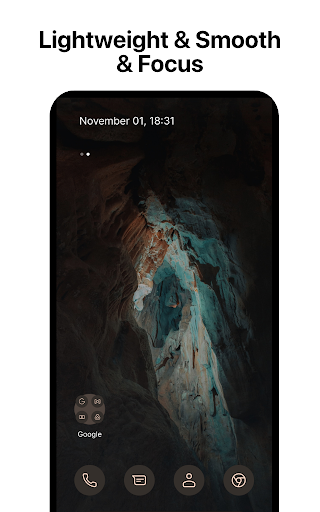
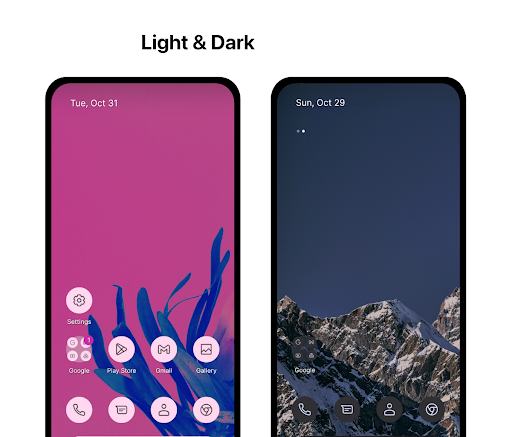
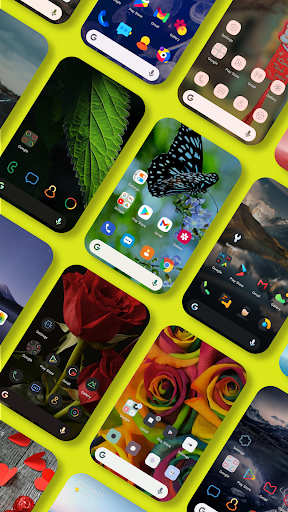

Pixel Launcher provides a new home screen experience like Android Pixel Launcher that allow you to be more customize your Android device.
This version of Pixel Launcher has been rebuilt on a new codebase to make new features possible, including dark mode, and numerous performance improvements (improved load time, less memory use, better battery performance, and fluent animation).
PIXEL LAUNCHER FEATURES
- Customizable pixel icons and adaptive icons (change icons color base on background color).
- Give your phone a consistent look and feel with custom pixel icon packs and pixel adaptive icons. You can feel comfortable to choose any icon pack you like.
- Customize Notification dots with number
- Customize dock bar on home screen with pixel corner and radius
- Customize folder icon on home screen
- Variant gestures, you can easily to customize and use them
- At A Glance Widgets
- Customization launcher font with your love
- Customization recent feature
- Customize columns and rows, icon sizes on App Drawer
- Support use adaptive icons (For example: https://play.google.com/store/apps/details?id=com.donnnno.arcticons&hl=en_US)
- Support use another dock server (Google, Bing, Wikipedia, DuckDuckGo)
- Custom dock icons
- Beautiful Wallpapers from Unsplash
Google Feed:
Install it with these steps:
1. Download and install Pixel Bridge (https://github.com/amirzaidi/AIDLBridge/releases/download/v3/pixelbridge.apk)
2. Restart launcher from Launcher Settings
Thanks Amir Zaidi
Fix glancer did not show Google Weather by Smartspacer:
How to use Smartspacer (Thanks KieronQuinn)
Go to launcher settings -> At a Glance -> Enable "At a Glance Provider selection" -> Download and install Smartspacer at link https://github.com/KieronQuinn/Smartspacer/releases/tag/1.2.2 and click "At a Glance Provider" -> Choose Smartspacer.
Dark theme:
· Comfortably use your phone at night or in low light environments with dark theme. This feature is compatible with Android’s dark mode settings.
Backup and Restore:
· Easily move between your phones or try Home Screen setups through Pixel Launcher’s Backup and Restore feature. Backups can be stored locally or saved to the cloud for easy transfers.
Improved performance:
· Pixel Launcher now loads faster, uses less memory, is more battery efficient, and offers fluent animations.
ACCESSIBILITY
The application commits not to collect or share any user information about this accessibility right.
App need accessibility permission to use functions: go home, recent apps, go back, set up the lock and display the Control Center, Listen to the open application to use the "Animation App" function.
Permission
- BIND_ACCESSIBILITY_SERVICE: To allow apps to draw gestures in HOME SCREEN. App does not use the permission for any other purpose. The application is only allowed to use this permission with the consent of the user.
- We never publicly disclose any personal or sensitive user data related to financial or payment activities or any government identification numbers, photos and contacts, etc.
This app uses Accessibility services.
This video demo how to we use accessibility permissions: https://www.youtube.com/shorts/k6Yud387ths
Thanks for assets from Pixabay, Unsplash
Contact us:
Email: phuctc.freelancer@gmail.com
Facebook: https://www.facebook.com/profile.php?id=100094232618606
Nhiều hơn

1. Tải trình cài đặt MEmu và hoàn tất cài đặt

2. Khởi động MEmu, sau đó mở Google Play trên trang chủ

3. Tìm kiếm Pixel Launcher trong Google Play
Install
4. Tải và Cài Đặt Pixel Launcher
5. Khi cài đặt hoàn tất, nhấp vào biểu tượng để bắt đầu

6. Trải nghiệm Pixel Launcher trên PC của bạn bằng MEmu
MEmu Play là trình giả lập Android miễn phí tốt nhất, với 50 triệu người dùng trải nghiệm ứng dụng Android tuyệt vời. Công nghệ ảo hóa của MEmu cho phép bạn chạy mượt mà hàng ngàn ứng dụng Android trên máy tính, ngay cả những ứng dụng đòi hỏi cấu hình cao nhất.
Màn hình lớn hơn cùng với đồ hoạ tốt hơn; thời lượng dài, không giới hạn về pin hoặc dữ liệu di động
Hỗ trợ đầy đủ Keymapping cho việc kiểm soát chính xác bàn phím và chuột hoặc gamepad
Nhiều tài khoản trò chơi hoặc tác vụ cùng lúc trên một PC với Quản lý Đa năng
Use Pixel Launcher on PC by following steps: