
Root
Đã cập nhật
Phiên bản hiện tại
1.17.0.1
Cung cấp bởi

Bạn không cần phải lo lắng về việc sạc quá mức khi sử dụng Root trên điện thoại của bạn, không phải sử dụng trên màn hình nhỏ bé và tận hưởng ứng dụng trên màn hình lớn hơn rất nhiều. Từ bây giờ, bạn hãy trải nghiệm ứng dụng của bạn toàn màn hình bằng bàn phím và chuột. MEmu cung cấp cho bạn tất cả các tính năng đáng ngạc nhiên mà bạn mong đợi: cài đặt nhanh, cài đặt dễ dàng, điều khiển trực quan, không còn giới hạn về pin, dữ liệu di động và các cuộc gọi làm phiền. MEmu 9 hoàn toàn mới là sự lựa chọn tốt nhất để sử dụng Root trên máy tính của bạn. Được mã hóa với sự hợp nhất của chúng tôi, trình quản lý multi-instance giúp mở 2 tài khoản trở lên cùng một lúc. Và điều quan trọng nhất là, công cụ mô phỏng độc quyền của chúng tôi có thể tận dụng hết toàn bộ tiềm năng trên PC của bạn, giúp mọi thứ vận hành trơn tru và thú vị.
Nhiều hơn
Tận hưởng trải nghiệm tuyệt vời khi sử dụng Root trên PC với MEmu Play. Đây là trình giả lập Android miễn phí mạnh mẽ, cung cấp cho bạn hàng ngàn ứng dụng Android trên máy tính. Thỏa sức kết nối với bạn bè và hoàn thiện công việc với hiệu suất cao hơn! Right from understanding the topics to clearing the exam, we offer you a one-stop solution for all your learning needs.
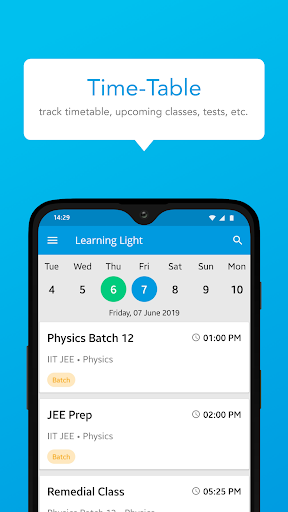
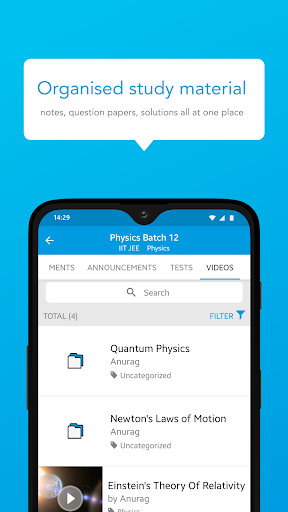
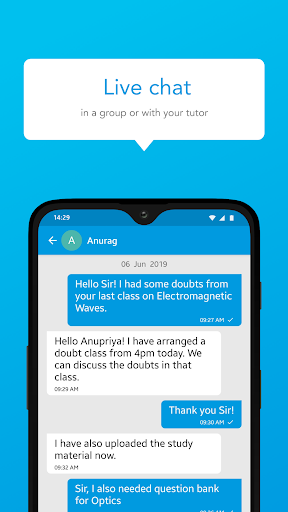
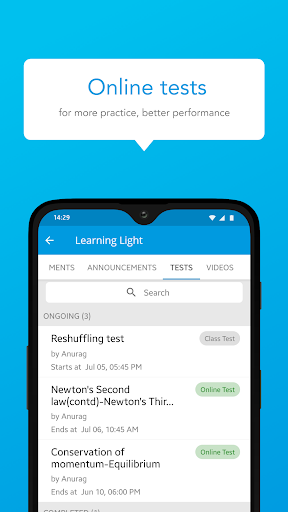
Right from understanding the topics to clearing the exam, we offer you a one-stop solution for all your learning needs. Now learn with us, uninterrupted from the safety of your home.
With a simple user interface, design and exciting features, our app is the go-to solution for students across the country.
åWhy study with us? Want to know what all you will get?
Interactive live classes
Let’s recreate our physical experiences now through our state-of-the-art live classes interface where multiple students can study, together.
- Periodical live classes to ensure you clear your exams
- Raise your hand feature to solve individual queries
Course material
- Get access to course, notes, and other study material on-the-go
- Regularly updated content
Tests and performance reports
- Get online tests and exams
- Track your performance, test scores & rank from time to time.
Ask every doubt
- Clearing doubts has never been easier. Ask your doubts by just clicking a screenshot/photo of the question and upload it. We’ll ensure that all your doubts are clarified.
- Clear your doubts on the go through our mobile app
Proven record of excellence:
- We have been part of the market for a long time now and we have helped multiple candidates clear their exams.
- Excellence has always been our motto, and the only thing that will never change is our motto.
⏰ Reminders and notifications for batches and sessions
- Get notifications about new courses, sessions and updates. No more worrying about missed classes, sessions, etc. because we only want you to focus on your studies.
- Get announcements around exam dates/special classes/ special events etc.
Assignment submission
- Practice makes a student perfect. Get regular online assignments so that you can become perfect.
- Submit your assignments online and we will help you in evaluating your performance
Anytime access
- Watch our classes, live or recorded, anytime from any of your devices.
Parent-Teacher discussion
- Parents can download the app and connect with teachers & track their ward’s performance
- Parents can easily chat with the teacher in case of any query
Payments and fees
- Easy fees submission with 100% safe and secure payment options
Online fee payment option for ease
Compete within groups
- Compete within groups and peers who are studying
- Get to see your comparative score as compared to peer students
Ads Free
- No ads for seamless studying experience
Safe and secure
- Safety of your data i.e. phone number, email address, etc. is of utmost importance
- We never use student data for any kind of advertisement
An online platform for studying in the most efficient and transparent manner. Download now !!
Nhiều hơn

1. Tải trình cài đặt MEmu và hoàn tất cài đặt

2. Khởi động MEmu, sau đó mở Google Play trên trang chủ

3. Tìm kiếm Root trong Google Play
Install
4. Tải và Cài Đặt Root
5. Khi cài đặt hoàn tất, nhấp vào biểu tượng để bắt đầu

6. Trải nghiệm Root trên PC của bạn bằng MEmu
MEmu Play là trình giả lập Android miễn phí tốt nhất, với 50 triệu người dùng trải nghiệm ứng dụng Android tuyệt vời. Công nghệ ảo hóa của MEmu cho phép bạn chạy mượt mà hàng ngàn ứng dụng Android trên máy tính, ngay cả những ứng dụng đòi hỏi cấu hình cao nhất.
Màn hình lớn hơn cùng với đồ hoạ tốt hơn; thời lượng dài, không giới hạn về pin hoặc dữ liệu di động
Hỗ trợ đầy đủ Keymapping cho việc kiểm soát chính xác bàn phím và chuột hoặc gamepad
Nhiều tài khoản trò chơi hoặc tác vụ cùng lúc trên một PC với Quản lý Đa năng
Use Root on PC by following steps: