U Launcher
Đã cập nhật
Phiên bản hiện tại
6.3
Cung cấp bởi

Bạn không cần phải lo lắng về việc sạc quá mức khi sử dụng U Launcher trên điện thoại của bạn, không phải sử dụng trên màn hình nhỏ bé và tận hưởng ứng dụng trên màn hình lớn hơn rất nhiều. Từ bây giờ, bạn hãy trải nghiệm ứng dụng của bạn toàn màn hình bằng bàn phím và chuột. MEmu cung cấp cho bạn tất cả các tính năng đáng ngạc nhiên mà bạn mong đợi: cài đặt nhanh, cài đặt dễ dàng, điều khiển trực quan, không còn giới hạn về pin, dữ liệu di động và các cuộc gọi làm phiền. MEmu 9 hoàn toàn mới là sự lựa chọn tốt nhất để sử dụng U Launcher trên máy tính của bạn. Được mã hóa với sự hợp nhất của chúng tôi, trình quản lý multi-instance giúp mở 2 tài khoản trở lên cùng một lúc. Và điều quan trọng nhất là, công cụ mô phỏng độc quyền của chúng tôi có thể tận dụng hết toàn bộ tiềm năng trên PC của bạn, giúp mọi thứ vận hành trơn tru và thú vị.
Nhiều hơn
Tải U Launcher trên PC với Trình giả lập Android MEmu. Tận hưởng trải nghiệm chơi game trên màn hình lớn All File Access permission .
All File Access permission
- This launcher includes a full fledged file manager that requires full access to file system.
- This launcher also includes a backup and restore function that also need all file access permissions.
About U Launcher
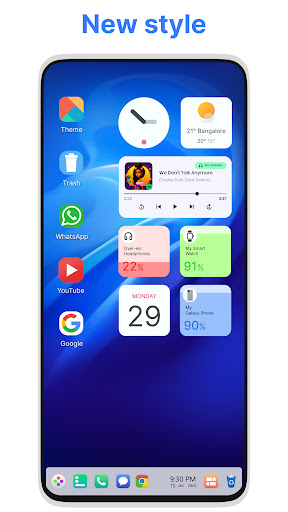
U Launcher is a new design for the Android mobile system launcher. It makes your phone better than before. It has a design similar of Ubuntu OS And now it opens up to amazing possibilities for launcher on your phone. With U Launcher your phone is the most powerful, personal, and intelligent devices they've ever been.
This Launcher sets a new standard for the Android mobile operating system. It makes your phone better than before. And now it opens up to amazing possibilities for launcher on your phone. With this Launcher, Your phone is the most powerful, personal, and intelligent devices they've ever been.
SUPPORTED FEATURES
File Manager
With built-in support of File Explore and File Manager you can search and explore your files and Folders, Copy, Paste, Zip/Unzip, RAR, Delete Files, Share Files and can do lot more...
Explore your file system with this simple and efficient file explorer and file manager in native desktop computer design. You will be amazed at the interface that resembles to Ubunut OS
- Built-In support of File Explorer
- Create Folders, Cut, Copy, Paste, Move, Share etc.
- Listing of all of your drives, SD Card, Storage, audio and video files and pictures in PC style.
- put the files to Recycle Bin and delete later in style
- Built-in ZIP support allows you to decompress or extract ZIP/RAR files
System Features
- Taskbar
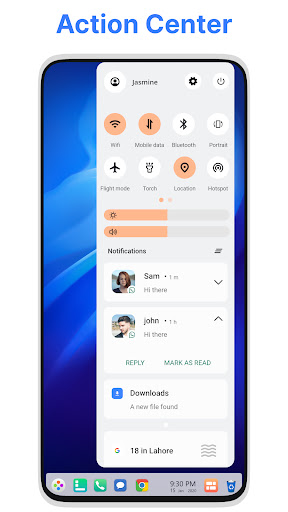
- Action Center. Notifier Center: You can check the notice of application or system with Notification Center.
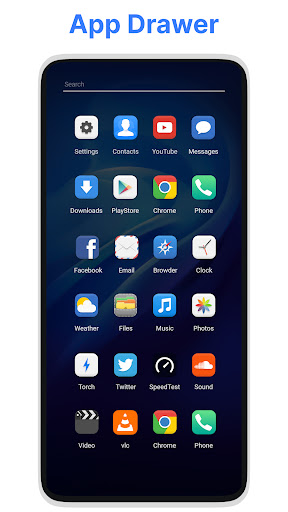
- Android application in Stylish Tiles - In Start Menu
- Best application are available on One Click - Create Shortcuts of most used application on Desktop by press and Hold Feature.
- Easy Navigation to the Apps
- Desktop Widgets
- Drag and drop Improved
- Clock Widget
- Weather Widget
- RAM info widget
- Changeable desktop folders
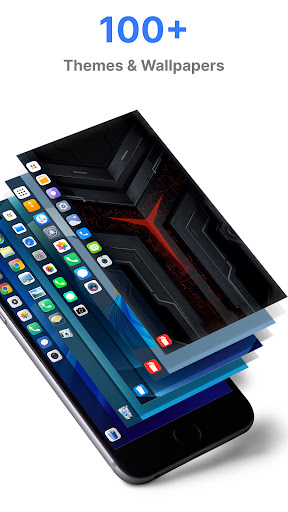
- Live Wallpapers
- Photo tiles changeable
- Task-bar icons removable
- Desktop App Folders
- Weather, Calendar and Photos tiles Added
- Task-bar Transparency option added
- Improved Themes Compatibility
- Multi Tasking Made optional (enable /disable from settings)
- Lock Screen
- Multi Color Support for Task bar and menu
- Themes and Icon Pack - Android TV /Tablet support
- Hide Applications
- Desktop Icons Removable
- Add Applications in Start Menu (Paid Only)
- Change the Start Menu Application (Press and Hold the app to change)
- Change applications in Task-bar (Press and Hold)
- Built-In Gallery Feature added
- Photo Tile changeable
- Widgets in desktop mode
- Built in apps (Photo viewer)
Nhiều hơn

1. Tải trình cài đặt MEmu và hoàn tất cài đặt

2. Khởi động MEmu, sau đó mở Google Play trên trang chủ

3. Tìm kiếm U Launcher trong Google Play
Install
4. Tải và Cài Đặt U Launcher
5. Khi cài đặt hoàn tất, nhấp vào biểu tượng để bắt đầu

6. Trải nghiệm U Launcher trên PC của bạn bằng MEmu
MEmu Play là trình giả lập Android miễn phí tốt nhất, với 50 triệu người dùng trải nghiệm ứng dụng Android tuyệt vời. Công nghệ ảo hóa của MEmu cho phép bạn chạy mượt mà hàng ngàn ứng dụng Android trên máy tính, ngay cả những ứng dụng đòi hỏi cấu hình cao nhất.
Màn hình lớn hơn cùng với đồ hoạ tốt hơn; thời lượng dài, không giới hạn về pin hoặc dữ liệu di động
Hỗ trợ đầy đủ Keymapping cho việc kiểm soát chính xác bàn phím và chuột hoặc gamepad
Nhiều tài khoản trò chơi hoặc tác vụ cùng lúc trên một PC với Quản lý Đa năng
Use U Launcher on PC by following steps: