
WAMR: Reveal deleted messages!
Đã cập nhật
Phiên bản hiện tại
6
Cung cấp bởi

Bạn không cần phải lo lắng về việc sạc quá mức khi sử dụng WAMR: Reveal deleted messages! trên điện thoại của bạn, không phải sử dụng trên màn hình nhỏ bé và tận hưởng ứng dụng trên màn hình lớn hơn rất nhiều. Từ bây giờ, bạn hãy trải nghiệm ứng dụng của bạn toàn màn hình bằng bàn phím và chuột. MEmu cung cấp cho bạn tất cả các tính năng đáng ngạc nhiên mà bạn mong đợi: cài đặt nhanh, cài đặt dễ dàng, điều khiển trực quan, không còn giới hạn về pin, dữ liệu di động và các cuộc gọi làm phiền. MEmu 9 hoàn toàn mới là sự lựa chọn tốt nhất để sử dụng WAMR: Reveal deleted messages! trên máy tính của bạn. Được mã hóa với sự hợp nhất của chúng tôi, trình quản lý multi-instance giúp mở 2 tài khoản trở lên cùng một lúc. Và điều quan trọng nhất là, công cụ mô phỏng độc quyền của chúng tôi có thể tận dụng hết toàn bộ tiềm năng trên PC của bạn, giúp mọi thứ vận hành trơn tru và thú vị.
Nhiều hơn
Tải WAMR: Reveal deleted messages! trên PC với Trình giả lập Android MEmu. Tận hưởng trải nghiệm chơi game trên màn hình lớn See Deleted Messages with WAMR!

See Deleted Messages with WAMR!
Ever wish you could see a deleted message? Searching for "wamr"? You've found the solution!
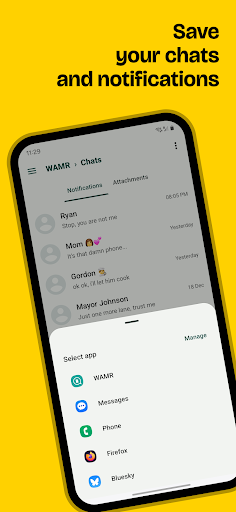
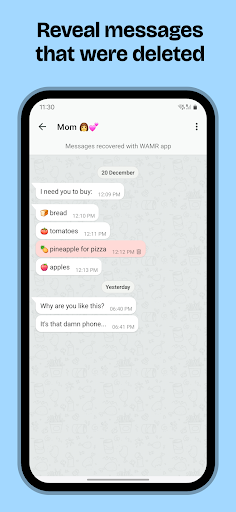
WAMR helps you recover deleted text messages and media attachments (photos, videos, voice notes, audio, GIFs, and stickers) from your chat apps. Stop wondering what was said and regain control of your conversations!
How WAMR works (for those searching "wamr")
WAMR leverages your notification history to create a backup of incoming messages. When a message is deleted, WAMR instantly notifies you and retrieves the content from its backup. It's a clever workaround for those frustrating disappearing messages!
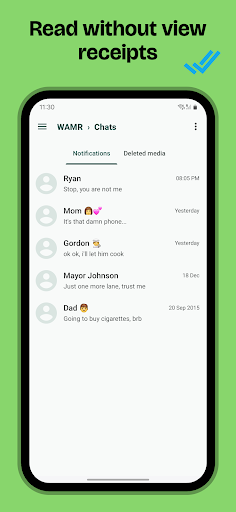
NO MORE BLUE CHECKS
Since you now have a live backup of your notifications, this means that you can read entire chats, conversations without sending "read receipts" (blue check marks).
Welcome back privacy!
Recover Media Too!
WAMR also works for media! If someone deletes a photo, video, or any other media attachment before you see it, WAMR will notify you and attempt to recover it.
Important Considerations for WAMR Users
WAMR relies on notifications. For optimal performance:
* Enable Notifications: Ensure notifications are enabled for your messaging apps. Silent chats won't be recoverable.
* Battery Optimization: Prevent Android from closing WAMR in the background by excluding it from battery optimization settings.
* Download success: WAMR can only save media files that have been fully downloaded. A stable internet connection is recommended.
Things to Keep in Mind
WAMR offers a workaround for retrieving deleted messages, but it has limitations based on the messaging app, Android OS, and other factors. It's important to understand that retrieving messages deleted before WAMR was installed is not possible.
Privacy Focused
Your privacy is paramount. WAMR saves everything locally on your device. This means that no one else has access to your chats, notifications, messages,
STATUS DOWNLOAD
Status download is not supported anymore, apologies for the inconvenience.
Download WAMR now and never miss a deleted message again!
Nhiều hơn

1. Tải trình cài đặt MEmu và hoàn tất cài đặt

2. Khởi động MEmu, sau đó mở Google Play trên trang chủ

3. Tìm kiếm WAMR: Reveal deleted messages! trong Google Play
Install
4. Tải và Cài Đặt WAMR: Reveal deleted messages!
5. Khi cài đặt hoàn tất, nhấp vào biểu tượng để bắt đầu

6. Trải nghiệm WAMR: Reveal deleted messages! trên PC của bạn bằng MEmu
MEmu Play là trình giả lập Android miễn phí tốt nhất, với 50 triệu người dùng trải nghiệm ứng dụng Android tuyệt vời. Công nghệ ảo hóa của MEmu cho phép bạn chạy mượt mà hàng ngàn ứng dụng Android trên máy tính, ngay cả những ứng dụng đòi hỏi cấu hình cao nhất.
Màn hình lớn hơn cùng với đồ hoạ tốt hơn; thời lượng dài, không giới hạn về pin hoặc dữ liệu di động
Hỗ trợ đầy đủ Keymapping cho việc kiểm soát chính xác bàn phím và chuột hoặc gamepad
Nhiều tài khoản trò chơi hoặc tác vụ cùng lúc trên một PC với Quản lý Đa năng
Use WAMR: Reveal deleted messages! on PC by following steps: