
WAMR - Recover deleted messages & status download
อัปเดตเมื่อ
เวอร์ชันปัจจุบัน
2.0
ให้บริการโดย

เมื่อใช้ WAMR - Recover deleted messages & status download บนโทรศัพท์ของคุณไม่ต้องกังวลกับการชาร์จไฟมากเกินไปปลดปล่อยตัวคุณเองจากหน้าจอขนาดเล็กและสนุกกับการใช้แอพนี้บนหน้าจอขนาดใหญ่ จากนี้ไปรับประสบการณ์เต็มหน้าจอของแอปพลิเคชันของคุณด้วยคีย์บอร์ดและเมาส์ MEmu มีคุณสมบัติที่น่าแปลกใจที่คุณคาดหวัง: การติดตั้งที่รวดเร็วและการตั้งค่าที่ง่ายควบคุมได้ง่ายไม่ จำกัด แบตเตอรี่ข้อมูลมือถือและการโทรที่รบกวน MEmu 9 ใหม่ล่าสุดเป็นตัวเลือกที่ดีที่สุดสำหรับการใช้ Meitu – โปรแกรมแก้ไขภาพแนวธรรมชาติ บนคอมพิวเตอร์ของคุณ ด้วยรหัสการดูดซึมของเราผู้จัดการหลายอินสแตนซ์ทำให้สามารถเปิดบัญชี 2 บัญชีขึ้นไปในเวลาเดียวกันได้ และที่สำคัญที่สุดเอ็นจิ้นจำลองพิเศษของเราสามารถปลดปล่อยศักยภาพของPCของคุณและทำให้ทุกอย่างราบรื่นและสนุกสนาน
แสดงเพิ่มเติม
ดาวน์โหลด WAMR - Recover deleted messages & status download บน PC ด้วย MEmu Android Emulator สนุกกับการเล่นบนหน้าจอขนาดใหญ่ See Deleted Messages with WAMR!

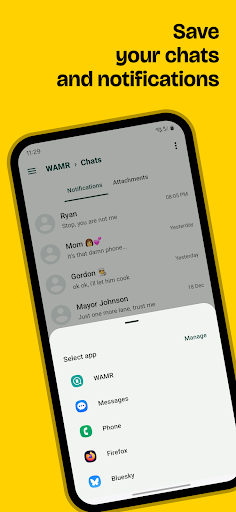
See Deleted Messages with WAMR!
Ever wish you could see a deleted message? Searching for "wamr"? You've found the solution!
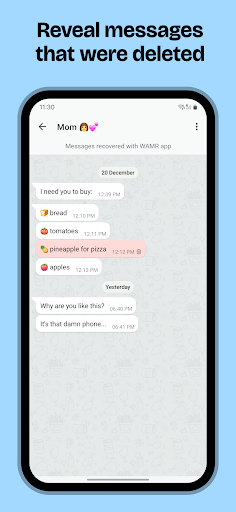
WAMR helps you recover deleted text messages and media attachments (photos, videos, voice notes, audio, GIFs, and stickers) from your chat apps. Stop wondering what was said and regain control of your conversations!
How WAMR works (for those searching "wamr")
WAMR leverages your notification history to create a backup of incoming messages. When a message is deleted, WAMR instantly notifies you and retrieves the content from its backup. It's a clever workaround for those frustrating disappearing messages!
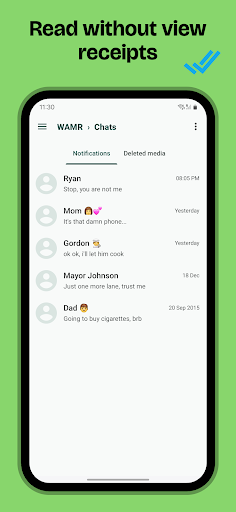
NO MORE BLUE CHECKS
Since you now have a live backup of your notifications, this means that you can read entire chats, conversations without sending "read receipts" (blue check marks).
Welcome back privacy!
Recover Media Too!
WAMR also works for media! If someone deletes a photo, video, or any other media attachment before you see it, WAMR will notify you and attempt to recover it.
Important Considerations for WAMR Users
WAMR relies on notifications. For optimal performance:
* Enable Notifications: Ensure notifications are enabled for your messaging apps. Silent chats won't be recoverable.
* Battery Optimization: Prevent Android from closing WAMR in the background by excluding it from battery optimization settings.
* Download success: WAMR can only save media files that have been fully downloaded. A stable internet connection is recommended.
Things to Keep in Mind
WAMR offers a workaround for retrieving deleted messages, but it has limitations based on the messaging app, Android OS, and other factors. It's important to understand that retrieving messages deleted before WAMR was installed is not possible.
Privacy Focused
Your privacy is paramount. WAMR saves everything locally on your device. This means that no one else has access to your chats, notifications, messages,
STATUS DOWNLOAD
Status download is not supported anymore, apologies for the inconvenience.
Download WAMR now and never miss a deleted message again!
แสดงเพิ่มเติม

1. ดาวน์โหลดตัวติดตั้ง MEmu และสิ้นสุดการติดตั้ง

2. เริ่ม MEmu จากนั้นเปิด Google Play บนหน้าแรก

3. ค้นหา WAMR - Recover deleted messages & status download ใน Google Play
Install
4. ดาวน์โหลดและติดตั้ง WAMR - Recover deleted messages & status download
5. เมื่อติดตั้งเสร็จให้คลิกที่ไอคอนเพื่อเริ่มใช้งาน

6. ใช้ MEmu เพื่อสัมผัสประสบการณ์ WAMR - Recover deleted messages & status download บนคอมพิวเตอร์ของคุณ
MEmu Play คือโปรแกรมจำลอง Android ที่ดีที่สุด มีผู้ใช้มากกว่า 50 ล้านคน มอบประสบการณ์การใช้งานแอป Android ขั้นสุดยอดให้กับคุณ เทคโนโลยีจำลองเสมือนของ MEmu ช่วยให้คุณรันแอป Android หลายพันแอปบนคอมพิวเตอร์ได้อย่างราบรื่น แม้แอปที่กินทรัพยากรเครื่องสูงที่สุด
จอใหญ่และกราฟฟิกสวยกว่า; เล่นได้นาน, ไม่ต้องใช้แบตเตอรี่โทรศัพท์หรือเน็ตโทรศัพท์.
ระบบปรับแต่งปุ่มคีย์บอร์ดและเม้าส์ตามที่คุณเลือก
เล่นมากกว่าหนึ่งเกมบน PC ในเวลาเดียวกันด้วยระบบหลายจอหรือ Multi-Instance manager.
Use WAMR - Recover deleted messages & status download on PC by following steps: