FreeStyle Libre 2 - CA
تم التحديث
الإصدار الحالي
2.11.2
تقديم

لا داعي للقلق بشأن الشحن الزائد عند استخدام FreeStyle Libre 2 - CA على هاتفك. تحرر من قيود الشاشة الصغيرة واستمتع به على شاشة أكبر باستخدام لوحة المفاتيح والفأرة. يوفر MEmu جميع الميزات الرائعة التي تتوقعها: تثبيت سريع، إعداد سهل، أدوات تحكم بديهية، ودون قيود على عمر البطارية، أو استخدام البيانات، أو المكالمات الواردة. يُعد MEmu 9 الجديد الخيار الأمثل لتجربة FreeStyle Libre 2 - CA على جهاز الكمبيوتر. بفضل تقنية التشفير الفريدة، يتيح لك مدير الحسابات المتعددة تشغيل حسابين أو أكثر في وقت واحد. والأهم من ذلك، أن محرك المحاكاة الفريد يستغل أداء جهاز الكمبيوتر بالكامل، مما يُحسّن تجربة التطبيق ويجعل كل شيء سلسًا للغاية.
أظهر المزيد
قم بتنزيل FreeStyle Libre 2 - CA على الكمبيوتر بإستخدام جهاز مقلد أندروز MEmu.استمتع بمتعة اللعب على الشاشة الكبيرة. The next generation of diabetes care is here.
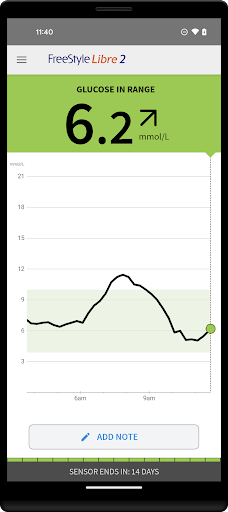
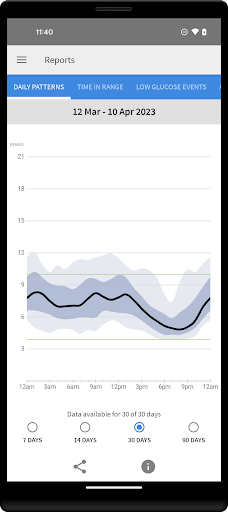
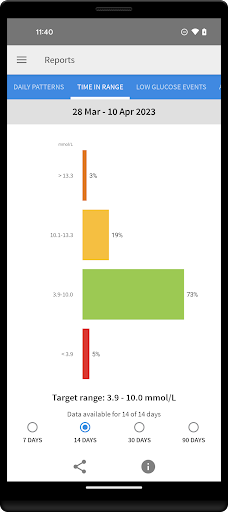
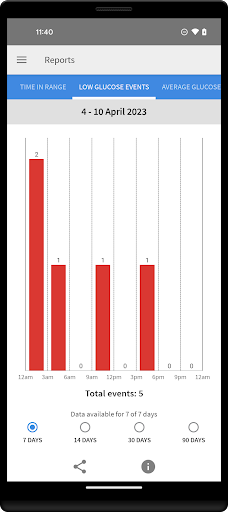
The next generation of diabetes care is here. FreeStyle Libre 2 provides real-time glucose readings, optional alarms and excellent accuracy. And now, FreeStyle Libre 2 users can get automatic glucose readings in the app, updated every minute.
◆◆◆◆◆◆
The #1 Sensor-based glucose monitoring system from Abbott takes diabetes management to a new level. [1]
NO FINGERPRICKS: Excellent accuracy, for adults and children [2]
OPTIONAL ALARMS: Customisable, real-time glucose alarms automatically alert you of highs and lows so that you can take action [3]
◆◆◆◆◆◆
COMPATIBILITY
Compatibility may vary between phones and operating systems. The FreeStyle Libre 2 app is only compatible with FreeStyle Libre 2 Sensors. Learn more about compatibility at http://FreeStyleLibre.com
◆◆◆◆◆◆
BEFORE STARTING YOUR SENSOR
Before you start your Sensor, choose which device you would like to use.
Alarms and glucose readings can only be received on your phone or your FreeStyle Libre 2 Reader (cannot be both). [3]
To receive alarms and glucose readings on your phone, you must start the Sensor with the FreeStyle Libre 2 app.
To receive alarms and glucose readings on your FreeStyle Libre 2 Reader, you must start the Sensor with your Reader.
Note that the FreeStyle Libre 2 app and Reader do not share data with each other. For complete information on a device, scan your Sensor every 8 hours with that device; otherwise, your reports will not include all your data. You can upload and view data from all of your devices on LibreView.com.
◆◆◆◆◆◆
FreeStyle, Libre, and related brand marks are marks of Abbott. Other trademarks are the property of their respective owners.
For additional legal notices and terms of use, go to http://FreeStyleLibre.com
If you are using the app, you must also have access to a blood glucose monitoring system as the app does not provide one.
[1] Data on file, Abbott Diabetes Care, Inc. Based on the number of users worldwide for the FreeStyle Libre systems compared to the number of users for other leading personal use sensor-based glucose monitoring systems.
[2] Finger pricks are required if glucose readings and alarms do not match symptoms or expectations
[3] Notifications will only be received when alarms are turned on and the sensor is within 20 feet, unobstructed from the reading device. You must enable the appropriate settings on your smartphone to receive alarms and alerts, see the FreeStyle Libre 2 User’s Manual for more information.
◆◆◆◆◆◆
To resolve any technical or Customer Service issues you are having with a FreeStyle Libre product, please contact FreeStyle Libre Customer Service directly at 1-888-205-8296.
أظهر المزيد

1. قم بتنزيل برنامج MEmu واكمال تثبيته

2. قم بتشغيل برنامج MEmu وفتح Google Play على الصفحة الرئيسية

3. ابح FreeStyle Libre 2 - CA في Google Play
Install
4. تنزيل وتثبيت FreeStyle Libre 2 - CA
5. انقر على الرمز للتشغيل بعد اكتمال التثبيت

6. استخدم MEmu لتجربة FreeStyle Libre 2 - CA على جهاز الكمبيوتر الخاص بك.
تطبيق MEmuهو افضل محاكى اندرويد مجانى وبالفعل 50 مليون شخص يستمتعون حاليا بتجربه اللعب عليه. تمكّنك تقنية MEmu الافتراضية من تشغيل آلاف ألعاب Android بسلاسة على الكمبيوتر الشخصي ، حتى أكثرها استخدامًا للرسومات.
شاشة أكبر وجرافيك افضل ووقت أطول بدون حدود البطارية وباقة التليفون
لوحة مفاتيح كاملة تدعم تحكم كامل عن طريق لوحة المفاتيح و الفأره وجيم باد
عدة العاب وحسابات ومهمات علي جهاز الكمبيوتر في وقت معين عن طريق Memu متعدد النوافذ
Use FreeStyle Libre 2 - CA on PC by following steps: