FreeStyle Libre 2 - CA
Atualizada
Versão atual
2.11.2
Oferecido por

Pare de se preocupar com sobrecargas ao usar FreeStyle Libre 2 - CA no seu celular, liberte-se da pequena tela e aproveite o uso do aplicativo numa tela muito maior. A partir de agora, obtenha uma experiência em tela cheia do seu aplicativo com teclado e mouse. O MEmu oferece-lhe todos os recursos surpreendentes que você esperava: instalação rápida e configuração fácil, controles intuitivos, sem mais limitações de bateria, dados móveis e chamadas perturbadoras. O novíssimo MEmu 9 é a melhor opção para usar FreeStyle Libre 2 - CA no seu computador. Codificado com a nossa absorção, o gerenciador de multi-instâncias possibilita a abertura de 2 ou mais contas ao mesmo tempo. E o mais importante, nosso mecanismo de emulação exclusivo pode liberar todo o potencial do seu PC, tornando tudo suave e agradável.
Mostre mais
Download do FreeStyle Libre 2 - CA no PC com MEmu Android Emulador: Divirta-se jogando na tela grande. The next generation of diabetes care is here.
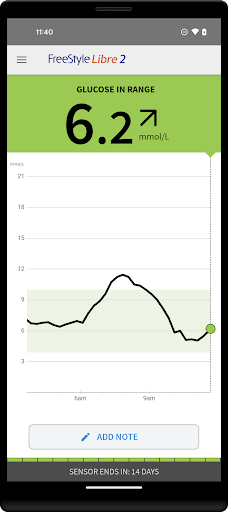
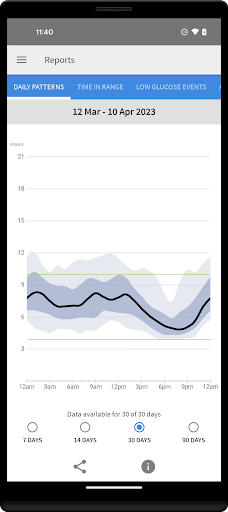
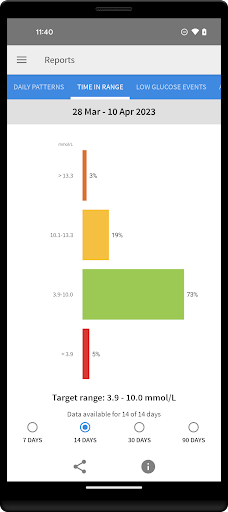
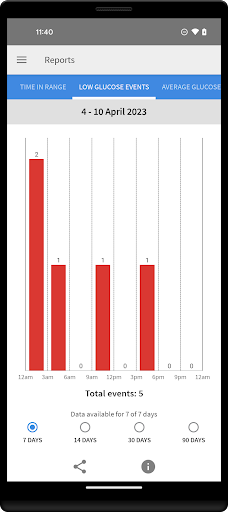
The next generation of diabetes care is here. FreeStyle Libre 2 provides real-time glucose readings, optional alarms and excellent accuracy. And now, FreeStyle Libre 2 users can get automatic glucose readings in the app, updated every minute.
◆◆◆◆◆◆
The #1 Sensor-based glucose monitoring system from Abbott takes diabetes management to a new level. [1]
NO FINGERPRICKS: Excellent accuracy, for adults and children [2]
OPTIONAL ALARMS: Customisable, real-time glucose alarms automatically alert you of highs and lows so that you can take action [3]
◆◆◆◆◆◆
COMPATIBILITY
Compatibility may vary between phones and operating systems. The FreeStyle Libre 2 app is only compatible with FreeStyle Libre 2 Sensors. Learn more about compatibility at http://FreeStyleLibre.com
◆◆◆◆◆◆
BEFORE STARTING YOUR SENSOR
Before you start your Sensor, choose which device you would like to use.
Alarms and glucose readings can only be received on your phone or your FreeStyle Libre 2 Reader (cannot be both). [3]
To receive alarms and glucose readings on your phone, you must start the Sensor with the FreeStyle Libre 2 app.
To receive alarms and glucose readings on your FreeStyle Libre 2 Reader, you must start the Sensor with your Reader.
Note that the FreeStyle Libre 2 app and Reader do not share data with each other. For complete information on a device, scan your Sensor every 8 hours with that device; otherwise, your reports will not include all your data. You can upload and view data from all of your devices on LibreView.com.
◆◆◆◆◆◆
FreeStyle, Libre, and related brand marks are marks of Abbott. Other trademarks are the property of their respective owners.
For additional legal notices and terms of use, go to http://FreeStyleLibre.com
If you are using the app, you must also have access to a blood glucose monitoring system as the app does not provide one.
[1] Data on file, Abbott Diabetes Care, Inc. Based on the number of users worldwide for the FreeStyle Libre systems compared to the number of users for other leading personal use sensor-based glucose monitoring systems.
[2] Finger pricks are required if glucose readings and alarms do not match symptoms or expectations
[3] Notifications will only be received when alarms are turned on and the sensor is within 20 feet, unobstructed from the reading device. You must enable the appropriate settings on your smartphone to receive alarms and alerts, see the FreeStyle Libre 2 User’s Manual for more information.
◆◆◆◆◆◆
To resolve any technical or Customer Service issues you are having with a FreeStyle Libre product, please contact FreeStyle Libre Customer Service directly at 1-888-205-8296.
Mostre mais

1. Faça o download do instalador do MEmu e conclua a instalação

2. Inicie o MEmu e depois abra o Google Play na página inicial

3. Pesquise FreeStyle Libre 2 - CA no Google Play
Install
4. Baixe e Instale FreeStyle Libre 2 - CA
5. Na conclusão da instalação, clique no ícone para iniciar

6. º Experimente o FreeStyle Libre 2 - CA no PC com o MEmu.
O MEmu Play é o melhor emulador Android gratuito, com 50 milhões de utilizadores a desfrutar da sua experiência superior com aplicações Android. A tecnologia de virtualização do MEmu permite-lhe executar milhares de aplicações Android sem problemas no seu computador, mesmo as mais exigentes.
Tela maior com gráficos melhores; Longa duração e sem limitação de bateria ou dados móveis.
Suporte completo ao Mapaeamento de Teclas para controle preciso do teclado e mouse ou gamepad.
Várias contas de jogos ou tarefas em um único PC de uma só vez com o Gerenciador de várias instâncias.
Use FreeStyle Libre 2 - CA on PC by following steps: