FreeStyle Libre 2 - CA
Обновлено
Текущая версия
2.11.2
Продавец

Перестаньте беспокоиться о быстром разряде батареи при использовании FreeStyle Libre 2 - CA на вашем телефоне. Освободитесь от крошечного экрана и наслаждайтесь приложением на гораздо большем экране. Теперь вы можете работать с приложением в полноэкранном режиме с удобством клавиатуры и мыши. MEmu предлагает вам все ожидаемые удивительные функции: быструю установку и простую настройку, интуитивно понятное управление и больше никаких забот о времени автономной работы, мобильном трафике или неожиданных звонках. Совершенно новый MEmu 9 — идеальный выбор для использования FreeStyle Libre 2 - CA на вашем компьютере. С помощью менеджера нескольких экземпляров MEmu вы можете одновременно использовать два или более аккаунтов. И самое главное, наш эксклюзивный движок эмуляции раскрывает весь потенциал вашего ПК, обеспечивая плавную и приятную работу.
Показать больше
Скачайте FreeStyle Libre 2 - CA на ПК с помощью Андроид эмулятора MEmu. Наслаждайтесь на большом экране. The next generation of diabetes care is here.
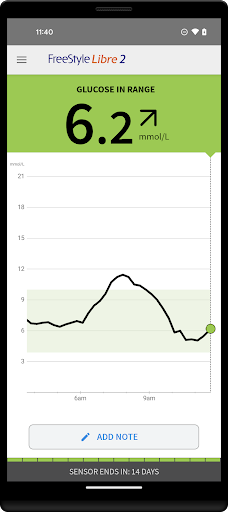
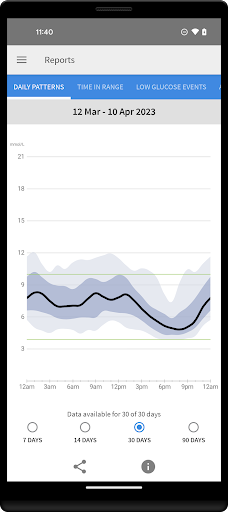
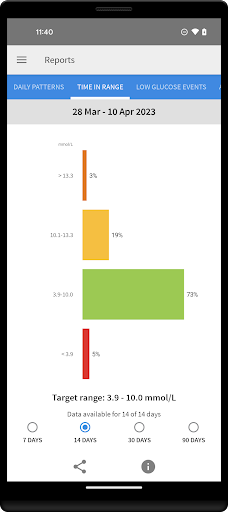
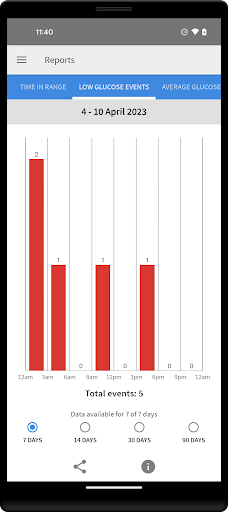
The next generation of diabetes care is here. FreeStyle Libre 2 provides real-time glucose readings, optional alarms and excellent accuracy. And now, FreeStyle Libre 2 users can get automatic glucose readings in the app, updated every minute.
◆◆◆◆◆◆
The #1 Sensor-based glucose monitoring system from Abbott takes diabetes management to a new level. [1]
NO FINGERPRICKS: Excellent accuracy, for adults and children [2]
OPTIONAL ALARMS: Customisable, real-time glucose alarms automatically alert you of highs and lows so that you can take action [3]
◆◆◆◆◆◆
COMPATIBILITY
Compatibility may vary between phones and operating systems. The FreeStyle Libre 2 app is only compatible with FreeStyle Libre 2 Sensors. Learn more about compatibility at http://FreeStyleLibre.com
◆◆◆◆◆◆
BEFORE STARTING YOUR SENSOR
Before you start your Sensor, choose which device you would like to use.
Alarms and glucose readings can only be received on your phone or your FreeStyle Libre 2 Reader (cannot be both). [3]
To receive alarms and glucose readings on your phone, you must start the Sensor with the FreeStyle Libre 2 app.
To receive alarms and glucose readings on your FreeStyle Libre 2 Reader, you must start the Sensor with your Reader.
Note that the FreeStyle Libre 2 app and Reader do not share data with each other. For complete information on a device, scan your Sensor every 8 hours with that device; otherwise, your reports will not include all your data. You can upload and view data from all of your devices on LibreView.com.
◆◆◆◆◆◆
FreeStyle, Libre, and related brand marks are marks of Abbott. Other trademarks are the property of their respective owners.
For additional legal notices and terms of use, go to http://FreeStyleLibre.com
If you are using the app, you must also have access to a blood glucose monitoring system as the app does not provide one.
[1] Data on file, Abbott Diabetes Care, Inc. Based on the number of users worldwide for the FreeStyle Libre systems compared to the number of users for other leading personal use sensor-based glucose monitoring systems.
[2] Finger pricks are required if glucose readings and alarms do not match symptoms or expectations
[3] Notifications will only be received when alarms are turned on and the sensor is within 20 feet, unobstructed from the reading device. You must enable the appropriate settings on your smartphone to receive alarms and alerts, see the FreeStyle Libre 2 User’s Manual for more information.
◆◆◆◆◆◆
To resolve any technical or Customer Service issues you are having with a FreeStyle Libre product, please contact FreeStyle Libre Customer Service directly at 1-888-205-8296.
Показать больше

1. Скачать инсталлятор MEmu и завершайте установку

2. Запускайте MEmu, затем откройте Google Play на главной странице

3. Ищите FreeStyle Libre 2 - CA в Google Play
Install
4. Скачайте и установите FreeStyle Libre 2 - CA
5. При завершении установки, нажмите на значок для старта

6. Наслаждайтесь FreeStyle Libre 2 - CA на своем компьютере с помощью MEmu.
MEmu Play — лучший бесплатный эмулятор Android, превосходный опыт работы с которым оценили 50 миллионов пользователей. Технология виртуализации MEmu позволяет без проблем запускать тысячи Android-приложений на вашем компьютере, даже самые требовательные.
Большой экран с лучшей графикой; Большая продолжительность, без ограничения батареи или мобильных данных.
Полная поддержка установки клавиш для точного управления клавиатурой и мышью или геймпадом.
Несколько игровых учетных записей или задач на одном компьютере одновременно с менеджером нескольких экземпляров.
Use FreeStyle Libre 2 - CA on PC by following steps: