FreeStyle Libre 2 - CA
Updated
Current Version
2.11.2
Offered By

Stop worrying about high battery drain when using FreeStyle Libre 2 - CA on your phone. Free yourself from the tiny screen and enjoy the app on a much larger display. From now on, get a full-screen experience of your app with the convenience of a keyboard and mouse. MEmu offers you all the surprising features you’d expect: quick installation and easy setup, intuitive controls, and no more worries about battery life, mobile data, or unexpected calls. The all-new MEmu 9 is the choice for using FreeStyle Libre 2 - CA on your computer. With the MEmu multi-instance manager, you can run two or more accounts at the same time. Most importantly, our exclusive emulation engine unlocks your PC’s full potential, delivering smooth and enjoyable performance.
Show more
Enjoy superb experience of using FreeStyle Libre 2 - CA on PC with MEMU App Player. It's a powerful free Android emulator which provides you with thousands of android apps for their desktop version. Enjoy connecting with friends and polishing your work with higher efficiency! The next generation of diabetes care is here.
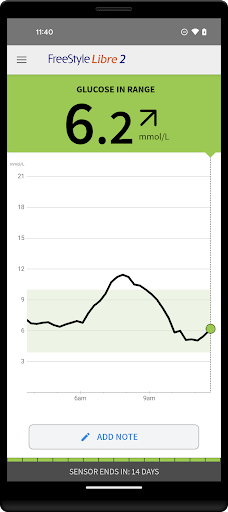
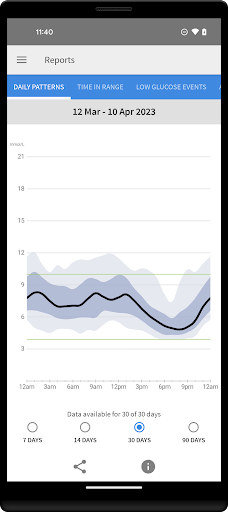
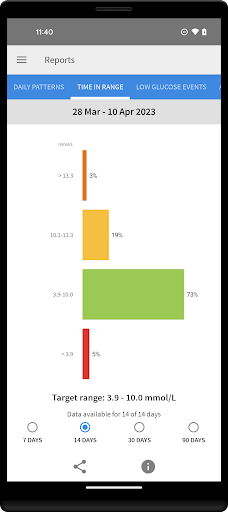
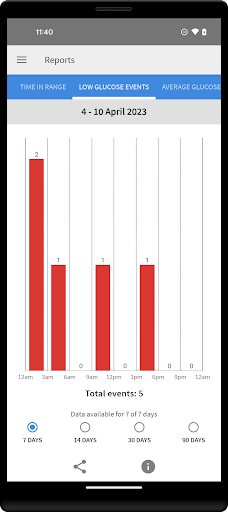
The next generation of diabetes care is here. FreeStyle Libre 2 provides real-time glucose readings, optional alarms and excellent accuracy. And now, FreeStyle Libre 2 users can get automatic glucose readings in the app, updated every minute.
◆◆◆◆◆◆
The #1 Sensor-based glucose monitoring system from Abbott takes diabetes management to a new level. [1]
NO FINGERPRICKS: Excellent accuracy, for adults and children [2]
OPTIONAL ALARMS: Customisable, real-time glucose alarms automatically alert you of highs and lows so that you can take action [3]
◆◆◆◆◆◆
COMPATIBILITY
Compatibility may vary between phones and operating systems. The FreeStyle Libre 2 app is only compatible with FreeStyle Libre 2 Sensors. Learn more about compatibility at http://FreeStyleLibre.com
◆◆◆◆◆◆
BEFORE STARTING YOUR SENSOR
Before you start your Sensor, choose which device you would like to use.
Alarms and glucose readings can only be received on your phone or your FreeStyle Libre 2 Reader (cannot be both). [3]
To receive alarms and glucose readings on your phone, you must start the Sensor with the FreeStyle Libre 2 app.
To receive alarms and glucose readings on your FreeStyle Libre 2 Reader, you must start the Sensor with your Reader.
Note that the FreeStyle Libre 2 app and Reader do not share data with each other. For complete information on a device, scan your Sensor every 8 hours with that device; otherwise, your reports will not include all your data. You can upload and view data from all of your devices on LibreView.com.
◆◆◆◆◆◆
FreeStyle, Libre, and related brand marks are marks of Abbott. Other trademarks are the property of their respective owners.
For additional legal notices and terms of use, go to http://FreeStyleLibre.com
If you are using the app, you must also have access to a blood glucose monitoring system as the app does not provide one.
[1] Data on file, Abbott Diabetes Care, Inc. Based on the number of users worldwide for the FreeStyle Libre systems compared to the number of users for other leading personal use sensor-based glucose monitoring systems.
[2] Finger pricks are required if glucose readings and alarms do not match symptoms or expectations
[3] Notifications will only be received when alarms are turned on and the sensor is within 20 feet, unobstructed from the reading device. You must enable the appropriate settings on your smartphone to receive alarms and alerts, see the FreeStyle Libre 2 User’s Manual for more information.
◆◆◆◆◆◆
To resolve any technical or Customer Service issues you are having with a FreeStyle Libre product, please contact FreeStyle Libre Customer Service directly at 1-888-205-8296.
Show more

1. Download MEmu installer and finish the setup

2. Start MEmu then open Google Play on the desktop

3. Search FreeStyle Libre 2 - CA in Google Play
Install
4. Download and Install FreeStyle Libre 2 - CA
5. On install completion click the icon to start

6. Enjoy using FreeStyle Libre 2 - CA on PC with MEmu
MEmu Play is the best Android emulator, and 100 million users already enjoy its superb Android app experience. Powered by advanced virtualization technology, it lets you enjoy thousands of Android apps smoothly on your PC—including the most graphics-intensive ones.
Bigger screen with better graphics; Long duration, without limitation of battery or mobile data.
Full Keymapping support for precise control of keyboard and mouse or gamepad.
Multiple game accounts or tasks on single PC at one time with Multi-Instance manager.
Use FreeStyle Libre 2 - CA on PC by following steps: