GhostLock
تم التحديث
الإصدار الحالي
1.3.0
تقديم

لا داعي للقلق بشأن الشحن الزائد عند استخدام GhostLock على هاتفك. تحرر من قيود الشاشة الصغيرة واستمتع به على شاشة أكبر باستخدام لوحة المفاتيح والفأرة. يوفر MEmu جميع الميزات الرائعة التي تتوقعها: تثبيت سريع، إعداد سهل، أدوات تحكم بديهية، ودون قيود على عمر البطارية، أو استخدام البيانات، أو المكالمات الواردة. يُعد MEmu 9 الجديد الخيار الأمثل لتجربة GhostLock على جهاز الكمبيوتر. بفضل تقنية التشفير الفريدة، يتيح لك مدير الحسابات المتعددة تشغيل حسابين أو أكثر في وقت واحد. والأهم من ذلك، أن محرك المحاكاة الفريد يستغل أداء جهاز الكمبيوتر بالكامل، مما يُحسّن تجربة التطبيق ويجعل كل شيء سلسًا للغاية.
أظهر المزيد
استمتع بتجربة رائعة لاستخدام GhostLock على جهاز الكمبيوتر مع MEmu Play. إنه محاكي أندرويد قوي ومجاني يوفر لك آلاف تطبيقات أندرويد لإصدار سطح المكتب. استمتع بالتواصل مع أصدقائك وحسّن عملك بكفاءة أعلى! Protect your privacy with GhostLock.
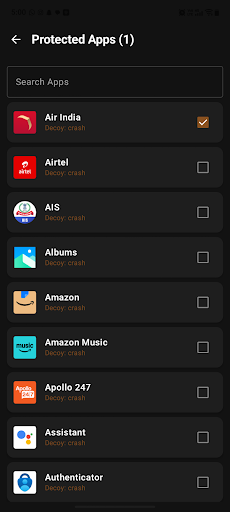
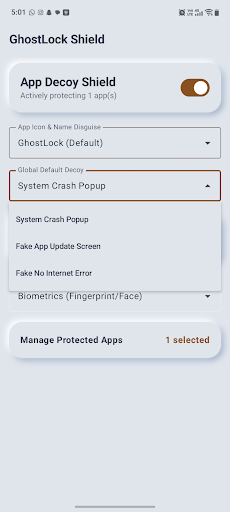
Protect your privacy with GhostLock
GhostLock is a lightweight, ad-free app protection tool that helps secure selected apps on your Android device using PIN or biometric authentication.
Your protection settings and app-lock configuration are stored locally on your device.
APP PROTECTION
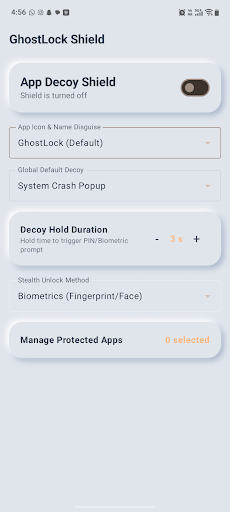
Choose which installed apps you want to protect. When a selected protected app is opened, GhostLock detects the foreground app and displays a protection screen before access is allowed.
PIN & BIOMETRIC SECURITY
Protect access using your device’s supported biometric authentication or a locally stored 4-digit PIN.
PIN credentials are securely processed and stored on the device.
CUSTOM PROTECTION SCREEN
GhostLock provides configurable protection-screen styles that appear when a protected app is opened.
CAMOUFLAGE OPTION
GhostLock can optionally provide an alternate calculator-style launcher appearance. This feature is enabled and controlled by the user and can be changed from GhostLock settings.
ACCESSIBILITYSERVICE API USAGE
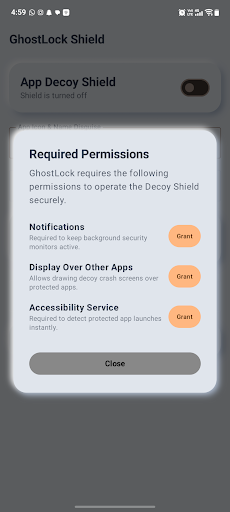
GhostLock uses Android’s AccessibilityService API as part of its core app-protection functionality.
Accessibility access is used to detect when an app selected by the user for protection becomes the foreground app. This allows GhostLock to display its protection screen at the appropriate time.
GhostLock does not use AccessibilityService to read messages, passwords, typed text, form contents, or private content inside other apps.
GhostLock does not use AccessibilityService to automatically click, type, modify settings, prevent uninstallation, or bypass Android privacy and security controls.
Accessibility access is used only to support the app-protection functionality selected by the user and can be disabled at any time from Android Accessibility Settings.
GhostLock is not an accessibility tool designed to assist users with disabilities.
PRIVACY
• No advertisements
• No behavioral tracking
• Protection configuration is stored locally on the device
• Users control which apps are protected
• Accessibility permission can be disabled at any time
Take control of access to your personal apps with GhostLock.
أظهر المزيد

1. قم بتنزيل برنامج MEmu واكمال تثبيته

2. قم بتشغيل برنامج MEmu وفتح Google Play على الصفحة الرئيسية

3. ابح GhostLock في Google Play
Install
4. تنزيل وتثبيت GhostLock
5. انقر على الرمز للتشغيل بعد اكتمال التثبيت

6. استخدم MEmu لتجربة GhostLock على جهاز الكمبيوتر الخاص بك.
تطبيق MEmuهو افضل محاكى اندرويد مجانى وبالفعل 50 مليون شخص يستمتعون حاليا بتجربه اللعب عليه. تمكّنك تقنية MEmu الافتراضية من تشغيل آلاف ألعاب Android بسلاسة على الكمبيوتر الشخصي ، حتى أكثرها استخدامًا للرسومات.
شاشة أكبر وجرافيك افضل ووقت أطول بدون حدود البطارية وباقة التليفون
لوحة مفاتيح كاملة تدعم تحكم كامل عن طريق لوحة المفاتيح و الفأره وجيم باد
عدة العاب وحسابات ومهمات علي جهاز الكمبيوتر في وقت معين عن طريق Memu متعدد النوافذ
Use GhostLock on PC by following steps: