GhostLock
Actualizada
Versión actual
1.3.0
Ofrecida por

Deje de preocuparse por los recargos cuando use GhostLock en su teléfono celular, libérese de la pequeña pantalla y disfrute usando la aplicación en una pantalla mucho más grande. A partir de ahora, obtenga una experiencia de pantalla completa de su aplicación con teclado y mouse. MEmu le ofrece todas las características sorprendentes que esperaba: instalación rápida y configuración fácil, controles intuitivos, no más limitaciones de batería, datos móviles y llamadas molestas. El nuevo MEmu 9 es la mejor opción para usar GhostLock en su computadora. Codificado con nuestra absorción, el administrador de instancias múltiples hace posible abrir 2 o más cuentas al mismo tiempo. Y lo más importante, nuestro exclusivo motor de emulación puede liberar todo el potencial de su PC, hacer que todo sea fluido y agradable.
Más detalles
Disfruta de una experiencia increíble usando GhostLock en tu PC con MEmu Play. Es un potente emulador de Android gratuito que te ofrece miles de aplicaciones de Android en su versión de escritorio. ¡Conéctate con tus amigos y optimiza tu trabajo! Protect your privacy with GhostLock.
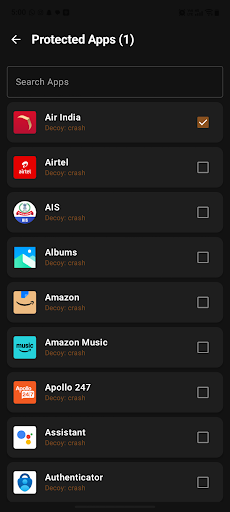
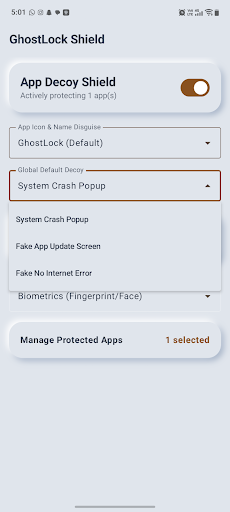
Protect your privacy with GhostLock
GhostLock is a lightweight, ad-free app protection tool that helps secure selected apps on your Android device using PIN or biometric authentication.
Your protection settings and app-lock configuration are stored locally on your device.
APP PROTECTION
Choose which installed apps you want to protect. When a selected protected app is opened, GhostLock detects the foreground app and displays a protection screen before access is allowed.
PIN & BIOMETRIC SECURITY
Protect access using your device’s supported biometric authentication or a locally stored 4-digit PIN.
PIN credentials are securely processed and stored on the device.
CUSTOM PROTECTION SCREEN
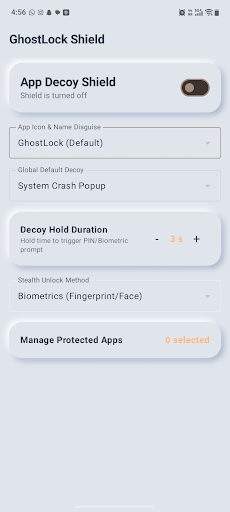
GhostLock provides configurable protection-screen styles that appear when a protected app is opened.
CAMOUFLAGE OPTION
GhostLock can optionally provide an alternate calculator-style launcher appearance. This feature is enabled and controlled by the user and can be changed from GhostLock settings.
ACCESSIBILITYSERVICE API USAGE
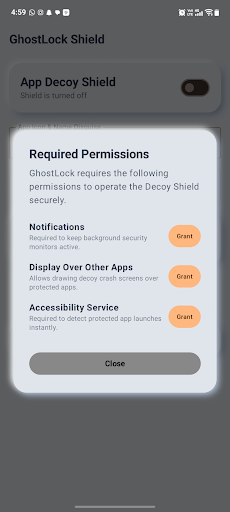
GhostLock uses Android’s AccessibilityService API as part of its core app-protection functionality.
Accessibility access is used to detect when an app selected by the user for protection becomes the foreground app. This allows GhostLock to display its protection screen at the appropriate time.
GhostLock does not use AccessibilityService to read messages, passwords, typed text, form contents, or private content inside other apps.
GhostLock does not use AccessibilityService to automatically click, type, modify settings, prevent uninstallation, or bypass Android privacy and security controls.
Accessibility access is used only to support the app-protection functionality selected by the user and can be disabled at any time from Android Accessibility Settings.
GhostLock is not an accessibility tool designed to assist users with disabilities.
PRIVACY
• No advertisements
• No behavioral tracking
• Protection configuration is stored locally on the device
• Users control which apps are protected
• Accessibility permission can be disabled at any time
Take control of access to your personal apps with GhostLock.
Más detalles

1. Descargar el instalador de MEmu y finalice la instalación

2. Iniciar MEmu y abrir Google Play en la página de inicio

3. Buscar GhostLock en Google Play
Install
4. Descargar y instalar GhostLock
5. Hacer click al icono para iniciar

6. Experiencia GhostLock en PC con MEmu
MEmu App Player es el mejor emulador de Android gratuito y 50 millones de personas ya están disfrutando su magnífica experiencia de aplicación en Android. La tecnología de virtualización de MEmu te permite jugar a miles de aplicaciones Android suavemente en tu PC, incluso los más intensivos gráficamente.
Pantalla más grande con mejores gráficos; Larga duración, sin limitación de batería o datos móviles.
Soporte completo de keymapping para un control preciso del teclado y el mouse o gamepad.
Múltiples cuentas de juegos o tareas en una sola PC a la vez con el administrador de instancias múltiples.
Use GhostLock on PC by following steps: