Krita
تم التحديث
الإصدار الحالي
5.2.8
تقديم

لا داعي للقلق بشأن الشحن الزائد عند استخدام Krita على هاتفك. تحرر من قيود الشاشة الصغيرة واستمتع به على شاشة أكبر باستخدام لوحة المفاتيح والفأرة. يوفر MEmu جميع الميزات الرائعة التي تتوقعها: تثبيت سريع، إعداد سهل، أدوات تحكم بديهية، ودون قيود على عمر البطارية، أو استخدام البيانات، أو المكالمات الواردة. يُعد MEmu 9 الجديد الخيار الأمثل لتجربة Krita على جهاز الكمبيوتر. بفضل تقنية التشفير الفريدة، يتيح لك مدير الحسابات المتعددة تشغيل حسابين أو أكثر في وقت واحد. والأهم من ذلك، أن محرك المحاكاة الفريد يستغل أداء جهاز الكمبيوتر بالكامل، مما يُحسّن تجربة التطبيق ويجعل كل شيء سلسًا للغاية.
أظهر المزيد
قم بتنزيل Krita على الكمبيوتر بإستخدام جهاز مقلد أندروز MEmu.استمتع بمتعة اللعب على الشاشة الكبيرة. Krita is a full-featured digital painting application designed for artists.
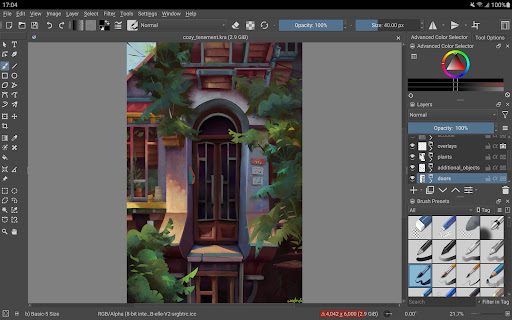
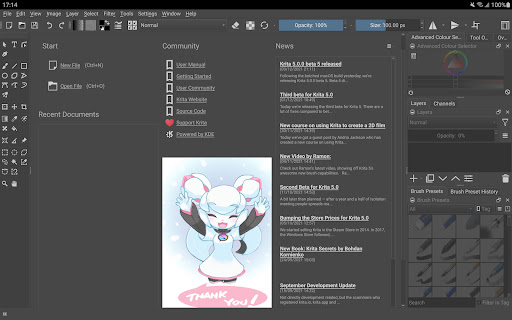
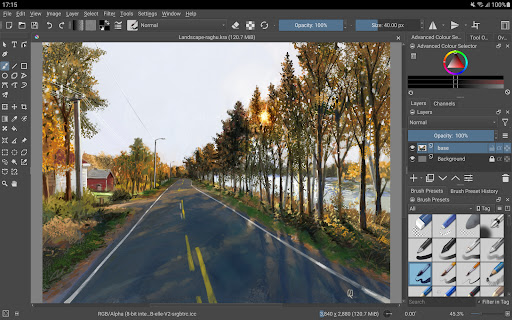
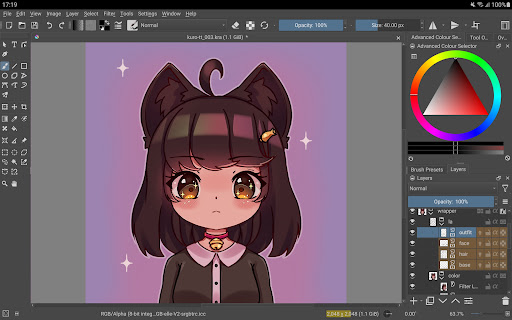
Krita is a full-featured digital painting application designed for artists. Whether you create illustrations, comics, animations, concept art or storyboards – Krita will be a powerful tool for you.
Krita offers many common and innovative features to make painting more fun and more productive. There are great brush engines for sketching and painting, stabilizers for freehand inking, assistants for constructing complex scenes, a distraction-free canvas-only mode for painting without bother, clone layers, layer styles, filter and transform masks for non-destructive editing. Krita supports all the most used file formats, including PSD.
Krita supports animation with onion skinning, storyboarding, comic book project management, scripting in Python, many powerful filters, selection tools, colorizing tools, color managed workflows, flexible workspaces… And much, much more. Discover the full feature set of Krita at https://krita.org!
This is a beta release of Krita and is not suitable for real work yet. Since the interface is currently optimized for big screen devices (tablets and chromebooks) we are not making it available for phones yet.
Krita is created by the Krita Foundation and Halla Rempt Software. The Krita project is part of the KDE community.
أظهر المزيد

1. قم بتنزيل برنامج MEmu واكمال تثبيته

2. قم بتشغيل برنامج MEmu وفتح Google Play على الصفحة الرئيسية

3. ابح Krita في Google Play
Install
4. تنزيل وتثبيت Krita
5. انقر على الرمز للتشغيل بعد اكتمال التثبيت

6. استخدم MEmu لتجربة Krita على جهاز الكمبيوتر الخاص بك.
تطبيق MEmuهو افضل محاكى اندرويد مجانى وبالفعل 50 مليون شخص يستمتعون حاليا بتجربه اللعب عليه. تمكّنك تقنية MEmu الافتراضية من تشغيل آلاف ألعاب Android بسلاسة على الكمبيوتر الشخصي ، حتى أكثرها استخدامًا للرسومات.
شاشة أكبر وجرافيك افضل ووقت أطول بدون حدود البطارية وباقة التليفون
لوحة مفاتيح كاملة تدعم تحكم كامل عن طريق لوحة المفاتيح و الفأره وجيم باد
عدة العاب وحسابات ومهمات علي جهاز الكمبيوتر في وقت معين عن طريق Memu متعدد النوافذ
Use Krita on PC by following steps: