WalkWork
تم التحديث
الإصدار الحالي
1.17.0
تقديم

لا داعي للقلق بشأن الشحن الزائد عند استخدام WalkWork على هاتفك. تحرر من قيود الشاشة الصغيرة واستمتع به على شاشة أكبر باستخدام لوحة المفاتيح والفأرة. يوفر MEmu جميع الميزات الرائعة التي تتوقعها: تثبيت سريع، إعداد سهل، أدوات تحكم بديهية، ودون قيود على عمر البطارية، أو استخدام البيانات، أو المكالمات الواردة. يُعد MEmu 9 الجديد الخيار الأمثل لتجربة WalkWork على جهاز الكمبيوتر. بفضل تقنية التشفير الفريدة، يتيح لك مدير الحسابات المتعددة تشغيل حسابين أو أكثر في وقت واحد. والأهم من ذلك، أن محرك المحاكاة الفريد يستغل أداء جهاز الكمبيوتر بالكامل، مما يُحسّن تجربة التطبيق ويجعل كل شيء سلسًا للغاية.
أظهر المزيد
قم بتنزيل WalkWork على الكمبيوتر بإستخدام جهاز مقلد أندروز MEmu.استمتع بمتعة اللعب على الشاشة الكبيرة. What is WalkWork?
What is WalkWork?
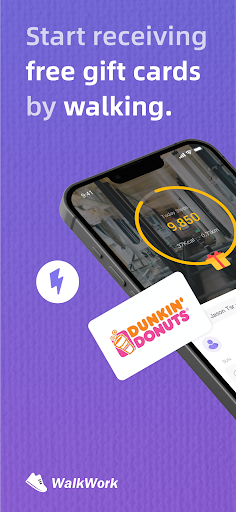
WalkWork is a step counter application where the more you walk, the more rewards you earn. You can exchange the rewarded energy for the rewards of your choice.
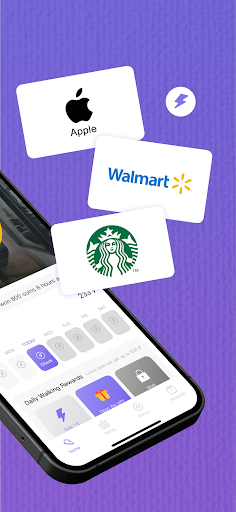
This step counter is completely free, and the activity tracker motivates you to walk. WalkWork converts your steps into 'StepEnergy' in the form of virtual energy to promote a healthier lifestyle. Everyone can use this energy to redeem various attractive rewards, such as popular gift cards.
The WalkWork app is entirely free, allowing you to obtain energy simply by walking or running. Our app's mission is to promote your health.
How to Use WalkWork?
Download the WalkWork app for free from the app store and launch it. After completing the setup process, start walking. Whenever you walk for a certain duration, you can claim unlocked energy blocks within the app.
Where Can You Collect Energy?
Home page treasure chests, newbie sign-ins, and daily stage rewards offer substantial rewards. Exchange the earned energy for gift cards (Amazon, Walmart, Sephora, eBay, Uber, etc.) and not only receive lucrative rewards but also improve your health.
How to Get StepEnergy?
Walking: Earn up to 100 energy units per day! When you reach 10,000 steps, all rewards will be unlocked and available for claiming!
Sign-In: Newbies can log in daily within the first seven days and receive energy. You can claim it at any time of the day!
Packs: Stage rewards are triggered when you reach a certain number of steps daily.
Lottery: The lucky wheel offers a chance to win up to 10,000 energy units.
The best part? All features are completely free!
Other Content
Big Wheel: Enjoy various free games in WalkWork. We regularly update new content.
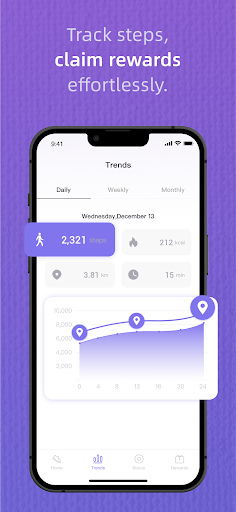
Trend: Review your exercise history and trends for daily, seven-day, and thirty-day periods! WalkWork compiles your steps, calorie burn, exercise time, and walking distance, allowing you to track your progress.
Attention
·WalkWork aims to track or encourage a healthy work-life, which may help people with certain chronic diseases or conditions live better.
·WalkWork is not intended for diagnosing acute or chronic diseases or other conditions, nor for their treatment or prevention. Before starting any new lifestyle or fitness program, you should seek advice from a physician.
·WalkWork is currently available for use worldwide. When using it, please enable the relevant permissions on your device to avoid your device being flagged as high-risk by the risk control system, which could impede your ability to redeem rewards. Please avoid using VPNs or other proxies or emulators, otherwise your account may be restricted.
·Use of devices not meeting specifications and standards may be limited.
·Gift card information in WalkWork is provided solely for redemption information and user obligations and does not imply any affiliation with our company in any way.
Compatible with iOS 14.0 or later versions.
· Support Team: Support@focusonsharing
· Website: https://www.focusonsharing.com/
أظهر المزيد

1. قم بتنزيل برنامج MEmu واكمال تثبيته

2. قم بتشغيل برنامج MEmu وفتح Google Play على الصفحة الرئيسية

3. ابح WalkWork في Google Play
Install
4. تنزيل وتثبيت WalkWork
5. انقر على الرمز للتشغيل بعد اكتمال التثبيت

6. استخدم MEmu لتجربة WalkWork على جهاز الكمبيوتر الخاص بك.
تطبيق MEmuهو افضل محاكى اندرويد مجانى وبالفعل 50 مليون شخص يستمتعون حاليا بتجربه اللعب عليه. تمكّنك تقنية MEmu الافتراضية من تشغيل آلاف ألعاب Android بسلاسة على الكمبيوتر الشخصي ، حتى أكثرها استخدامًا للرسومات.
شاشة أكبر وجرافيك افضل ووقت أطول بدون حدود البطارية وباقة التليفون
لوحة مفاتيح كاملة تدعم تحكم كامل عن طريق لوحة المفاتيح و الفأره وجيم باد
عدة العاب وحسابات ومهمات علي جهاز الكمبيوتر في وقت معين عن طريق Memu متعدد النوافذ
Use WalkWork on PC by following steps: