How to Solve Poor Performance
 |
|
If you feel poor performance when using MEmu, it’s absolutely abnormal because MEmu is most powerful Android Emulator in this world. 😉
In fact, there are five possible reasons.
- You are using an very outdated computer, maybe five years ago or even older, like Intel Pentium, Celeron or Atom serial processor with less than 2GB memory.
[Solution: You deserved a better computer, check system requirements.] - The hardware virtualization feature is not enabled or conflicted on your computer.
[Solution: You can try to enable/fix it. Enable VT or Solve VT Conflict] - You have installed too many apps in a single VM, which makes the performance worse.
[Solution: Create a new VM with Multi-MEmu if you have more 30 apps installed.] - Some antivirus or security software is not in favor of emulator software very much, like 360 or bit-defender. As far as I know, some installation failures are also caused by such kind of software.
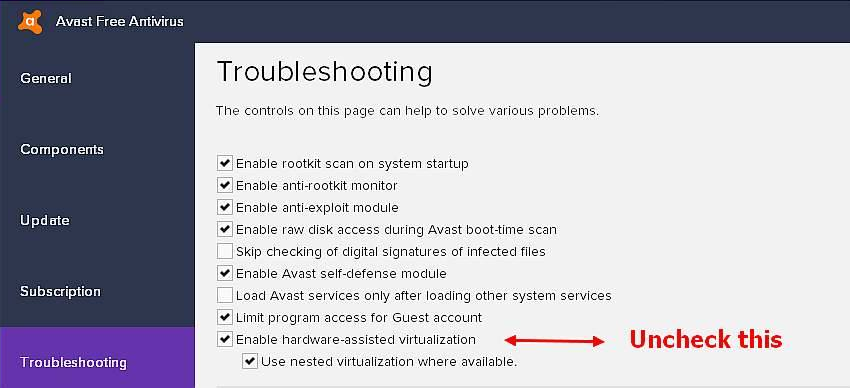
[Solution: Turn off these software completely and try with MEmu again.] - Some other antivirus software like AVAST and/or AVG by default enable "Hardware assisted virtualization" that means they are exclusively using some CPU-cores, too.
[Solution: You have to disable this feature in mentioned AV-programs' settings.]
>> Back to MEmu 101, everything you need to know about MEmu <<
Official Website: https://www.memuplay.com
Online Support: https://www.facebook.com/memuplayer
User Group: https://www.facebook.com/groups/memuplayer