MEmu
English
  • 简体中文
  • 新马简中
  • 繁體中文
  • Español
  • Português
  • Italiano
  • Français
  • Deutsch
  • Pусский
  • Indonesia
  • Tiếng Việt
  • Melayu
  • ภาษาไทย
  • 日本語
  • 한국어
  • हिन्दी
  • العَرَبِيَّة
  • Türkçe
  • Polski
  • Čeština
  • Ελληνικά
  • Українська
  • বাংলা
  • اردو‎
  • Nederlands
Support Business
Blog
  • App Reviews
  • Game Reviews
  • Game Guides
  • Game News
  • MEmu Latest
  • Release Notes
Game Center
  • Strategy
  • Role Playing
  • Action
  • Adventure
  • Racing
  • Casual
  • Card
  • Arcade
  • Sports
  • Simulation
  • Puzzle
  • Music
  • Word
  • Board
  • Casino
  • Trivia
  • Educational
  • Pre-registration
  • category_
  • category_null
  • Game Center
  • Blog
  • Business
  • Support
MENU
  • Home
  • App Reviews
  • Game Reviews
  • Game News
  • Game Guides
  • Redeem Codes
  • MEmu Latest
  • Release Notes
Skip to content
  • Home
  • App Reviews
  • Game Reviews
  • Game News
  • Game Guides
  • Redeem Codes
  • MEmu Latest
  • Release Notes
Download
Download and Play the Top 5 Most Downloaded Football Mobile Games on PC
Top 8 Free Apps Like Football Live TV for Mobile for FIFA World Cup 2026
How to Update Chrome to the Latest Version on the Google Play Store
Download and Play Devastate on PC: The Ultimate Gaming Guide with MEmu Play
NTE 1.2 Banner
Neverness to Everness 1.2 Banners: Shinku & Iroi Release Date, Leaks, and Pull Guide

Tag: lang-en

App Reviews   

Top 8 Free Apps Like Football Live TV for Mobile for FIFA World Cup 2026

2026-06-12

SEE MORE

Recent Posts

  • Download and Play the Top 5 Most Downloaded Football Mobile Games on PC

    "Whether you are counting down the days until the FIFA World Cup 2026 kicks off or just looking to pass the time during your daily commute, nothing beats the thrill of the beautiful game right in the palm of your hand. But with thousands of sports apps flooding the app stores, finding the perfect one can feel like trying to score from the halfway line." In this post, we’re breaking down the ultimate gaming lineup for every football fanatic. If you want to step off the sidelines and into the boots of your favorite superstars, we’ll dive straight into the Top 5 Most Downloaded Mobile Football Games dominating the charts right now. From hyper-realistic match simulations to addictive casual arcade classics, we have everything you need to conquer the virtual pitch on your PC. 1. EA SPORTS FC™ Mobile (Formerly FIFA Mobile) Downloads: 500M+ (Google Play alone) Why it's #1: The undisputed king of mobile football. Backed by official licenses, it features real players, authentic kits, and major leagues. It offers a premier multiplayer experience, allowing you to build an Ultimate Team, participate in live events, and compete in head-to-head matches. <memubtn game_id=1902&ext=20260612></memubtn> 2. eFootball™ (Formerly PES Mobile) Downloads: 100M+ Why it's a fan favorite: Developed by Konami, eFootball is highly praised by the gaming community for having the most realistic graphics and tactical on-pitch gameplay on mobile. If you prefer physics-based simulation and precise dribbling over arcade mechanics, this is your go-to. <memubtn game_id=2005&ext=20260612></memubtn> 3. Football League 2026 Downloads: 100M+ Why it's booming: This game has exploded in popularity as a lightweight, storage-friendly option that doesn't sacrifice depth. It features smooth 3D player animations, smart AI, and both online and offline modes, making it incredibly accessible for mid-range and budget smartphones. <memubtn game_id=84144&ext=20260612></memubtn> 4. Soccer Super Star Downloads: 100M+ Why it's so addictive: Unlike full match simulations, Soccer Super Star is a casual, flick-to-kick arcade puzzle game. You play through bite-sized match scenarios where you swipe your finger to curve passes and smash top-corner goals. It's the ultimate pick-up-and-play offline game. <memubtn game_id=53787&ext=20260612></memubtn> 5. Dream League Soccer (DLS) Downloads: 100M+ Why it stays on top: DLS strikes the perfect balance between playing on the pitch and acting as a club manager. You get to sign FIFPro licensed superstars, design your own team kits, upgrade your home stadium, and rise through 8 competitive divisions. <memubtn game_id=41176&ext=20260612></memubtn> ⚽ Ready to elevate your football viewing? Don't let a small screen ruin the match. Download MEmu Play on your PC today and experience your favorite football games with maximum performance!

  • Top 8 Free Apps Like Football Live TV for Mobile for FIFA World Cup 2026

    For sports enthusiasts and cord-cutters, keeping up with live football matches on the go can be a challenge. While popular mobile apps like Football Live TV offer free match updates and streams, there are several highly rated alternatives on Android that deliver incredible live coverage, interactive match features, and tournament tools. Whether you are looking to stream global tournaments live or want to run a bracket predictor pool with friends, here are the top 8 free alternatives to Football Live TV for Android. 1. FIFA World Cup 2026™ The official app for the biggest football event on earth is an absolute must-have for tournament coverage. It features live scores, official brackets, match highlights, and host city guides for the games across the USA, Canada, and Mexico. Pros: 100% official real-time updates; includes fantasy football, predictors, and 3D stadium maps; completely ad-free. Cons: Focuses heavily on the World Cup tournament rather than year-round domestic club leagues. <memubtn game_id=370934&ext=20260612></memubtn> 2. TSN: FIFA World Cup 2026™ As Canada’s premier sports network, the TSN app offers dedicated, high-quality streams and professional analysis tailored specifically for tournament viewers looking for comprehensive match coverage. Pros: Expert analysis, high-definition live feeds, and robust push notifications for goals and match events. Cons: Geo-restricted outside of Canada; requires a network provider login for full live video access. <memubtn game_id=34401&ext=20260612></memubtn> 3. FOX One: Live News, Sports, TV FOX One brings a comprehensive suite of live broadcasting right to your mobile device, making it a reliable hub for major sports games, pre-game commentary, and live tournament television. Pros: Excellent video streaming stability; offers live studio panels and broken-down post-match breakdowns. Cons: Contains ad interruptions; full live TV streaming requires a participating cable or television provider login. <memubtn game_id=370979&ext=20260612></memubtn> 4. Tubi: Movies & Live TV While known primarily as a movie streaming giant, Tubi features an extensive array of free, ad-supported live TV channels, including dedicated sports networks and tournament broadcast channels. Pros: 100% free with no subscription or credit card required; massive on-demand content library alongside live TV. Cons: Ad-supported (unskippable commercial breaks); live sports are subject to regional broadcasting availability. <memubtn game_id=21325&ext=20260612></memubtn> 5. JTBC NOW For international viewers looking to keep up with East Asian football broadcasts, K-League updates, and global tournament feeds, Korea's JTBC NOW offers a smooth mobile streaming ecosystem. Pros: Clean, responsive UI; high-quality streaming servers with minimal buffering. Cons: The user interface is primarily in Korean; international streaming feeds can sometimes be subject to region-locking. <memubtn game_id=371012&ext=20260612></memubtn> 6. MAXstream - Live Sports & TV A massive entertainment and sports hub out of Southeast Asia, MAXstream aggregates live television channels, sports packages, and tournament live streams directly to your Android screen. Pros: Broad variety of sports channels; great alternative for catching international streaming feeds. Cons: Premium sports channels require small in-app pack purchases; heavily reliant on a stable mobile data connection. <memubtn game_id=51557&ext=20260612></memubtn> 7. Bolão de Futebol 2026 (Soccer Pool) If you prefer the community side of Football Live TV, this interactive simulator is perfect. It allows you to create private prediction pools with friends, guess exact scores, and climb global leaderboards. Pros: Highly interactive; fun scoring system to compete with friends; real-time ranking updates. Cons: Strictly an interactive score-predictor and stats app, meaning it does not host live video streams. <memubtn game_id=371075&ext=20260612></memubtn> 8. 치지직 (CHZZK) Naver's popular live-streaming platform has become a hub for community viewing parties, esports, and interactive sports commentary streams hosted by popular football content creators. Pros: Incredible high-definition video quality; active live chat to discuss the match with thousands of fans simultaneously. Cons: Content is mostly community-driven commentary rather than official broadcast feeds; native language is Korean. <memubtn game_id=255998&ext=20260612></memubtn> Why You Should Play and Stream These Apps on PC with MEmu Play While these applications are designed for mobile devices, using them on your phone can lead to battery drain, overheating, and limited screen space. Running these top football apps on your PC using MEmu Play unlocks the ultimate viewing and playing experience: The Big Screen Advantage: Don't squint at a 6-inch phone display during a crucial match. Watch high-definition tournament feeds from apps like FIFA, FOX, and Tubi on your large desktop monitor. No Battery or Thermal Throttling: Live video streaming and prediction games consume massive amounts of battery power. With MEmu Play, you can watch live TV for hours without worrying about your phone overheating or dying mid-match. Seamless Multi-Tasking (Multi-Instance Manager): Want to watch a live stream on Tubi or CHZZK while simultaneously managing your tournament predictions on Bolão de Futebol 2026? MEmu’s Multi-Instance feature allows you to open multiple apps side-by-side seamlessly. Smooth Navigation and Precision Control: Use your keyboard and mouse to navigate complex streaming menus, log stats, and chat with other fans effortlessly compared to clumsy touchscreen typing. ⚽ Ready to elevate your football viewing? Don't let a small screen ruin the match. Download MEmu Play on your PC today and experience your favorite football apps with maximum performance!

  • How to Update Chrome to the Latest Version on the Google Play Store

    For certain reasons, some apps or games require the latest version of Chrome to function properly. This blog aims to guide players on how to update Chrome on the MEmu emulator. How to update Chrome on MEmu (Step-by-Step) Getting started takes less than five minutes. Follow these simple steps to elevate your game: Step 1: Open the Google Play Store Step 2: Search 'Chrome' and Click Update Step 3: Launch the Game After the Update is Complete.

  • Download and Play Devastate on PC: The Ultimate Gaming Guide with MEmu Play

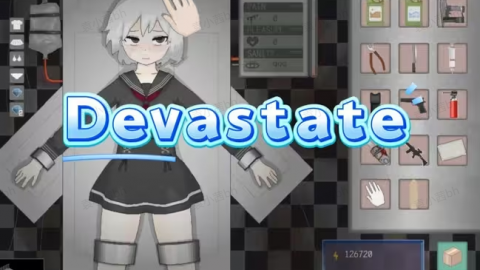
    Devastate is an immersive 2D anime-style survival management game that perfectly balances wilderness exploration with deep character interaction. Set against the backdrop of a desolate, ruined world, the game ensures that every excursion matters and every minor choice carries weight. <memubtn game_id=350063&ext=20260612></memubtn> As a player, you will navigate abandoned streets and silent forests to scavenge vital resources, bringing them back to fortify a sanctuary you can truly call home. Along your journey, you will cross paths with a mysterious girl living in a laboratory, forming a unique bond through daily care and meaningful conversations. Are you ready to dive into the chaotic, action-packed world of Devastate? While playing on mobile is fun, let’s be honest: touch controls, battery drain, and small screens can seriously hold back your true gaming potential. If you want to dominate the battlefield, maximize your graphics, and experience seamless performance, playing on PC is the ultimate move. Today, we’re showing you how to unlock the best way to experience the game using MEmu Play, the fastest and most reliable Android emulator on the market. Contents Why You Need to Play Devastate on PC How to Download and Play Devastate on PC (Step-by-Step) Step 1: Download MEmu Play Step 2: Install the Emulator Step 3: Open the Google Play Store Step 4: Install Devastate Step 5: Update Chrome to latest verion on Google store Step 6: Configure and Conquer! Pro Tip for the Best Performance Why You Need to Play Devastate on PC Playing Devastate on your computer completely transforms the experience. Here is why thousands of players are making the switch to MEmu Play: Precision Control Mapping: Ditch the clumsy touchscreen. MEmu allows you to map your keyboard and mouse perfectly, giving you lightning-fast reflexes and pixel-perfect accuracy. Stunning Visuals & High FPS: Don’t let your phone overheat. Push Devastate to its absolute maximum graphical settings and enjoy smooth, lag-free 60+ FPS gameplay on your large monitor. Unlimited Power: Say goodbye to low-battery warnings and annoying background notifications mid-match. The Multi-Instance Edge: Want to manage multiple accounts or multitask while playing? MEmu’s Multi-Instance Manager lets you run several windows effortlessly. How to Download and Play Devastate on PC (Step-by-Step) Getting started takes less than five minutes. Follow these simple steps to elevate your game: Step 1: Download MEmu Play First, you need the engine to run it all. Head over to the official website and download the latest version of the emulator: 👉 [Download MEmu Play on PC here] Step 2: Install the Emulator Run the downloaded installer file. The setup wizard is incredibly straightforward—just click "Quick Install," and let the software handle the rest. Step 3: Open the Google Play Store Once MEmu Play launches, locate the Google Play Store icon on the home screen. Sign in with your Google account (or create a quick free one) to access the app library. Step 4: Install Devastate Type "Devastate" into the Google Play search bar. Click the "Install" button next to the game, and it will automatically download directly into your MEmu emulator. Step 5: Update Chrome to the latest version on the Google Play Store. Step 6: Configure and Conquer! Click the game icon on your MEmu home screen to launch it. The emulator will automatically recommend a keyboard layout, but you can customize the keys to your exact liking using the keyboard panel on the right sidebar. Pro Tip for the Best Performance To ensure Devastate runs as smoothly as butter, make sure to enable Hardware Virtualization (VT-x/AMD-V) in your computer’s BIOS settings. MEmu Play utilizes this technology to give your virtual Android environment a massive performance boost, utilizing your PC's CPU and GPU to their fullest potential. What are you waiting for? Don't let hardware limitations slow you down. [Download MEmu Play today] and experience Devastate the way it was truly meant to be played!

  • Neverness to Everness 1.2 Banners: Shinku & Iroi Release Date, Leaks, and Pull Guide

    NTE 1.2 Banner

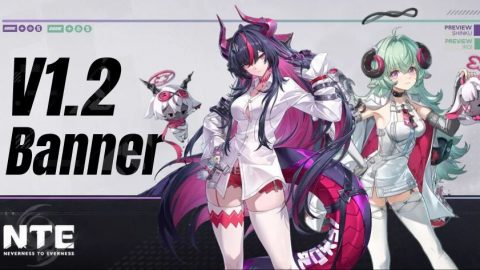
    With Neverness to Everness already breaking records — surpassing 30 million pre-registrations and generating over $14.6 million in first-day revenue — the community is wasting no time looking ahead. Version 1.1 banners are nearly confirmed, and players are already shifting their focus toward NTE 1.2. According to the latest leaks, Version 1.2 will introduce two brand-new S-Rank characters: Shinku and Iroi. This guide covers everything currently known about the NTE 1.2 banners, including release dates, character roles, team compositions, resource planning, and pull recommendations. ContentsNTE 1.2 Release Date — When Does the Update Launch?NTE 1.2 Banner Overview — Shinku and IroiShinku Banner — NTE 1.2 Phase 1Shinku Character OverviewBest Team Compositions for ShinkuIroi Banner — NTE 1.2 Phase 2Iroi Character OverviewPotential Team Compositions for IroiShinku vs. Iroi: Which NTE 1.2 Banner Should You Pull?Pull Recommendation by Player TypeNTE 1.2 Pull Planning — How Many Pulls Can You Save?Resource TipsFuture NTE Characters Beyond Version 1.2Frequently Asked QuestionsConclusion NTE 1.2 Release Date — When Does the Update Launch? Based on current leak sources and community analysis, NTE Version 1.2 is expected to launch on July 2, 2026. The patch will run for approximately 42 days, divided into two banner phases of 21 days each. EventExpected DateVersion 1.2 ReleaseJuly 2, 2026Shinku Banner (Phase 1)July 2 – July 23, 2026Iroi Banner (Phase 2)July 23 – August 13, 2026Version 1.2 EndAugust 13, 2026 NTE 1.2 Banner Overview — Shinku and Iroi Version 1.2 is expected to feature two new S-Rank characters with distinctly different roles, making this a pivotal update for team-building decisions. Banner PhaseCharacterRarityAttributeRolePhase 1ShinkuS-RankLumina (Light)Main DPSPhase 2IroiS-RankLingxi (Spirit)Support Shinku Banner — NTE 1.2 Phase 1 Shinku Character Overview DetailInfoNameShinkuRarityS-RankAttributeLumina / Light (Leaked)RoleMain DPSBanner PhasePhase 1Expected ReleaseJuly 2, 2026 Shinku is among the most talked-about characters heading into Version 1.2. Based on available leaks and official gameplay footage, she is a burst-focused Main DPS with visually striking attack effects and strong single-target damage output. Her Ultimate appears to deal multi-hit AoE damage followed by a concentrated finishing strike on the primary target, suggesting her rotation will center heavily around skill and Ultimate usage. For players building Light-attribute teams, Shinku has the potential to become the cornerstone offensive unit. Importantly, Shinku is expected to integrate into the existing Light-attribute Creation framework rather than requiring an entirely new team structure — a significant advantage for players who already have Light-team investments. Best Team Compositions for Shinku Team TypeSuggested LineupWhy It WorksOptimal Light TeamShinku + Iroi + Protagonist + JiuyuanBalanced burst damage with full team supportBoss / Single-TargetShinku + Iroi + Protagonist + HathorMaximizes single-target DPS for boss encountersFlexible / BudgetShinku + Protagonist + Jiuyuan + CarlosAccessible lineup using existing characters Iroi Banner — NTE 1.2 Phase 2 Iroi Character Overview DetailInfoNameIroiRarityS-RankAttributeLingxi / Spirit (Leaked)RoleSupportBanner PhasePhase 2Expected ReleaseJuly 23, 2026 Iroi may not be generating the same level of hype as Shinku, but don't overlook her. Early leaks suggest she will function as a team-oriented support character, providing damage buffs, utility, or rotation optimization to enhance the overall team. Support characters in NTE tend to have longer-lasting meta relevance than Main DPS units. If Iroi's final kit delivers consistent buffing or unique utility mechanics, she could slot into a wide variety of teams — not just those built around Shinku. Potential Team Compositions for Iroi Team TypeSuggested LineupPurposeShinku CoreShinku + Iroi + Protagonist + JiuyuanFull synergy; maximizes Shinku's burst potentialBoss FocusShinku + Iroi + Protagonist + HathorStrong single-target output for end-game bossesCreation CoreIroi + Protagonist + Jiuyuan + Flex SlotKeeps existing Creation setup with new support layerUniversal SupportMain DPS + Iroi + Protagonist + Flex SlotIroi in any team if her buffs prove universal Shinku vs. Iroi: Which NTE 1.2 Banner Should You Pull? CategoryShinkuIroiRoleMain DPSSupportBanner PhasePhase 1Phase 2PlaystyleBurst / Single-Target DamageTeam Buffs & UtilityFlexibilityModerateHigh (Expected)Long-Term Meta ValueTBDHigh (Expected)Best ForPlayers needing a DPS corePlayers with established rosters Pull Recommendation by Player Type New players → Prioritize Shinku. A reliable Main DPS makes story progression and exploration significantly smoother. Players without a strong Main DPS → Shinku is the most direct upgrade to your team's damage output. Players with mature, built-out teams → Iroi is likely the more impactful pickup; support characters are easier to integrate and tend to remain relevant longer. Light-team players → Shinku is a high-priority pull with the potential to anchor your entire Light lineup. Long-term value seekers → Watch Iroi closely. Strong buffing support characters have historically aged well in similar games. F2P players with limited resources → Wait to evaluate Shinku's live performance first. Since Iroi is Phase 2, you have additional time to assess her complete kit before committing. NTE 1.2 Pull Planning — How Many Pulls Can You Save? Player TypeEstimated Pulls Before 1.2Key SourcesF2P~26 PullsEvents, daily missions, version rewards, redemption codesMonthly Pass~41 PullsAll F2P sources + Monthly Pass daily rewards Resource Tips If you pulled Carlos and Shinku is your main goal — stop spending now and begin saving immediately. If you plan to pull Shinku — complete all limited-time events and daily missions to maximize your pull count before 1.2. If you plan to pull Iroi — since she arrives in Phase 2, you have roughly three additional weeks to accumulate resources. If you're undecided — wait for Shinku's live performance data and Iroi's full kit reveal before finalizing your strategy. Future NTE Characters Beyond Version 1.2 Version 1.2 isn't the end of the roadmap. Several additional characters have been mentioned in leak channels: CharacterStatusExpected WindowExeLeakedFuture VersionElymsLeakedFuture VersionMintCurrently ReleasedMay receive additional contentOthersRumoredTBD Frequently Asked Questions When does NTE Version 1.2 release? Based on current leaks, Version 1.2 is expected to launch on July 2, 2026. Is Shinku the first banner in NTE 1.2? Yes. Shinku is anticipated to headline Phase 1, with Iroi following in Phase 2 starting July 23. Is Iroi a DPS or support character? Iroi is expected to be a support character, focused on team buffs and utility rather than direct damage. Should I pull Carlos or save for Shinku? If your account lacks a reliable main DPS, saving for Shinku is generally the stronger long-term play. If you enjoy Carlos or need an immediate upgrade, his banner still has value. How many pulls can F2P players save before 1.2? Approximately 26 pulls through events, daily missions, version rewards, and redemption codes. Which NTE 1.2 character is the better pull? It depends on your account. Shinku is better if you need a Main DPS; Iroi is stronger if you have an established roster and want to boost your existing team. Conclusion Based on all available leak data, Shinku will headline NTE 1.2 Phase 1 as a burst-heavy Main DPS, and Iroi will follow in Phase 2 as a potentially game-changing support character.

  • PUBG MOBILE x NARUTO SHIPPUDEN Collaboration: Release Date & Free Rewards

    PUBG x Naruto

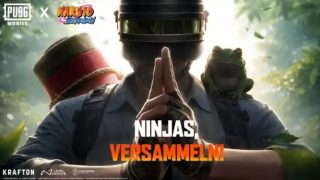
    A massive cross-dimensional ninja storm is about to hit the high-stakes battlefields of PUBG MOBILE. The game has officially announced its collaboration with the legendary anime NARUTO SHIPPUDEN. Launching on July 9, 2026, alongside the Version 4.5 update, this epic crossover will bring iconic characters — Naruto Uzumaki, Sasuke Uchiha, Itachi Uchiha, Madara Uchiha, Kakashi Hatake, and more — straight into the action, complete with their signature jutsu and undeniable charisma. ContentsRelease Date and UpdateWhat is Naruto Shippuden?What's Included in the CollaborationHow to Obtain Collaboration ItemsAre the NARUTO Skins Worth It?Conclusion Release Date and Update Mark your calendars: the PUBG MOBILE x NARUTO SHIPPUDEN collaboration goes live on July 9, 2026, with the Version 4.5 update. A global rollout will follow in mid-July, meaning you can dive into fresh ninja-themed content, limited-time events, new skin progression paths, and more the moment you log in. What is Naruto Shippuden? NARUTO SHIPPUDEN is the beloved sequel to the worldwide phenomenon Naruto, based on Masashi Kishimoto's iconic manga. It follows Naruto Uzumaki and his friends as they grow stronger, face powerful enemies, and protect their village through unbreakable bonds and the “Will of Fire.” Renowned for its breathtaking ninjutsu battles, deep emotions, and unforgettable moments, the series has shaped the childhoods of millions. This collaboration channels the spirit of the Hidden Leaf Village directly into PUBG MOBILE's intense battle royale. What's Included in the Collaboration The collaboration is packed with high-quality ninja-themed items and immersive experiences. Key highlights include: Character Skins & Outfits: Mythic-tier sets inspired by Naruto Uzumaki, Sasuke Uchiha, Itachi Uchiha, Madara Uchiha, Kakashi Hatake, and more. Expect intricate designs with exclusive chakra effects, custom animations, and signature emotes. Weapons, Vehicles & Accessories: Ninja-style weapon finishes (such as a special M416 skin), vehicle skins, parachutes, backpacks, and popular items. Some weapons may feature upgradeable appearances, kill effects, and unique animations. Voice Packs & More: Authentic character voice packs, ninjutsu-inspired emotes, graffiti, avatars, and additional collectibles to elevate your battlefield presence. Free Rewards: Players can also claim free items simply by logging in daily and checking the in-game Game Center tab. How to Obtain Collaboration Items Rewards can be unlocked primarily through the following routes: Item TypeRarityHow to ObtainNaruto / Sasuke OutfitsMythic / Top-tierPrize Path (complete tasks)Weapon Finishes & SkinsLimitedPrize Path + Lucky SpinVoice Packs / EmotesCommon ~ RareLogin rewards, tasks, Game CenterFree Items & TokensFree / EventDaily login, limited-time missions The Prize Path is your main progression system. Spend UC to unlock the premium track and earn rewards by completing matches and daily missions. Free players can still collect plenty of items, while paying players can secure Mythic sets faster. A Lucky Spin will also be available for extra chances at rare rewards. Stay tuned to official channels — more details will be revealed once the update drops. Are the NARUTO Skins Worth It? Absolutely — especially for Naruto fans and dedicated collectors. The outfits deliver outstanding production quality, excellent character fidelity, and stunning visual effects that blend ninjutsu seamlessly with PUBG MOBILE’s gunplay. Voice packs and special animations provide deep immersion. However, since collaboration items are typically time-limited, casual players should focus on free paths and events first. Plan your spending wisely, and above all, enjoy the experience. Conclusion The PUBG MOBILE x NARUTO SHIPPUDEN collaboration launches on July 9, 2026, with Version 4.5, fusing the raw energy of ninja spirit with the tension of battle royale. From Naruto's Shadow Clone technique to Sasuke's Sharingan and beyond, this crossover will reshape the battlefield with passion, strategy, and nostalgia. Whether you're a longtime fan or simply hungry for fresh experiences, this update promises unforgettable moments. Get your chakra ready — see you on the battlefield on July 9!


  • Jigokuraku: Battle in Hell's Paradise English Version Launches on July 1

    Jigokuraku Battle

    Good news for English-speaking fans of the popular anime Hell's Paradise — the mobile spinoff is finally getting an official English version. Just announced, Jigokuraku: Battle in Hell's Paradise will launch with English-language support (and dedicated English worlds) on July 1. Jigokuraku follows an elite squad of ninjas in Edo-period Japan. Convicted of various crimes, they're offered a full pardon — on one condition: retrieve the elixir of immortality from Shinsenkyo, a strange and treacherous island that's far deadlier than your average deathtrap. Alongside the English release, the team also confirmed that a Steam version is coming, featuring both Japanese and English language options and full cross-progression support. On top of that, key voice actors shared a special message thanking fans and expressing their hopes that players will enjoy Jigokuraku: Battle in Hell's Paradise. https://www.youtube.com/watch?v=l0Npx8GuX-8 In terms of gameplay, Battle in Hell's Paradise looks to be a card-battling RPG with a lighter visual style, at least based on what's been shown so far. But with co-op play and a strong focus on character interactions and teamwork, it might just put an interesting enough twist on the formula to be worth checking out. And that's not all — this latest announcement also confirms that brand-new, exclusive characters will be joining the roster. While some anime purists are bound to groan at that reveal, plenty more fans will be eager to see who's joining the cast of Hell's Paradise when it arrives on mobile in English-speaking countries this July.

  • How to Play Pigeon Paradise on PC with MEmu Play Emulator

    Have you ever dreamed of building your own sky sanctuary, raising rare avian flocks, and mastering the authentic art of traditional pigeon keeping? Look no further than Pigeon Paradise, the unique simulation game by @aliyapicidev available on the Google Play Store. This captivating simulator allows you to build customized coops, feed and nurture your birds, hatch eggs, and use whistle commands to guide your flock as they execute breathtaking tumbles and glides in the open sky. <memubtn game_id=368786&ext=20260608></memubtn> While managing your flock on a smartphone is a fun casual experience, checking your nests, training birds, and watching complex tumbling flights can quickly strain your eyes and overheat your phone's battery. To unlock the true, immersive beauty of this realistic day-and-night simulation, playing Pigeon Paradise on PC with MEmu Play is the definitive way to go. Here is why MEmu Play is the perfect choice for expanding your digital pigeon empire. Contents Why Choose MEmu Play for Pigeon Paradise? 1. Flawless Simulation with Zero Lag on Low-End PCs 2. Breathtaking Visuals and a Macro View of the Sky 3. Seamless Control via Keymapping and Whistle Commands 4. Multi-Instance Management for Massive Flock Breeding Simple Guide to Install & Play Pigeon Paradise on PC Why Choose MEmu Play for Pigeon Paradise? MEmu Play is widely recognized as one of the most efficient, lightweight Android emulators globally, specifically tailored to deliver top-tier performance without bogging down your system hardware. 1. Flawless Simulation with Zero Lag on Low-End PCs Simulation games with active AI entities—like a sky full of flocking, tumbling pigeons—can consume significant mobile CPU resources. MEmu Play is highly optimized to run perfectly even on budget computers or older laptops with only 2GB or 4GB of RAM. It handles the realistic day/night cycle, flock physics, and environment rendering smoothly, ensuring your birds glide across the screen without a single frame drop. 2. Breathtaking Visuals and a Macro View of the Sky Watching your prize pigeons perform magnificent aerial acrobatics, glides, and tumbles is the core joy of Pigeon Paradise. Squinting at a tiny 6-inch phone screen ruins the grandeur. By launching the game through MEmu Play on your PC monitor, you can appreciate the gorgeous skyboxes, detailed bird animations, and full coop layouts in glorious high definition. 3. Seamless Control via Keymapping and Whistle Commands In Pigeon Paradise, timing is everything when sending your birds on sorties or calling them back using precise whistle commands. Instead of tapping blindly on a smudged touch screen, MEmu Play allows you to map your whistle, feed distribution, and coop management controls straight to your keyboard and mouse. One-click hotkeys make taming wild pigeons and gathering gold from daily quests infinitely faster and easier. 4. Multi-Instance Management for Massive Flock Breeding Want to speed up your breeding programs, hatch multiple eggs at once, or manage different coop strategies simultaneously? MEmu’s robust Multi-Instance Manager lets you run multiple separate windows of the emulator simultaneously. You can easily nurture multiple distinct pigeon accounts without breaking a sweat or crashing your Windows OS. Core Features of Pigeon Paradise You'll Master on PC: Coop Customization: Set up feeders, waterers, and nest shelves comfortably using your mouse precision. Flock Expansion: Catch and tame wild pigeons from the vast sky and cross-breed them to hatch unique chicks. Acrobatic Training: Train your birds to improve their stats and watch their flight behaviors on a cinematic display. Simple Guide to Install & Play Pigeon Paradise on PC Setting up your virtual pigeon paradise takes less than five minutes. Just follow these simple steps: Download MEmu Play: Go to the official MEmu website and download the latest, clean installation package. Install the Emulator: Run the setup wizard on your Windows PC and launch MEmu Play once finished. Access Google Play: Open the built-in Google Play Store app inside MEmu and quickly sign in with your Google account. Search and Download: Search for "Pigeon Paradise" in the store search bar, click "Install," and let the game download. Launch Your Coop: Click the game icon on your MEmu home screen, set up your favorite keyboard shortcuts, and start building your flock! ⚡ Don't limit your flock to a tiny screen! [Download MEmu Play Today], install Pigeon Paradise, and watch your birds dominate the sky in stunning high-definition! ⚡

  • Free Fire 9th Anniversary Ultimate Guide: Redeem Codes, Events & Free Rewards

    Free Fire 9th Anniversary

    Hello, Survivors! The highly anticipated Free Fire 9th Anniversary celebration has officially kicked off. This is your golden moment to claim exclusive gifts across every server. In this complete guide, you'll find the latest redeem codes, event schedules, core activities, and a step-by-step walkthrough to earn rare, limited-edition rewards—all without spending a dime. ContentsLatest Free Fire 9th Anniversary Redeem CodesFree Fire 9th Anniversary Event ScheduleFree Fire 9th Anniversary Core EventsNew Anniversary Map & Classic ModesServer‑Wide Challenges – Collect Anniversary TokensMystery Collaboration Rumors – Who Is the 9th Anniversary Guest?How to Get Free Fire 9th Anniversary Event RewardsFAQ – Free Fire 9th Anniversary EventConclusion Latest Free Fire 9th Anniversary Redeem Codes CodeRewardsFF9MREDEEM20261x 9th Anniversary Weapon Loot Crate + 500 Memory TokensF9ANIVPASSGIFTExclusive Elite Pass Discount Voucher + Diamond Royale CardBOOYAH9YEARSFFFree Custom Room Card (3‑Hour Unlimited) + Neon BackpackGFF9PEAKDAILY7Legendary Character Trial Card Choice Box + Magic Cube Fragment How to Redeem:Visit the official redemption site or follow the detailed guide here:https://www.memuplay.com/blog/free-fire-redeem-codes.html Free Fire 9th Anniversary Event Schedule According to official teasers and community leaks, the brand‑new anniversary version launches on June 24, 2026 – “A New Era Begins on June 24.” The month‑long celebration is divided into four phases: Pre‑hype warm‑up Main anniversary interface launch Peak Day login blast Post‑celebration wrap‑up Free Fire 9th Anniversary Core Events https://www.youtube.com/watch?v=ydDPYnnOqCc New Anniversary Map & Classic Modes To celebrate nine years of battle royale dominance, Garena introduces a futuristic, neon‑drenched overhaul of a fan‑favorite map, complete with anti‑gravity zones and celebratory portals. Alongside this visual masterpiece, nostalgic modes make their triumphant return: Original Titan Strike Brick Swingers Chaotic Big Head mode These are available in both casual and ranked play, blending old‑school mechanics with modern updates for veterans and newcomers alike. Server‑Wide Challenges – Collect Anniversary Tokens The core progression system revolves around a global community milestone tracker. Individually, players collect 9th Anniversary Memory Tokens by: Completing daily in‑game missions Finding floating token generators on the battlefield Tokens can be spent in the Anniversary Exchange Store on elite loot crates, weapon blueprints, and vehicle skins. Mystery Collaboration Rumors – Who Is the 9th Anniversary Guest? Every major Free Fire anniversary features a star‑studded collaboration, and 2026 is no exception. The upcoming partnership will bring: A brand‑new theme song Limited‑edition emotes An interactive in‑game virtual concert where players can gather on a digital stage to earn free cosmetic rewards Keep an eye on official social media channels – the mystery celebrity will be revealed during the opening ceremony. How to Get Free Fire 9th Anniversary Event Rewards Event NameRewardsHow to Claim9th Anniversary Peak Day LoginFree Ultimate Character Bundle / Magic Cube + Exclusive Commemorative ItemsLog in on the designated Peak Day (a specific weekend during the event window) and claim directly from the main anniversary interface.14‑Day Cumulative Login9th Anniversary exclusive avatars, animated backgrounds, limited‑edition pet skins, gold, supply vouchersLog in daily and check in on the event panel. Reaching 14 cumulative days unlocks all rewards.Server‑Wide Challenges & Token Collection9th Anniversary limited neon legendary bundle, exclusive vehicle skins, elite loot crates1. Play Ranked or Classic matches, eliminate enemies, or find floating generators to collect Memory Tokens, then exchange them in the event store.2. Global players accumulate match points; when milestones are reached, everyone unlocks milestone crates.Limited‑Time Gold Store UpdateReturning classic legendary character skins (e.g., Joker series, Night Clown), limited emotes, animated weapon skinsSpend standard Gold (earned through regular gameplay) to purchase items directly in the updated anniversary Gold Store.9th Anniversary Booyah Pass (Space/Interstellar Theme)Space‑themed motorcycle skin, hoverboard, Gloo Wall, anniversary‑themed male character costume bundleComplete daily and weekly pass missions (survival time, damage dealt, revives) to level up your Booyah Pass. Free tier unlocks basic rewards; premium tier (unlocked with diamonds) grants all exclusive items. FAQ – Free Fire 9th Anniversary Event 1. Can I get all the 9th‑anniversary rewards without spending real diamonds?Yes. By diligently completing daily missions and redeeming codes, you can unlock the vast majority of anniversary cosmetics completely for free. 2. What happens if I miss Peak Day? Can I still claim the rewards later?If you miss logging in during the official 24‑hour Peak Day window, you will forfeit those exclusive bonuses. However, most exchange stores remain active, so you can still earn many other rewards. Conclusion Happy 9th Anniversary, Free Fire survivors! This celebration showcases the game's incredible longevity and passionate community. It's not only the most reward‑heavy event yet, but it also brings fresh gameplay modes and activities. Jump in, claim your codes, and enjoy the festivities!

  • Arknights: Endfield Mi Fu Build Guide: Kit, Materials, Weapons, Gear, Pull Tips & Team Comps

    Arknights Endfield Mi Fu

    With the arrival of Mi Fu, the fierce patrol captain from Wuling City, physical teams finally have their ultimate hyper-carry! Her unique "greatsword and fist" combat style lets her consume Vulnerability stacks to unleash devastating burst damage. This guide covers the best weapons and gear to maximize her explosive potential. ContentsArknights: Endfield – Mi Fu OverviewMi Fu SkillsMi Fu MaterialsMi Fu WeaponsTop Recommendation – Signature WeaponSecond RecommendationThird RecommendationMi Fu Gear RecommendationMi Fu Team CompsPure Physical Burst TeamF2P Stable Damage TeamPhysical‑Arts Hybrid TeamBeginner Clearing TeamConclusion Arknights: Endfield – Mi Fu Overview Mi Fu is a premier 6-star Physical Hyper-DPS who dominates the battlefield by alternating between heavy greatsword slashes and rapid fist strikes. Her core mechanic revolves around consuming enemy Vulnerability stacks to trigger massive burst damage. Character OverviewMi FuRarity6 ★ ElementPhysicalWeapon TypeSwordClassGuard Mi Fu Skills Basic Attack – Fistmancer of BladesA fluid 4‑hit sequence mixing sword slashes and fist strikes. The finisher deals extra damage to staggered targets and helps regenerate SP, keeping Mi Fu in the fight longer. Battle Skill – Qingbo TriplexA signature 3‑stage ability with low SP cost. Stage 1: Pulls lighter enemies or closes the gap on heavy foes. Stage 2: Delivers a series of punches ending in Crush damage while consuming Vulnerability. Stage 3: Unleashes a charged "World Splitter" heavy strike for massive frontal burst damage. Combo Skill – Fists of No RegretsActivates when the enemy has 3+ Vulnerability stacks. Applies additional Susceptibility and advances her Battle Skill directly to Stage 2 for smoother combos. Ultimate – Pile of No MercyA forward charge that lifts and slams enemies, adding Vulnerability and setting up immediate Stage 2 follow‑ups. Perfect for initiating engages or staggering crowds. TalentProvides a protective shield and boosts interruption resistance, reinforcing her frontline durability. Skill Upgrade Priority Battle Skill > Ultimate > Combo Skill > Basic Attack Mi Fu Materials Listed below are Mi Fu's build materials. Materialsr OverviewBlighted Jadeleaf/False Aggela × 84Advanced Cultivation Selection Box I × 126Mark of Perseverance × 24Bloodcap/Cosmagaric × 8Protohedron × 562Protoset × 60Kalkodendra × 12Chrysodendra × 16Vitrodendra × 16Protoprism × 461Protodisk × 33Pink Bolete × 3Red Bolete × 5Ruby Bolete × 5T-Creds × 939600 Mi Fu Weapons Top Recommendation – Signature Weapon Amaranthine Tassel (6★ Greatsword) Purpose‑built for devastating combo sequences. Landing three‑stage heavy strikes progressively amplifies break‑defense and damage bonuses. When paired with Mi Fu’s innate Physical Vulnerability mechanic, the damage multipliers align perfectly. This is her signature BiS weapon – at maximum refinement, it delivers the highest damage ceiling. Second Recommendation Phantom Pain (6★ Greatsword) A mixed‑damage greatsword available for free through the Monthly Battle Pass. It provides balanced bonuses to both Physical ATK and Originium Arts, enabling stable damage stacking whenever Battle or Combo Skills are used. It fits Mi Fu’s hybrid playstyle exceptionally well. When the signature weapon is unavailable, the damage difference is minimal. This is the top low‑cost choice for F2P players and performs excellently in both pure physical and hybrid teams. Third Recommendation Ancient Canal (5★ Greatsword) A massive heavy sword specialized in imbalance and break‑defense. Its affixes greatly enhance imbalance efficiency and dual‑type damage bonuses, making it outstanding for clearing dense enemy groups and rapidly shredding toughness. It outperforms Exemplar in stages filled with small mobs, but falls off against high‑armor bosses. A strong situational pick for dedicated break‑defense teams. Mi Fu Gear Recommendation Swordmancer Gear Pack Gear OverviewSwordmancer Gear PackMain Stat PriorityStrength > Originium Arts Intensity > Physical Damage BonusSub Stat PriorityPhysical Damage Bonus > Crit Rate > Crit Damage > Imbalance Efficiency > Ultimate Charge3-piece set effect: Wearer's Stagger Efficiency Bonus +20%. After the wearer applies a Physical Status, the wearer also performs 1 hit that deals 250% ATK of Physical DMG and [10 Stagger]. Effect trigger cooldown: 15s. Mi Fu Team Comps Pure Physical Burst Team Pure Physical Burst TeamMi FuChen QianyuPogranichnikLifengBest suited for the Amaranthine Tassel signature weapon. The two supports rapidly stack maximum break-defense (Vulnerability), while Lifeng further strengthens imbalance execution. This is the top choice for boss speedrunning and high-damage racing. F2P Stable Damage Team F2P Stable Damage TeamMi FuChen QianyuPogranichnikEmberCompatible with Phantom Pain and Exemplar. Ember provides strong team-wide survivability. Low gearing requirements and excellent performance across all content types—the most versatile and beginner-friendly team. Physical‑Arts Hybrid Team Physical-Arts Hybrid TeamMi FuRossiPogranichnikCamilleFocuses on Phantom Pain's mixed-damage playstyle. Arts damage helps counter high Physical Resistance enemies, while Camille accelerates skill rotations and overall team cycling. Beginner Clearing Team Beginner Clearing TeamMi FuChen QianyuAkekuriDa PanAll characters are easy to obtain, making this an ideal low-investment team for story progression and early-game clearing. Sufficient tankiness to comfortably push through the main storyline. Conclusion In short, Mi Fu is a powerhouse physical DPS who excels at shredding enemy defenses. Pair her with teammates that build up Vulnerability stacks, focus on Crit stats, and she will effortlessly crush any boss in her way.

  • How to Play Pokémon Champions on PC with MEmu Emulator (Get 120FPS & Free Mega Raichu!)

    <memubtn game_id=367262&ext=20260605></memubtn> Big news, trainers! The Pokémon Company International just dropped a massive announcement: Pokémon Champions is officially launching on mobile on June 17, 2026! Pre-registration is already live on the Google Play Store. Even better, to celebrate the mobile launch, everyone who logs in between June 17 and September 2, 2026, will get a free Raichu along with its brand-new Mega Stones: Raichunite X and Raichunite Y! Whether you want to dominate the field with Mega Raichu X's Electric Surge or land 100% accurate hits with Mega Raichu Y's No Guard, this is an event you cannot miss. Contents Why Choose MEmu Play for Pokémon Champions? 1. Zero Lag and Maximum FPS on Low-End PCs 2. Experience Mega Evolutions in Stunning High Definition 3. Smart Keymapping & Mouse Controls 4. Flawless Multi-Instance for Rerolling and Multi-Accounting How to Download and Play Pokémon Champions on PC Don't Miss Out on Mega Raichu X & Y! While Pokémon Champions features cross-platform play with the Nintendo Switch, you don't need expensive console hardware to get the ultimate competitive edge. Here is why playing Pokémon Champions on PC with MEmu Play is the best way to become a top-tier champion—even if you are playing on a low-end PC or a budget laptop. Why Choose MEmu Play for Pokémon Champions? Pokémon Champions brings deep, complex, strategy-driven battles to your screen. To climb the global ranked ladders, you need a setup that won't lag, overheat, or drop frames during critical turns. MEmu Play is engineered specifically to give you the smoothest experience possible. 1. Zero Lag and Maximum FPS on Low-End PCs Don't let a old PC or a overheating smartphone ruin your win streak. MEmu Play is famous for being the most lightweight Android emulator on the market. It uses significantly less RAM and CPU than other heavy emulators. If your PC has 2GB or 4GB of RAM, MEmu Play will optimize your system resources to ensure Pokémon Champions runs smoothly without any stuttering. 2. Experience Mega Evolutions in Stunning High Definition Mega Raichu X and Y look incredible, but mobile screens are too small to appreciate the new battle animations and Electric Terrain visual effects. With MEmu, you can bypass mobile hardware limitations. Upscale your graphics to 1080p or 4K, unlock 120FPS, and watch your Pokémon battles unfold on a massive monitor. 3. Smart Keymapping & Mouse Controls Competitive Pokémon battles require quick navigation through menus, move selections, and team switches. Instead of fumbling with clumsy touch controls on a small phone screen, MEmu Play lets you map all your commands to your keyboard and mouse. Switch Pokémon, trigger Mega Evolutions, and execute strategies instantly with precise clicks. 4. Flawless Multi-Instance for Rerolling and Multi-Accounting Want to test out different team compositions or manage multiple Nintendo Accounts simultaneously? MEmu's Multi-Instance Manager allows you to open multiple windows of Pokémon Champions at the exact same time without crashing your computer. How to Download and Play Pokémon Champions on PC <memubtn game_id=367262&ext=20260605></memubtn> Getting started takes less than five minutes. Follow these simple steps: Download MEmu Play: Visit the official MEmu website and download the latest, clean version of the emulator. Install & Launch: Run the installer on your Windows PC. Once installed, create Android 12 instance and open. Log into Google Play: Open the Google Play Store inside MEmu and sign in with your Google account. Pre-register / Download: Search for "Pokémon Champions" and click Pre-register (or Download if it is past June 17!). Link Your Nintendo Account: Once the game launches, log in with your Nintendo Account to enable cross-save progression between your PC and other devices. Don't Miss Out on Mega Raichu X & Y! The battle for the championship begins on June 17, 2026. Claim your free Raichu, secure your Mega Stones, and start building your ultimate competitive team on the big screen. ⚡ Ready to claim your title? [Click here to download MEmu Play] and pre-register for Pokémon Champions on PC today!

  • Illusion Connect Re Codes June 2026 *latest*

    illusion connect re code

    Illusion Connect: Re is a dynamic tactical RPG from SUGARGAME NETWORK LIMITED that blends real‑time strategic battles with deep hero collection. Reunite with the Radiants, build your dream squad from a massive roster of unique characters, and take on powerful Nightmares while adjusting formations on the fly. Beyond combat, you can dive into emotional stories and design your own personalized home retreat, making it a perfect pick for players who love strategy, character collecting, and frequent summons. To give your team an early boost, redeem the latest Illusion Connect: Re codes for free diamonds, summon tickets, gold, EXP, partners, and more. These rewards are especially helpful if you are just starting or planning to reroll. Claim them quickly and bookmark the source to stay updated with new codes as they arrive. ContentsAll Active Illusion Connect: Re CodesHow to Redeem Illusion Connect: Re CodesHow to Get More Illusion Connect: Re CodesWhy Aren't My Illusion Connect: Re Codes Working?Conclusion All Active Illusion Connect: Re Codes CodeDetails#LUCKY789Valid: June 11 - July 11#REWEEK1Valid: June 11 - July 11#ICDC10KExpires: 2026-12-31#GIFT20261Valid: June 8 - July 8#REDCLOGLimited rewards#REFBLOGLimited rewards#WEBTOPUPLimited rewards#RECONNECTLimited rewards#ILLUSIONLimited rewards#FREE10000Limited rewards#SUMMON10KLimited rewards#GACHA10000Limited rewards#WAIFU2026Limited rewards#ICRFREE10KLimited rewards#ICR10000Limited rewards How to Redeem Illusion Connect: Re Codes Launch the game and tap your avatar/profile icon in the upper-left corner. Open Settings, then select the Redeem option – it usually appears as a gift icon. Enter a valid code carefully. For Illusion Connect: Re, make sure to include the “#” symbol when typing the code. Tap Confirm. You can redeem up to 1 code every 5 seconds. If the code is active, you will see a “Congrats” message, and the reward details will appear directly below it. Rewards are granted directly – there’s no need to visit your mailbox. How to Get More Illusion Connect: Re Codes Staying ahead with the latest BBZ codes is easy when you know where to look. Here are the two best ways: Bookmark this page. We frequently scour the internet for active Basketball Zero codes, so you’ll always find the freshest batch right here — no need to waste valuable grinding time. Join the official Illusion Connect: Re Discord server. Keep a close eye on the announcements channel, since there isn’t a dedicated codes channel yet. Developers often drop surprise codes during events or update reveals. Follow Illusion Connect: Re Facebook: Illusion Connect: Re official page and group Why Aren't My Illusion Connect: Re Codes Working? If a code won’t redeem, here’s what might have gone wrong: Mistyped details. Even a single wrong capital letter or missing punctuation will cause an error. Stick to the copy/paste method whenever possible. Expired codes. These rewards disappear quickly, so claim them as soon as they appear. Missing prerequisites. Remember, you must join the Current Roblox group and like the game before any code will work. Conclusion This guide covers everything you need to know about Illusion Connect: Re codes, including the latest rewards and step-by-step redemption methods. Whether you are looking to upgrade your gear or explore new game mechanics, we hope these resources improve your overall gaming experience.

  • How to play Soul Land: Awakening World on PC with MEmu

    Soul Land: Awakening World

    Warriors, it's time to set out on an adventure to the magnificent Douluo Continent through MEmu! Soul Land: Awakening World from 37games.Japan has officially launched on Android — an open-world MMORPG inspired by the legendary saga of Tang San, featuring breathtaking 3D visuals and fluid, hard-hitting action combat that feels incredibly powerful. Step into the role of a rising martial spirit master, explore a vast and stunning martial world, take on missions, defeat fearsome monsters, and sharpen your spirit power as you fight your way to becoming the realm’s supreme champion. ContentsWhat awaits you in Soul Land: Awakening WorldWhy MEmu Is the Ultimate Command Center for Soul Land: Awakening WorldGet Started in 3 Simple Steps What awaits you in Soul Land: Awakening World Stunning high-definition 3D graphics — sharp, detailed, and truly spectacular. A cast of martial heroes — featuring both original characters and beloved figures from the series. A massive open world to explore freely, complete with warp points for easy travel. Action-packed combat — unleash devastating combos using four distinct spirit weapons. Convenience systems that let you chain spirit-weapon skills together more smoothly than ever. Soul beast dungeons — dive deep to hunt for high-year spirit rings of immense power. Comprehensive upgrade systems to keep your warrior growing stronger with every battle. From the incredibly detailed character models and spirit manifestations to a world so expansive you can casually explore it all day long, this is Soul Land brought to life in grand style. https://www.youtube.com/watch?v=hq6n0ydjWDc Why MEmu Is the Ultimate Command Center for Soul Land: Awakening World 1. Experience the Douluo Continent in Breathtaking Full HDFrom shimmering spirit rings to colossal soul beast dungeons, every detail in Soul Land: Awakening World deserves a big screen. MEmu’s high-definition rendering (OpenGL/Vulkan) brings the game’s vivid spirit manifestations, dynamic weather, and sweeping fantasy landscapes to life with crisp, immersive clarity. Track your quests, admire the intricate character models, and soak in the grand atmosphere of the martial world — all on your monitor, without squinting at a tiny phone screen. 2. Unleash Devastating Combos with Custom KeymappingCombat in Soul Land: Awakening World is fast, stylish, and demands split-second precision. Swap between four spirit weapons, chain explosive combos, and dodge lethal attacks effortlessly. With MEmu’s intuitive keyboard mapping, you can assign attacks, dodges, ultimate skills, and weapon switching to your favorite mouse and keyboard keys. Never fumble a touch control again — execute flawless combos every single time and dominate both PvE and PvP battles. 3. Conquer a Massive Open World TogetherThe Douluo Continent is enormous and teeming with challenges — from spirit beast hunts and high-year soul ring dungeons to guild wars and world bosses. MEmu makes cooperative play and exploration more comfortable than ever. Enjoy seamless party play on a large display, coordinate tactics with your guild, and keep the adventure alive for hours. Plus, with MEmu’s Multi-Instance Manager, you can manage multiple characters or practice different spirit master builds side by side, maximizing your progression. 4. Elite Performance — Zero Lag, Zero OverheatingGrinding for rare soul rings and battling ancient spirit beasts pushes hardware to the limit — on a phone, that means throttling, frame drops, and a dead battery. MEmu harnesses your PC’s powerful CPU and GPU to deliver buttery-smooth 60+ FPS gameplay, stable even in the most intense raid encounters. Play for hours without your device overheating or needing a charger, and stay fully immersed in the martial world. 5. True Cross‑Platform FreedomSoul Land: Awakening World supports cross‑platform progress between Android, iOS, and PC (Steam). With MEmu, your journey is always connected — log in to the same Google account, and you can switch from your mobile device to PC in seconds. Grind daily quests on your phone while commuting, then come home to enjoy epic dungeon runs and stunning scenery on the big screen. Your adventure on the Douluo Continent never has to stop. Get Started in 3 Simple Steps Download & Install: Grab the latest version of MEmu Play from the official website. Search for the Game: Open the Google Play Store inside MEmu and search for “Soul Land: Awakening World.” Optimize Your Settings: Head to Settings > Engine and allocate at least 4 CPU cores and 4GB RAM. Switch the graphics renderer to Vulkan mode for the smoothest visual performance, then launch the game and begin your rise as a legendary spirit master!

  • PUBG MOBILE x aespa Collab: Your Ultimate Guide to Dominate with Style

    PUBG MOBILE x Aespa

    The wait is finally over. aespa is officially dropping into the battlegrounds, and this isn't just a simple cosmetic crossover—it’s a full-blown fusion of K-pop futurism and battle royale intensity. Launching globally on June 1, 2026, as part of the Version 4.4 update, the PUBG MOBILE x aespa collaboration brings the group's "SYNK DIVE" concept to life with playable member skins, exclusive voice packs, dance emotes, and immersive map changes. Whether you're a dedicated MY or a seasoned chicken dinner hunter, this guide will walk you through everything you need to secure the loot and own the stage. ContentsWhen and What: Collab Overview & TimelineStar Power: Mythic-Level Member SkinsBeyond the Outfits: A Full aespa ArsenalHow to Unlock the CollectionEstimated Costs (Based on Similar Collabs)Pre-Launch Preparation ChecklistGameplay Tips: Turn the Battleground Into Your StageConclusion When and What: Collab Overview & Timeline Global Release Date: June 1, 2026 (PUBG MOBILE 4.4 update) Duration: A multi-week event with several phases, limited-time missions, a themed shop, and daily rewards. Built exclusively for mobile and refined from earlier PC and console runs, this event fully integrates aespa’s high-tech, metallic aesthetic into the game. Expect new lobby music, custom UI elements, and a battlefield atmosphere that feels like a concert and a warzone all at once. Star Power: Mythic-Level Member Skins The absolute highlight of this collab is the full playable character sets for all four members. Each is a complete transformation with custom face models, hairstyles, signature animations, and voice lines that make your survivor stand out in every lobby and firefight. Karina Set: Sharp leader energy with bold metallic accents. Pure battle-queen vibes. Giselle Set: Edgy, experimental street-tech style for players who love a rule-breaking look. Winter Set: A cool, icy futuristic aesthetic that looks as deadly as it is stylish. Ningning Set: Elegant yet powerful, with stunning details that command attention. These aren’t just outfits. They come with unique animations for landing, sprinting, aiming, and more. When you rush into a compound looking like this, you’re already winning the psychological battle. Beyond the Outfits: A Full aespa Arsenal The collaboration goes deep, letting you deck out your entire loadout: Weapon Skins: Exclusive finishes for popular guns like the M416 and AKM. Exclusive Melee: A themed frying pan to flex on your eliminated foes. Parachute Skin: Make your entrance as dramatic as the drop itself. Dance Emotes & Music: Unlock moves for aespa’s tracks—think "Dark Arts" and "Whiplash." Hype your squad before a hot drop or celebrate a win in the final circle with a perfectly synchronized performance. Voice Packs: Hear Karina, Giselle, Winter, and Ningning deliver classic in-game callouts like “Enemy down!” and “Reloading!” It’s an immersion booster that adds fresh flavor to every match. Battlefield Upgrades: Look out for themed airplanes, supply crates, vehicle wraps, and even possible localized aespa transformations on maps like Miramar. How to Unlock the Collection There are multiple paths to secure these items, catering to both free-to-play grinders and those looking to grab everything on day one. Lucky Spin & Crates: The primary gacha system using UC or event currency. This is where you’ll hunt for the full member sets and rarest items. Themed Bundles & Direct Purchase: Step-up packs and direct buys in the shop offer better odds for specific sets without relying purely on luck. Event Missions & Daily Logins: Complete tasks and log in consistently to earn fragments, tokens, and free pulls. Dedicated grinding can unlock a surprising amount. Workshop Crafting: A smart safety net. Disassemble duplicate or unwanted items into fragments, then synthesize to target specific pieces you’re missing. Web Events: Link your account and participate on the official event page for extra crates and rewards that don’t cost UC. Estimated Costs (Based on Similar Collabs) Exact numbers will be confirmed at launch, but past events give us a solid idea of what to expect: Item TypeApproximate Cost / RequirementFull Member Set (e.g., Karina)1,200–1,800 UC or equivalent Spin currencyWeapon Skin600–900 UCEmote Pack400–600 UCParachute / Pan300–500 UCComplete Discounted BundleStep-up packs offer the best overall value Smart approach: Focus on completing daily missions early to maximize free progress and minimize the UC you need to spend. Pre-Launch Preparation Checklist A little planning goes a long way during a busy launch. Before June 1 arrives, make sure you’re ready: Stock UC Early: Top up in advance so you can grab bundles the second the shop updates. Clear Inventory Space: Make room for all the new skins, crates, and fragments. Set Your Priorities: If your budget is tight, choose one or two favorite member sets first. A full set delivers the biggest visual and animation impact. Link Your Accounts: Ensure everything is synced for web events, which often dish out free boxes. Gameplay Tips: Turn the Battleground Into Your Stage Confidence is Key: Equipping a full Aespa appearance isn’t just about looks—the custom animations and rare aura genuinely intimidate opponents in close-range fights. Squad Vibes: Use the new dance emotes before the plane drops to get your team’s energy up. Style Meets Strategy: The metallic designs really pop on most maps, so pair them with smart positioning. Use those gorgeous weapon skins on your main loadout and track your performance to keep improving. Complete Daily Collab Missions: This is the no-cost way to stack up free rewards without touching your wallet. Conclusion The PUBG MOBILE x aespa collab perfectly fuses high-energy K-pop aesthetics with the survival intensity of battle royale. From mythic-level skins and exclusive voice packs to themed weaponry and map upgrades, this event rewards both fans and competitive players alike.

  • How to Experience High Frame Rate + High Graphics in Honor of Kings on MEmu Play

    Play Honor of kings on MEmu

    Want to enjoy Honor of Kings with buttery‑smooth 120 FPS and stunning high graphics on PC? With the right settings in MEmu, it’s absolutely doable. Follow this guide to unlock the best possible visual experience. ContentsPart 1: Enabling Ultra‑High Frame Rate (120 FPS)Part 2: Enabling High Graphics QualityFinal Tips Part 1: Enabling Ultra‑High Frame Rate (120 FPS) Open MEmu settings – Launch MEmu and click the settings icon on the toolbar. Choose a compatible device model Go to the Advanced or Model tab and select one of the following: SAMSUNG Galaxy S22 (built‑in preset) Custom model: nubia NX709S Custom model: vivo V2186ABoth custom models work equally well – pick whichever you prefer. Set the frame rate to 120 FPS In the same settings window, find the Frame rate option. Turn on High frame rate and choose 120 FPS from the dropdown. Restart MEmu – The emulator needs to reboot for the changes to take effect. Launch Honor of Kings – Go to Graphics settings inside the game, then select Ultra as your frame rate option. Now you should experience smooth 120 FPS gameplay! Part 2: Enabling High Graphics Quality If you want both high graphics and ultra‑high frame rate at the same time, follow these extra steps: Use the vivo V2186A device model only Go back to MEmu settings → Model → select vivo V2186A (custom). High graphics + 120 FPS work best with this specific model. If the game says “device not compatible” for high graphics After setting the vivo V2186A model, open MEmu settings again. Navigate to the Advanced tab and check the box for “Software” (likely referring to software rendering / OpenGL compatibility mode). Click OK and restart MEmu. Once done, you'll be able to turn on High or Ultra graphics quality inside Honor of Kings without losing the 120 FPS option. Final Tips Make sure your PC meets the recommended specs for MEmu (at least 8 GB RAM, a decent GPU, and virtualization enabled in BIOS). If you still encounter stuttering, try allocating more CPU cores and RAM to MEmu in the settings (under Performance). Keep MEmu and your graphics drivers updated for the best compatibility. Enjoy your premium Honor of Kings experience on the big screen – smooth as silk, crisp as glass!

Top Games

  • Garena Free Fire PC

    Garena Free Fire

    Action · GARENA INTERNATIONAL I

  • PUBG MOBILE PC

    PUBG MOBILE

    Action · Level Infinite

  • Call of Duty Mobile PC

    Call of Duty Mobile

    Action · Activision Publishing, Inc.

  • Among Us PC

    Among Us

    Action · Innersloth LLC

  • Mobile Legends PC

    Mobile Legends

    Action · MOONTON

  • Brawl Stars PC

    Brawl Stars

    Action · Supercell

  • Clash of Clans PC

    Clash of Clans

    Strategy · Supercell

  • Clash Royale PC

    Clash Royale

    Strategy · Supercell

  • Lords Mobile PC

    Lords Mobile

    Strategy · IGG.COM

  • GTA 5 PC

    GTA 5

    Action · ImpulseGaming

  • SCHOOLBOY RUNAWAY - STEALTH PC

    SCHOOLBOY RUNAWAY - STEALTH

    Arcade · Linked Squad

  • Tekken 3 PC

    Tekken 3

    Action · BANDAI NAMCO Entertainment Inc.

  • Garena Free Fire Max PC

    Garena Free Fire Max

    Action · GARENA INTERNATIONAL I

  • Bus Simulator Indonesia PC

    Bus Simulator Indonesia

    Simulation · Maleo

  • Indian Bikes Driving 3D PC

    Indian Bikes Driving 3D

    Simulation · Rohit Gaming Studio

  • Love and Deepspace PC

    Love and Deepspace

    Simulation · InFold Pte. Ltd.

  • Hay Day PC

    Hay Day

    Casual · Supercell

  • Crafting and Building PC

    Crafting and Building

    Adventure · GeneRe

  • Car Parking Multiplayer PC

    Car Parking Multiplayer

    Simulation · olzhass

  • Magic Chess: Go Go PC

    Magic Chess: Go Go

    Strategy · Vizta Games

  • Supermarket Simulator PC

    Supermarket Simulator

    Simulation · KATIE LOUISE JEE

  • BATTLEGROUNDS MOBILE INDIA PC

    BATTLEGROUNDS MOBILE INDIA

    Action · KRAFTON, Inc.

  • Predictor Aviator PC

    Predictor Aviator

    Arcade · MobisMobis

  • Car For Sale Simulator 2023 PC

    Car For Sale Simulator 2023

    Simulation · Westeight Studio

MEmu

Play With The Best Android Emulator

MEmu
DOWNLOAD
MEmu

Follow us

  • Facebook
  • X
  • Youtube

Support & Contact

  • MEmu Support
  • Facebook Group
  • Discord
  • Email

Popular Games on PC

  • Garena Free Fire PC
  • PUBG MOBILE PC
  • Call of Duty Mobile PC
  • Among Us PC
  • Mobile Legends PC
  • Brawl Stars PC
  • Clash of Clans PC
  • Clash Royale PC
  • Lords Mobile PC
  • GTA 5 PC

Top Apps on PC

  • WhatsApp Messenger PC
  • Instagram PC
  • Facebook PC
  • WhatsApp Business PC
  • Facebook Lite PC
  • Snapchat PC
  • BIGO LIVE - Live Stream PC
  • Likee - Let You Shine PC
  • HAGO PC
  • MeetMe: Chat & Meet New People PC

More Games on PC

  • Game Center

About

  • About Us
  • Android Emulator
  • MEmu 9.0

Download

  • Download

Business

  • MEmu for Business

Copyright © 2026 Microvirt. All Rights Reserved.|Terms of Use|Privacy Policy|About Us