Game World: Life Story
আপডেট করা হয়েছে
বর্তমান সংস্করণ
8.73.19.01
অফার করেছে

Game World: Life Story খেলার জন্য আপনার সমস্ত আবেগের সাথে, আপনার হাত আপনার ফোনের একটি ছোট স্ক্রিনে সীমাবদ্ধ থাকার কথা নয়। একজন পেশাদারের মতো খেলুন এবং কীবোর্ড এবং মাউস দিয়ে আপনার গেমের সম্পূর্ণ নিয়ন্ত্রণ পান। মেমু আপনাকে এমন সমস্ত জিনিস সরবরাহ করে যা আপনি প্রত্যাশা করছেন। ডাউনলোড করুন এবং পিসিতে Game World: Life Story খেলুন। আপনি যতক্ষণ চান ততক্ষণ খেলুন, ব্যাটারি, মোবাইল ডেটা এবং বিরক্তিকর কলগুলির আর কোনও সীমাবদ্ধতা নেই। একদম নতুন MEmu 9 হল পিসিতে Game World: Life Story খেলার সেরা পছন্দ। আমাদের দক্ষতার সাথে প্রস্তুত, সূক্ষ্ম প্রিসেট কীম্যাপিং সিস্টেম Game World: Life Story কে একটি বাস্তব পিসি গেম করে তোলে। MEmu মাল্টি-ইনস্ট্যান্স ম্যানেজার একই ডিভাইসে 2 বা তার বেশি অ্যাকাউন্ট চালানো সম্ভব করে তোলে। এবং সবচেয়ে গুরুত্বপূর্ণ, আমাদের একচেটিয়া ইমুলেশন ইঞ্জিন আপনার পিসির সম্পূর্ণ সম্ভাবনা প্রকাশ করতে পারে, সবকিছুকে মসৃণ করে তুলতে পারে।
বেশি দেখান
Download Game World: Life Story on PC with MEmu Android Emulator. Enjoy playing on big screen. Bigger!


Bigger! Freer! Wilder!
Secrets to unlock. Adventures to conquer.
This is only the first chapter of Kalliu Game World.
A greater Kalliu World is on the way.
Are you ready to step in?
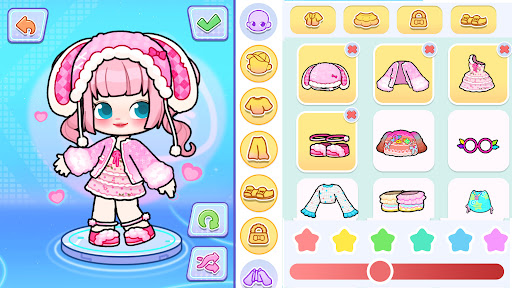
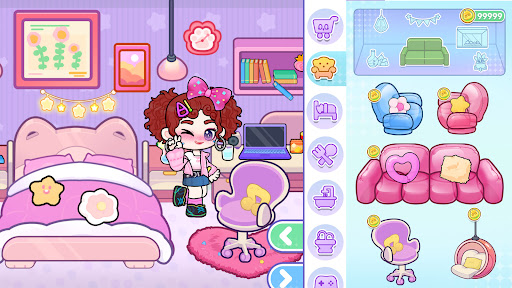
In this fully open world, you can create characters, design houses, explore every location, and unlock hidden surprises. Build, discover, upgrade—this is your world.
CREATE UNLIMITED CHARACTERS
Become a doctor, a designer, a celebrity… or anyone you want! Create endless characters and style their hair, outfits, expressions, and actions. Change identities anytime and rewrite the story whenever you feel like it.
No rules. No limits. Just your imagination.
BUILD AND DESIGN YOUR DREAM HOME
Princess house? Modern loft? Seaside villa? Just get creative! With the powerful home design system, you can build the house you want, upgrade furniture, and redesign layouts. Keep exploring to discover rare items and hidden decorations to upgrade your home.
The more you explore, the more surprises you'll find.
EXPLORE AND DISCOVER SECRETS
From the school and hospital to the shopping mall, beauty salon, sunny beach, and pink villa, every location is open to explore. Look closely and you might find hidden coins, unlock secret rooms, or trigger surprise events… Start your own treasure hunt.
Every exploration reveals a new secret.
UNLOCK HOLIDAY EVENTS AND SPECIAL GIFTS
Don't forget to watch for our anniversary and seasonal events! Lots of gifts will be waiting for you, including coins, furniture, outfits, pets, and more. Also keep an eye on special in-game quests. Complete the challenges to unlock exclusive gifts and extra rewards.
You never know when the next surprise will appear!
HERE, YOU'LL HAVE ENDLESS POSSIBILITIES!
Jump into new adventures through role-playing. Explore freely and expand your world. Take on challenges and upgrade your items. Come experience it now!
FEATURES:
- A fully open world to explore;
- Secrets, rooms, and coin hunts;
- Unlimited characters to create;
- Advanced home design system;
- Holiday events and special gifts;
- Free exploration across the entire world;
- New location(s) updated every week;
- Day and night cycle with weather system;
- Safe and friendly game environment;
- Play offline anytime, anywhere.
বেশি দেখান

1. MEmu ইনস্টলার ডাউনলোড করুন এবং সেটআপ শেষ করুন

2. MEmu শুরু করুন তারপর ডেস্কটপে Google Play খুলুন

3. Google Play এ Game World: Life Story খুঁজুন
Install
4. Game World: Life Story ডাউনলোড এবং ইনস্টল করুন
5. ইনস্টল সমাপ্তি শুরু করতে আইকনে ক্লিক করুন

6. MEmu এর সাথে পিসিতে Game World: Life Story খেলা উপভোগ করুন
মেমু প্লে হল সেরা অ্যান্ড্রয়েড এমুলেটর এবং 100 মিলিয়ন মানুষ ইতিমধ্যেই এর দুর্দান্ত অ্যান্ড্রয়েড গেমিং অভিজ্ঞতা উপভোগ করছে। MEmu ভার্চুয়ালাইজেশন প্রযুক্তি আপনাকে আপনার পিসিতে হাজার হাজার অ্যান্ড্রয়েড গেম মসৃণভাবে খেলার ক্ষমতা দেয়, এমনকি সবচেয়ে গ্রাফিক-ইনটেনসিভ গেমগুলিও।
ভালো গ্রাফিক্সের সাথে বড় স্ক্রীন; লম্বা অবধি, ব্যাটারি বা মোবাইল ডাটা'র কোন সীমা ছাড়া।
কীবোর্ড এবং মাউস বা গেমপ্যাডের সুনির্দিষ্ট নিয়ন্ত্রণের জন্য সম্পূর্ণ কীম্যাপিং সমর্থন।
মাল্টি-ইনস্ট্যান্স ম্যানেজারের সাথে একটি পিসিতে একাধিক গেম অ্যাকাউন্ট বা কাজ।
নিম্নলিখিত ধাপগুলোর মাধ্যমে পিসি এ Game World: Life Story খেলুন: