Shroom and Gloom
আপডেট করা হয়েছে
বর্তমান সংস্করণ
অফার করেছে

Shroom and Gloom খেলার জন্য আপনার সমস্ত আবেগের সাথে, আপনার হাত আপনার ফোনের একটি ছোট স্ক্রিনে সীমাবদ্ধ থাকার কথা নয়। একজন পেশাদারের মতো খেলুন এবং কীবোর্ড এবং মাউস দিয়ে আপনার গেমের সম্পূর্ণ নিয়ন্ত্রণ পান। মেমু আপনাকে এমন সমস্ত জিনিস সরবরাহ করে যা আপনি প্রত্যাশা করছেন। ডাউনলোড করুন এবং পিসিতে Shroom and Gloom খেলুন। আপনি যতক্ষণ চান ততক্ষণ খেলুন, ব্যাটারি, মোবাইল ডেটা এবং বিরক্তিকর কলগুলির আর কোনও সীমাবদ্ধতা নেই। একদম নতুন MEmu 9 হল পিসিতে Shroom and Gloom খেলার সেরা পছন্দ। আমাদের দক্ষতার সাথে প্রস্তুত, সূক্ষ্ম প্রিসেট কীম্যাপিং সিস্টেম Shroom and Gloom কে একটি বাস্তব পিসি গেম করে তোলে। MEmu মাল্টি-ইনস্ট্যান্স ম্যানেজার একই ডিভাইসে 2 বা তার বেশি অ্যাকাউন্ট চালানো সম্ভব করে তোলে। এবং সবচেয়ে গুরুত্বপূর্ণ, আমাদের একচেটিয়া ইমুলেশন ইঞ্জিন আপনার পিসির সম্পূর্ণ সম্ভাবনা প্রকাশ করতে পারে, সবকিছুকে মসৃণ করে তুলতে পারে।
বেশি দেখান
MEmu Play দিয়ে পিসিতে Shroom and Gloom ডাউনলোড করুন। বড় স্ক্রিনে এটি উপভোগ করুন। Shroom and Gloom is a first-person, roguelike double-deckbuilder that brings you mobs of monstrous mushrooms and mountains of mega-combos!


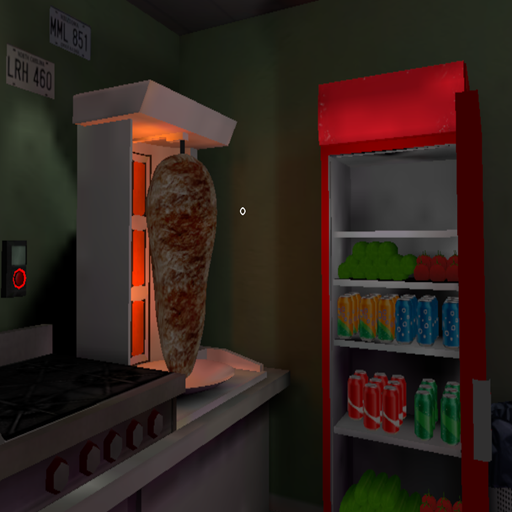
Shroom and Gloom is a first-person, roguelike double-deckbuilder that brings you mobs of monstrous mushrooms and mountains of mega-combos!Unleash hundreds of cards to hack, slash and roast your way through hand drawn dungeons of fungal foes! Build devastating decks, and grow cards into massive abominations as you fight your way into the heart of The Gloom!Double-Deckbuilding!Build 2 distinct decks! Use the combat deck to survive fierce battles! Use the explore deck to navigate dungeons, modify your cards, and unlock new weapons and abilities!Eye-ball melting art!Hand-drawn art and animations collide with dozens of rich 3D spaces, bringing you into a surreal world of mushrooms and madness!Infinite growth and monstrous mega-combos!Shroom and Gloom offers unique ways for players to grow and modify their cards infinitely. Grow low level starting cards into over-powered attacks, or modify rare cards into game-breaking super-weapons!Less blocking, more eating!Why block your enemies when you could eat them instead! Shroom and Gloom features a bounty of ways for you to season, skewer or roast your foes, then eat them to restore lost health. Better yet, throw your roasted enemies into a pot, and cook up some game-changing soups!
বেশি দেখান

1. MEmu ইনস্টলার ডাউনলোড করুন এবং সেটআপ শেষ করুন

2. MEmu শুরু করুন তারপর ডেস্কটপে Google Play খুলুন

3. Google Play এ Shroom and Gloom খুঁজুন
Install
4. Shroom and Gloom ডাউনলোড এবং ইনস্টল করুন
5. ইনস্টল সমাপ্তি শুরু করতে আইকনে ক্লিক করুন

6. MEmu এর সাথে পিসিতে Shroom and Gloom খেলা উপভোগ করুন
মেমু প্লে হল সেরা অ্যান্ড্রয়েড এমুলেটর এবং 100 মিলিয়ন মানুষ ইতিমধ্যেই এর দুর্দান্ত অ্যান্ড্রয়েড গেমিং অভিজ্ঞতা উপভোগ করছে। MEmu ভার্চুয়ালাইজেশন প্রযুক্তি আপনাকে আপনার পিসিতে হাজার হাজার অ্যান্ড্রয়েড গেম মসৃণভাবে খেলার ক্ষমতা দেয়, এমনকি সবচেয়ে গ্রাফিক-ইনটেনসিভ গেমগুলিও।
ভালো গ্রাফিক্সের সাথে বড় স্ক্রীন; লম্বা অবধি, ব্যাটারি বা মোবাইল ডাটা'র কোন সীমা ছাড়া।
কীবোর্ড এবং মাউস বা গেমপ্যাডের সুনির্দিষ্ট নিয়ন্ত্রণের জন্য সম্পূর্ণ কীম্যাপিং সমর্থন।
মাল্টি-ইনস্ট্যান্স ম্যানেজারের সাথে একটি পিসিতে একাধিক গেম অ্যাকাউন্ট বা কাজ।
নিম্নলিখিত ধাপগুলোর মাধ্যমে পিসি এ Shroom and Gloom খেলুন: