AI Video Maker - Renderforest
আপডেট করা হয়েছে
বর্তমান সংস্করণ
3.9.6
অফার করেছে

আপনার মোবাইলে AI Video Maker - Renderforest ব্যবহার করার সময় অতিরিক্ত চার্জ নিয়ে চিন্তা করা বন্ধ করুন, নিজেকে ছোট পর্দা থেকে মুক্ত করুন এবং অনেক বড় ডিসপ্লেতে অ্যাপ ব্যবহার করে উপভোগ করুন। এখন থেকে, কীবোর্ড এবং মাউস দিয়ে আপনার অ্যাপের একটি পূর্ণ-স্ক্রীন অভিজ্ঞতা পান। MEmu আপনাকে সমস্ত আশ্চর্যজনক বৈশিষ্ট্যগুলি অফার করে যা আপনি আশা করেছিলেন: দ্রুত ইনস্টল এবং সহজ সেটআপ, স্বজ্ঞাত নিয়ন্ত্রণ, ব্যাটারির আর কোন সীমাবদ্ধতা নেই, মোবাইল ডেটা এবং বিরক্তিকর কল৷ একদম নতুন MEmu 9 হল আপনার কম্পিউটারে AI Video Maker - Renderforest ব্যবহার করার সেরা পছন্দ। MEmu মাল্টি-ইনস্ট্যান্স ম্যানেজার একই সময়ে 2 বা তার বেশি অ্যাকাউন্ট খোলা সম্ভব করে তোলে। এবং সবচেয়ে গুরুত্বপূর্ণ, আমাদের একচেটিয়া ইমুলেশন ইঞ্জিন আপনার পিসির সম্পূর্ণ সম্ভাবনা প্রকাশ করতে পারে, সবকিছুকে মসৃণ এবং উপভোগ্য করে তুলতে পারে।
বেশি দেখান
Download AI Video Maker - Renderforest on PC with MEmu Android Emulator. Enjoy playing on big screen. Create professional videos in minutes with Renderforest – the all-in-one video maker, editor, and intro maker app.
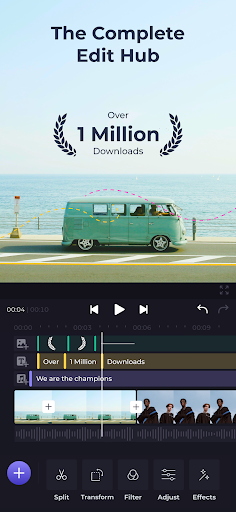
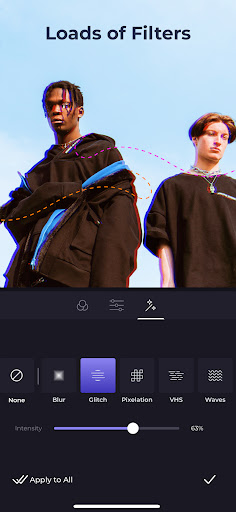
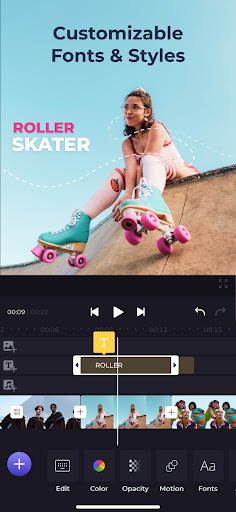

Create professional videos in minutes with Renderforest – the all-in-one video maker, editor, and intro maker app.
Easily edit, trim, and add effects to your videos with just a few taps. Access a massive library of customizable video templates for any occasion or industry. Create stunning intros and outros, visualize your music with eye-catching effects, and combine photos and videos into engaging slideshows. No experience needed – Renderforest makes it easy to bring your creative vision to life.
Create Videos That Wow:
• Intuitive Video Editor: Effortlessly trim, merge, add music, and apply effects with just a few taps.
• Massive Template Library: Explore a vast collection of customizable video templates for any occasion or industry.
• Customizable Everything: Add your own branding, music, text animations, and more to make each video uniquely yours.
• Intro & Outro Maker: Animate your logo in a variety of styles, including minimal, dark, retro, and footage-based, add calls to action, and give your videos a polished look.
• Music Visualizer: Bring your music to life with eye-catching visualizations.
• Slideshow Maker: Merge your images and video clips into a smooth slideshow with the transitions of your choice. Find templates for weddings, birthdays, holidays, travel, business, and more.
• ...and More! Create promo videos, presentations, lyric videos, and so much more.
Perfect for:
• Entrepreneurs & Businesses: Craft eye-catching promotional videos and social media content.
• Content Creators: Level up your YouTube videos, TikTok clips, and Instagram stories.
• Anyone with a story to Tell: Capture memories, create birthday tributes, or simply have fun with video!
Discover the power of Renderforest – the video creation app that puts professional results in your pocket. Download today and start creating!
বেশি দেখান

1. MEmu ইনস্টলার ডাউনলোড করুন এবং সেটআপ শেষ করুন

2. MEmu শুরু করুন তারপর ডেস্কটপে Google Play খুলুন

3. Google Play এ AI Video Maker - Renderforest খুঁজুন
Install
4. AI Video Maker - Renderforest ডাউনলোড এবং ইনস্টল করুন
5. ইনস্টল সমাপ্তি শুরু করতে আইকনে ক্লিক করুন

6. MEmu ব্যবহার করে আপনার কম্পিউটারে AI Video Maker - Renderforest উপভোগ করুন
MEmu Play হল সেরা অ্যান্ড্রয়েড এমুলেটর, যার ১০ কোটিরও বেশি ব্যবহারকারী এর উন্নত অ্যান্ড্রয়েড অ্যাপ অভিজ্ঞতা উপভোগ করছেন। MEmu 9 এর ভার্চুয়ালাইজেশন প্রযুক্তি আপনাকে আপনার কম্পিউটারে হাজার হাজার অ্যান্ড্রয়েড অ্যাপ মসৃণভাবে চালাতে দেয়, এমনকি সবচেয়ে চাহিদাসম্পন্ন অ্যাপগুলিও।
ভালো গ্রাফিক্সের সাথে বড় স্ক্রীন; লম্বা অবধি, ব্যাটারি বা মোবাইল ডাটা'র কোন সীমা ছাড়া।
কীবোর্ড এবং মাউস বা গেমপ্যাডের সুনির্দিষ্ট নিয়ন্ত্রণের জন্য সম্পূর্ণ কীম্যাপিং সমর্থন।
মাল্টি-ইনস্ট্যান্স ম্যানেজারের সাথে একটি পিসিতে একাধিক গেম অ্যাকাউন্ট বা কাজ।
নিম্নলিখিত ধাপগুলোর মাধ্যমে পিসি এ AI Video Maker - Renderforest ব্যবহার করুন: