MapQuest: Get Directions
আপডেট করা হয়েছে
বর্তমান সংস্করণ
10.18.0
অফার করেছে

আপনার মোবাইলে MapQuest: Get Directions ব্যবহার করার সময় অতিরিক্ত চার্জ নিয়ে চিন্তা করা বন্ধ করুন, নিজেকে ছোট পর্দা থেকে মুক্ত করুন এবং অনেক বড় ডিসপ্লেতে অ্যাপ ব্যবহার করে উপভোগ করুন। এখন থেকে, কীবোর্ড এবং মাউস দিয়ে আপনার অ্যাপের একটি পূর্ণ-স্ক্রীন অভিজ্ঞতা পান। MEmu আপনাকে সমস্ত আশ্চর্যজনক বৈশিষ্ট্যগুলি অফার করে যা আপনি আশা করেছিলেন: দ্রুত ইনস্টল এবং সহজ সেটআপ, স্বজ্ঞাত নিয়ন্ত্রণ, ব্যাটারির আর কোন সীমাবদ্ধতা নেই, মোবাইল ডেটা এবং বিরক্তিকর কল৷ একদম নতুন MEmu 9 হল আপনার কম্পিউটারে MapQuest: Get Directions ব্যবহার করার সেরা পছন্দ। MEmu মাল্টি-ইনস্ট্যান্স ম্যানেজার একই সময়ে 2 বা তার বেশি অ্যাকাউন্ট খোলা সম্ভব করে তোলে। এবং সবচেয়ে গুরুত্বপূর্ণ, আমাদের একচেটিয়া ইমুলেশন ইঞ্জিন আপনার পিসির সম্পূর্ণ সম্ভাবনা প্রকাশ করতে পারে, সবকিছুকে মসৃণ এবং উপভোগ্য করে তুলতে পারে।
বেশি দেখান
Download MapQuest: Get Directions on PC with MEmu Android Emulator. Enjoy playing on big screen. MapQuest টার্ন-বাই-টার্ন GPS নেভিগেশন অ্যাপের সাহায্যে যেখানে যেতে হবে সেখানে যান। হাঁটা বা গাড়ি চালানোর জন্য ভয়েস নেভিগেশন ব্যবহার করা হোক বা মানচিত্রে আগ্রহের পয়েন্টগুলি অন্বেষণ করা হোক না কেন, MapQuest-এ আপনার মার্কিন যুক্তরাষ্ট্র এবং কানাডা নেভিগেট করার জন্য প্রয়োজনীয় সরঞ্জাম রয়েছে৷.
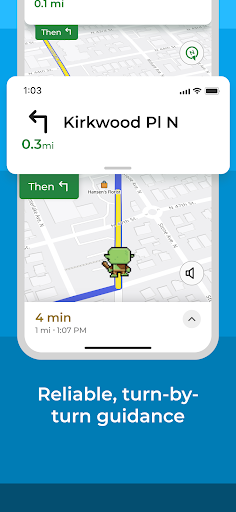
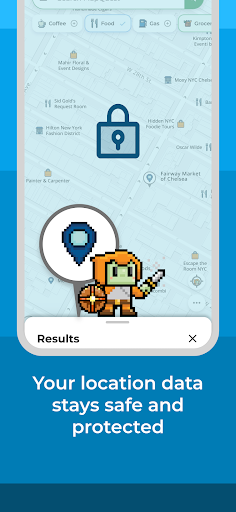
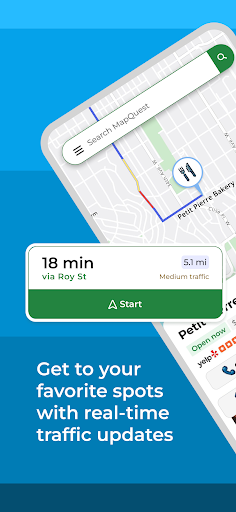
MapQuest টার্ন-বাই-টার্ন GPS নেভিগেশন অ্যাপের সাহায্যে যেখানে যেতে হবে সেখানে যান। হাঁটা বা গাড়ি চালানোর জন্য ভয়েস নেভিগেশন ব্যবহার করা হোক বা মানচিত্রে আগ্রহের পয়েন্টগুলি অন্বেষণ করা হোক না কেন, MapQuest-এ আপনার মার্কিন যুক্তরাষ্ট্র এবং কানাডা নেভিগেট করার জন্য প্রয়োজনীয় সরঞ্জাম রয়েছে৷
মানচিত্র এবং নেভিগেশন বৈশিষ্ট্য:
• আপ-টু-ডেট স্যাটেলাইট ছবি এবং মানচিত্র
• হাঁটা এবং গাড়ি চালানোর দিকনির্দেশের জন্য পালাক্রমে ভয়েস নেভিগেশন
• রিয়েল-টাইম ট্র্যাফিক আপডেটগুলি আপনাকে আপনার গন্তব্যের দ্রুততম উপায়গুলি খুঁজে পেতে সহায়তা করে৷
• আপনার সময়, গ্যাস এবং অর্থ বাঁচাতে সাহায্য করার জন্য অপ্টিমাইজ করা রাউটিং
• একটি স্পিডোমিটার যাতে আপনি আপনার রুটের গতিসীমার সাথে আপনার বর্তমান গতির তুলনা করতে পারেন৷
প্রিয়
• বিকল্প রুট পছন্দ যাতে আপনার যেখানে যেতে হবে সেখানে যাওয়ার জন্য আপনার কাছে একাধিক বিকল্প রয়েছে৷
• রুট সেটিংস যা আপনাকে হাইওয়ে এবং টোল রোডের মতো জিনিসগুলি এড়াতে সাহায্য করে৷
• মাল্টিপয়েন্ট রুট যাতে আপনি শুধুমাত্র একটি স্টপের বেশি অন্তর্ভুক্ত করতে পারেন
• পরিকল্পনা: আপনার বর্তমান অবস্থান ছাড়া অন্য কোথাও থেকে শুরু করে রুট তৈরি করুন
নির্দেশনা পাওয়ার চেয়ে আরও বেশি কিছু করুন:
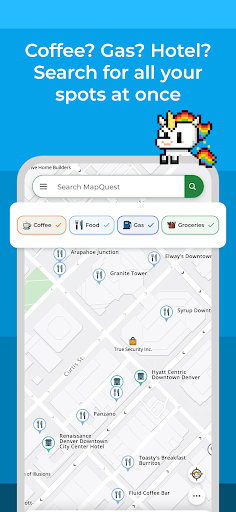
• আমাদের লেয়ার বারের সাথে রেস্টুরেন্ট, বার, গ্যাস স্টেশন এবং হোটেলের মতো কাছাকাছি আগ্রহের পয়েন্টগুলি অনুসন্ধান করুন এবং অন্বেষণ করুন
• চমৎকার হোটেল ডিল খুঁজুন এবং MapQuest এর মাধ্যমে বুক করুন
• আপনার ভেতরের ভোজনরসিকদের খাওয়ান এবং খাওয়ার জন্য নতুন জায়গা আবিষ্কার করুন: মেনু ব্রাউজ করুন, রিজার্ভেশন করুন এবং ওপেনটেবল এবং গ্রুবহাবের আগ্রহের পয়েন্টগুলির মাধ্যমে খাবার অর্ডার করুন
• কাছাকাছি গ্যাস স্টেশনের দাম তুলনা করে অর্থ সাশ্রয় করুন
• স্থানীয় আবহাওয়া দেখুন যাতে আপনি আগাম পরিকল্পনা করতে পারেন
• গাড়ি ভেঙে গেছে? সাহায্যের জন্য সরাসরি অন-ডিমান্ড রাস্তার পাশে সহায়তা অ্যাক্সেস করুন
• আমাদের সংশ্লিষ্ট Android ওয়াচ অ্যাপের মাধ্যমে যেতে যেতে দিকনির্দেশ পান
অনুগ্রহ করে নোট করুন: ব্যাকগ্রাউন্ডে চলমান জিপিএসের ক্রমাগত ব্যবহার ব্যাটারির আয়ু নাটকীয়ভাবে হ্রাস করতে পারে।
বেশি দেখান

1. MEmu ইনস্টলার ডাউনলোড করুন এবং সেটআপ শেষ করুন

2. MEmu শুরু করুন তারপর ডেস্কটপে Google Play খুলুন

3. Google Play এ MapQuest: Get Directions খুঁজুন
Install
4. MapQuest: Get Directions ডাউনলোড এবং ইনস্টল করুন
5. ইনস্টল সমাপ্তি শুরু করতে আইকনে ক্লিক করুন

6. MEmu ব্যবহার করে আপনার কম্পিউটারে MapQuest: Get Directions উপভোগ করুন
MEmu Play হল সেরা অ্যান্ড্রয়েড এমুলেটর, যার ১০ কোটিরও বেশি ব্যবহারকারী এর উন্নত অ্যান্ড্রয়েড অ্যাপ অভিজ্ঞতা উপভোগ করছেন। MEmu 9 এর ভার্চুয়ালাইজেশন প্রযুক্তি আপনাকে আপনার কম্পিউটারে হাজার হাজার অ্যান্ড্রয়েড অ্যাপ মসৃণভাবে চালাতে দেয়, এমনকি সবচেয়ে চাহিদাসম্পন্ন অ্যাপগুলিও।
ভালো গ্রাফিক্সের সাথে বড় স্ক্রীন; লম্বা অবধি, ব্যাটারি বা মোবাইল ডাটা'র কোন সীমা ছাড়া।
কীবোর্ড এবং মাউস বা গেমপ্যাডের সুনির্দিষ্ট নিয়ন্ত্রণের জন্য সম্পূর্ণ কীম্যাপিং সমর্থন।
মাল্টি-ইনস্ট্যান্স ম্যানেজারের সাথে একটি পিসিতে একাধিক গেম অ্যাকাউন্ট বা কাজ।
নিম্নলিখিত ধাপগুলোর মাধ্যমে পিসি এ MapQuest: Get Directions ব্যবহার করুন: