
BinManager: BIN Generator
Ενημερώθηκε
Τρέχουσα έκδοση
2.4.0
Προσφέρεται από

Σταματήστε να ανησυχείτε για υπερβολικές χρεώσεις όταν χρησιμοποιείτε το BinManager: BIN Generator στο κινητό σας, απελευθερώστε τον εαυτό σας από τη μικροσκοπική οθόνη και απολαύστε τη χρήση της εφαρμογής σε μια πολύ μεγαλύτερη οθόνη. Από τώρα και στο εξής, αποκτήστε εμπειρία πλήρους οθόνης της εφαρμογής σας με πληκτρολόγιο και ποντίκι. Το MEmu σας προσφέρει όλες τις εκπληκτικές δυνατότητες που περιμένατε: γρήγορη εγκατάσταση και εύκολη εγκατάσταση, διαισθητικά χειριστήρια, όχι περισσότερους περιορισμούς μπαταρίας, δεδομένα κινητής τηλεφωνίας και ενοχλητικές κλήσεις. Το ολοκαίνουργιο MEmu 9 είναι η καλύτερη επιλογή για χρήση του BinManager: BIN Generator στον υπολογιστή σας. Κωδικοποιημένο με την απορρόφηση μας, ο διαχειριστής πολλαπλών παρουσιών καθιστά δυνατό το άνοιγμα 2 ή περισσότερων λογαριασμών ταυτόχρονα. Και το πιο σημαντικό, ο αποκλειστικός κινητήρας εξομοίωσης μπορεί να απελευθερώσει όλες τις δυνατότητες του υπολογιστή σας, να κάνει τα πάντα ομαλά και ευχάριστα.
Show more
Απολαύστε την υπέροχη εμπειρία αναπαραγωγής του BinManager: BIN Generator σε υπολογιστή με το MEMU Play. Πρόκειται για έναν ισχυρό δωρεάν εξομοιωτή Android που σας επιτρέπει να παίζετε χιλιάδες παιχνίδια Android. BinManager: BIN Generator helps developers, QA engineers, and students prepare safe sandbox data when building or reviewing payment flows.
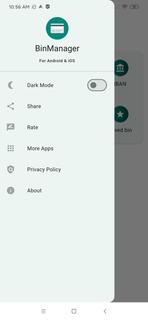
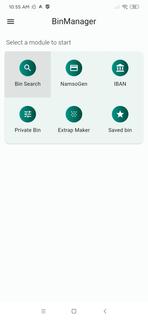
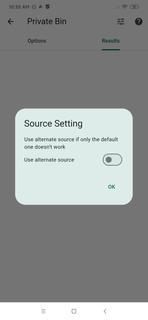
BinManager: BIN Generator helps developers, QA engineers, and students prepare safe sandbox data when building or reviewing payment flows. It focuses on structured identifiers and reference fields so you can run demos, classroom exercises, and staging checks without exposing real cardholder information. Moreover, it avoids live processing and keeps activities within an educational and testing context. For users looking for a reliable toolkit, BinManager: BIN Generator APK supports practical training and controlled QA tasks with simple steps.Features of BinManager: BIN GeneratorNamso Gen style BIN generatorBinManager: BIN Generator lets you create structured test BINs in a Namso Gen style for demos, sandbox sessions, and QA checks. You can quickly prepare sample identifiers that match the expected format for forms and flows. This speeds up test-data preparation while keeping your activity separate from real customer data.IBAN generator and validatorYou can build and verify IBANs to check format and structure for development or classroom use. The validator helps confirm that sample accounts follow standard rules before you move on to integration steps. This saves time during early testing and reduces avoidable format errors.Detailed BIN lookupBinManager: BIN Generator provides issuer, country, card brand, and card type details so you can see how identifiers map to attributes. This helps you verify routing or UI logic that depends on issuer metadata. As a result, you can confirm card classification behavior before testing broader scenarios.Private BIN search and saved setsYou can find specific BINs with a focused search and then save frequently used entries for future sessions. Saved lists help standardize repeated QA work across teammates and test cycles. This keeps your staging runs consistent and easy to reproduce.Form fill helpers for UI checksThe Extrap Maker produces dummy expiry dates and CVV placeholders to populate forms. With these placeholders ready, you can check validation states, error messages, and field behaviors without relying on any live data. It makes interface testing faster and more controlled.Important use notes for BinManager: BIN GeneratorThis app is designed strictly for educational and testing purposes. It does not process real transactions and does not require live cardholder data. Use only in sandbox or classroom environments, follow your organizationâs policies, and comply with local laws. Do not attempt real payments with any data created inside the app.How to use BinManager: BIN Generator on AndroidUse this guide to prepare sample identifiers and form data for sandbox checks. The process keeps your test runs organized from generation to lookup and validation, so you can focus on results. If you plan to download BinManager: BIN Generator, follow these steps after installation.Open the app and choose a task such as Generate BIN, Lookup BIN, or IBAN Tools. This helps you begin in the right section.For BIN generation, enter the required pattern if needed and create your structured test BINs. Then note the outputs you want to reuse.To check issuer details, run a BIN lookup to view bank, country, brand, and card type. Confirm that your interface or routing logic reacts as expected.For IBAN work, create a sample IBAN and validate its format. Adjust inputs until the validator confirms a proper structure.When preparing forms, use the Extrap Maker to add expiry dates and CVV placeholders. Finally, save commonly used BINs to keep future QA sessions consistent.Start testing with BinManager: BIN GeneratorBinManager: BIN Generator supports classroom practice and QA workflows with focused tools for BIN and IBAN data. It helps you simulate flows safely and keep test inputs organized from start to finish. Download BinManager: BIN Generator APK on APKPure to prepare safe test data and organize your workflows.
Show more

1. Κατεβάστε το πρόγραμμα εγκατάστασης MEmu και ολοκληρώστε την εγκατάσταση

2. Ξεκινήστε το MEmu και στη συνέχεια ανοίξτε το Google Play στην επιφάνεια εργασίας

3. Αναζητήστε τον BinManager: BIN Generator στο Google Play
Install
4. Λήψη και εγκατάσταση του BinManager: BIN Generator
5. Μόλις ολοκληρωθεί η εγκατάσταση, κάντε κλικ στο εικονίδιο για να ξεκινήσετε

6. Απολαύστε τη χρήση του BinManager: BIN Generator σε υπολογιστή με το MEmu
Το MEmu Play είναι ο καλύτερος δωρεάν εξομοιωτής Android, που χρησιμοποιείται αυτήν τη στιγμή από πάνω από 50 εκατομμύρια χρήστες που απολαμβάνουν την εμπειρία εφαρμογών που προσφέρει. Μέσω της τεχνολογίας εικονικοποίησης MEmu 9, οι χρήστες μπορούν να δοκιμάσουν εφαρμογές Android στους υπολογιστές τους, ακόμα και σε εκείνους που απαιτούν υψηλή ισχύ επεξεργασίας γραφικών, οι οποίες λειτουργούν ομαλά σαν να λειτουργούν στα κινητά τηλέφωνα τελευταίας γενιάς, χωρίς να θυσιάζεται η ποιότητα της εικόνας και η εμπειρία χρήστη.
Μεγαλύτερη οθόνη με καλύτερα γραφικά. Μεγάλη διάρκεια ζωής, χωρίς περιορισμό μπαταρίας ή δεδομένων κινητής τηλεφωνίας.
Πλήρης υποστήριξη αντιστοίχισης πλήκτρων για ακριβή έλεγχο του πληκτρολογίου και του ποντικιού ή του gamepad.
Πολλαπλοί λογαριασμοί παιχνιδιών ή εργασίες σε έναν υπολογιστή ταυτόχρονα με τον διαχειριστή πολλαπλών περιπτώσεων.
Use BinManager: BIN Generator on PC by following steps: