
BinManager: BIN Generator
Оновлено
Поточна версія
2.4.0
Постачальник

Перестаньте турбуватися про надмірні витрати, використовуючи ххх на своєму мобільному телефоні, звільніться від крихітного екрану і насолоджуйтеся використанням програми на набагато більшому дисплеї. Відтепер отримуйте повний екран свого додатка за допомогою клавіатури та миші. MEmu пропонує вам усі дивовижні функції, які ви очікували: швидка установка та просте налаштування, інтуїтивно зрозумілі елементи керування, більше обмежень від акумулятора, мобільних даних та тривожних дзвінків. Зовсім новий MEmu 9 – найкращий вибір для використання Єдина Школа на вашому комп’ютері. За допомогою нашого поглинання менеджер із кількома примірниками одночасно дозволяє відкрити 2 або більше рахунків. І найголовніше, наш ексклюзивний емуляційний двигун може вивільнити весь потенціал вашого ПК, зробити все гладким і приємним.
Show more
Насолоджуйтесь чудовим досвідом використання BinManager: BIN Generator на ПК за допомогою MEmu Play. Це потужний безкоштовний емулятор Android, який пропонує тисячі програм Android для настільних комп'ютерів. Насолоджуйтесь спілкуванням з друзями та покращенням своєї роботи з більшою ефективністю! BinManager: BIN Generator helps developers, QA engineers, and students prepare safe sandbox data when building or reviewing payment flows.
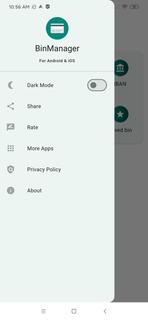

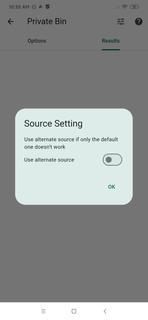

BinManager: BIN Generator helps developers, QA engineers, and students prepare safe sandbox data when building or reviewing payment flows. It focuses on structured identifiers and reference fields so you can run demos, classroom exercises, and staging checks without exposing real cardholder information. Moreover, it avoids live processing and keeps activities within an educational and testing context. For users looking for a reliable toolkit, BinManager: BIN Generator APK supports practical training and controlled QA tasks with simple steps.Features of BinManager: BIN GeneratorNamso Gen style BIN generatorBinManager: BIN Generator lets you create structured test BINs in a Namso Gen style for demos, sandbox sessions, and QA checks. You can quickly prepare sample identifiers that match the expected format for forms and flows. This speeds up test-data preparation while keeping your activity separate from real customer data.IBAN generator and validatorYou can build and verify IBANs to check format and structure for development or classroom use. The validator helps confirm that sample accounts follow standard rules before you move on to integration steps. This saves time during early testing and reduces avoidable format errors.Detailed BIN lookupBinManager: BIN Generator provides issuer, country, card brand, and card type details so you can see how identifiers map to attributes. This helps you verify routing or UI logic that depends on issuer metadata. As a result, you can confirm card classification behavior before testing broader scenarios.Private BIN search and saved setsYou can find specific BINs with a focused search and then save frequently used entries for future sessions. Saved lists help standardize repeated QA work across teammates and test cycles. This keeps your staging runs consistent and easy to reproduce.Form fill helpers for UI checksThe Extrap Maker produces dummy expiry dates and CVV placeholders to populate forms. With these placeholders ready, you can check validation states, error messages, and field behaviors without relying on any live data. It makes interface testing faster and more controlled.Important use notes for BinManager: BIN GeneratorThis app is designed strictly for educational and testing purposes. It does not process real transactions and does not require live cardholder data. Use only in sandbox or classroom environments, follow your organizationâs policies, and comply with local laws. Do not attempt real payments with any data created inside the app.How to use BinManager: BIN Generator on AndroidUse this guide to prepare sample identifiers and form data for sandbox checks. The process keeps your test runs organized from generation to lookup and validation, so you can focus on results. If you plan to download BinManager: BIN Generator, follow these steps after installation.Open the app and choose a task such as Generate BIN, Lookup BIN, or IBAN Tools. This helps you begin in the right section.For BIN generation, enter the required pattern if needed and create your structured test BINs. Then note the outputs you want to reuse.To check issuer details, run a BIN lookup to view bank, country, brand, and card type. Confirm that your interface or routing logic reacts as expected.For IBAN work, create a sample IBAN and validate its format. Adjust inputs until the validator confirms a proper structure.When preparing forms, use the Extrap Maker to add expiry dates and CVV placeholders. Finally, save commonly used BINs to keep future QA sessions consistent.Start testing with BinManager: BIN GeneratorBinManager: BIN Generator supports classroom practice and QA workflows with focused tools for BIN and IBAN data. It helps you simulate flows safely and keep test inputs organized from start to finish. Download BinManager: BIN Generator APK on APKPure to prepare safe test data and organize your workflows.
Show more

1. Download MEmu installer and finish the setup

2. Start MEmu then open Google Play on the desktop

3. Search BinManager: BIN Generator in Google Play
Install
4. Download and Install BinManager: BIN Generator
5. On install completion click the icon to start

6. Enjoy using BinManager: BIN Generator on PC with MEmu
MEmu App Player є кращим безкоштовним емулятором Android, і 50 мільйонів людей вже користуються його чудовим ігровим досвідом Android. Технологія віртуалізації MEmu дає вам змогу відтворювати тисячі ігор Android на вашому комп'ютері, навіть найбільш насичених графікою.
Bigger screen with better graphics; Long duration, without limitation of battery or mobile data.
Full Keymapping support for precise control of keyboard and mouse or gamepad.
Multiple game accounts or tasks on single PC at one time with Multi-Instance manager.
Use BinManager: BIN Generator on PC by following steps: