
Playfy Tv: Livescores
Aktualizováno
Aktuální verze
1.0.0
Od vývojáře

Přestaňte se obávat přebíjení při používání Playfy Tv: Livescores na mobilním telefonu, uvolněte se z malé obrazovky a užívejte si aplikace na mnohem větším displeji. „Společnost MEmu vám nabízí všechny překvapivé funkce, které jste očekávali: rychlá instalace a snadné nastavení, intuitivní ovládání, žádná omezení baterií, mobilní data a rušivá volání. Zcela nový přístroj MEmu 9 je nejlepší volbou použití Playfy Tv: Livescores ve vašem počítači. díky naší absorpci umožňuje správce více instancí otevření 2 nebo více účtů současně. A co je nejdůležitější, náš exkluzivní emulační modul může uvolnit plný potenciál vašeho počítače, učinit vše plynulým a příjemným.
Show more
Užijte si skvělý zážitek z používání Playfy Tv: Livescores u na PC s MEmu Play. Je to výkonný bezplatný emulátor Androidu, který vám nabízí tisíce aplikací pro Android ve verzi pro stolní počítače. Užívejte si spojení s přáteli a vylepšujte svou práci s vyšší efektivitou! Playfy TV: LiveScores is a fast and reliable football app designed for fans who want to stay updated with live scores and match results â½Follow matches in real time, check fixtures, view final results, and explore detailed football information â all in one clean and easy-to-use app.
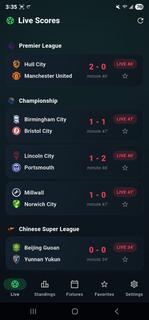

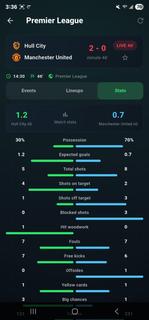
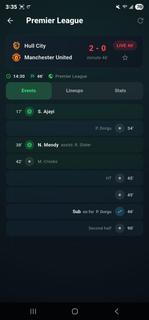
Playfy TV: LiveScores is a fast and reliable football app designed for fans who want to stay updated with live scores and match results â½Follow matches in real time, check fixtures, view final results, and explore detailed football information â all in one clean and easy-to-use app.Playfy TV: LiveScores is an app designed for those who can't get enough of watching live football games. It's easy to navigate and lets you watch all the latest live football matches. The quality of the matches varies depending on your Internet speed; for those with high-speed Internet, matches are streamed in HD, while for those with 3G, the quality is lower.Dive into the world of soccer with PlayFy TV: LiveScores. Get detailed updates and stay connected with the action from your favourite football games, no matter where you are.Whether it's league matches or international tournaments, our app ensures you never miss a moment. Designed to offer seamless usability, it provides accurate scores and match details through a user-friendly interface tailored for all fans.Key Featuresâ½ï¸ Live Score UpdatesGet instant alerts for goals, cards, substitutions, and match highlights.ð In-Depth Match StatsExplore detailed live stats like possession, shots, passes, and more.ð¥ Player LineupsCheck full starting lineups to understand each teamâs match strategy.ðLeague DetailsBrowse schedules, team info, and history from leagues worldwide.ðTables & FixturesTrack standings, past results, and upcoming matches with ease.âï¸ Favorite TeamsFollow your teams closely with personalized updates and notifications.ð¡ Data SourceAll football data, including live scores, fixtures, and results, is provided by trusted public sports data APIs.â ï¸ Disclaimer!!!PlayFy does NOT stream or broadcast live matches.The app provides scores, results, and match information only.All team names, logos, and trademarks belong to their respective owners.ð² Download PlayFy now and never miss a football score again!Disclaimer: This provides football information only and does not endorse any tournaments, teams, or betting activities.
Show more

1. Stáhněte si instalační program MEmu a dokončete instalaci

2. Spusťte MEmu a poté otevřete Google Play na ploše

3. Vyhledejte Playfy Tv: Livescores v Google Play
Install
4. Stáhněte a nainstalujte Playfy Tv: Livescores
5. Po dokončení instalace klikněte na ikonu pro spuštění

6. Užívejte si používání Playfy Tv: Livescores na PC s MEmu
MEmu je bezplatný a vynikající emulátor Androidu s 50 miliony uživatelů, který poskytuje vynikající zážitek z aplikací. Virtualizační technologie MEmu 9 vám umožňuje plynule spouštět aplikace pro Android na vašem počítači, a to i ty nejnáročnější.
Větší obrazovka s lepší grafikou; Dlouhá výdrž bez omezení baterie nebo mobilních dat.
Plná podpora mapování kláves pro přesné ovládání klávesnice a myši nebo gamepadu.
Více herních účtů nebo úkolů na jednom počítači najednou s Multi-Instance Managerem.
Use Playfy Tv: Livescores on PC by following steps: