Playfy Tv: Livescores
Bijgewerkt
Huidige Versie
1.0.0
Aangeboden door

Maak je geen zorgen meer over extra kosten bij het gebruik van Playfy Tv: Livescores op je mobiele telefoon, bevrijd jezelf van het kleine scherm en geniet van het gebruik van de app op een veel groter display. Vanaf nu, krijg een volledige schermervaring van je app met toetsenbord en muis. MEmu biedt je alle verrassende functies die je verwachtte: snelle installatie en eenvoudige configuratie, intuïtieve besturing, geen beperkingen meer van batterij, mobiele data en storende oproepen. De gloednieuwe MEmu 9 is de beste keuze voor het gebruik van Playfy Tv: Livescores op je computer. MEmu multi-instance manager maakt het mogelijk om tegelijkertijd 2 of meer accounts te openen. En het belangrijkste, onze exclusieve emulatiemotor kan het volledige potentieel van je PC benutten, waardoor alles soepel en plezierig wordt.
Meer tonen
Geniet van een fantastische ervaring met Playfy Tv: Livescores op je pc met MEmu Play. Het is een krachtige gratis Android-emulator die je duizenden Android-apps biedt voor de desktopversie. Geniet van contact met vrienden en verbeter je werk met hogere efficiëntie! Playfy TV: LiveScores is a fast and reliable football app designed for fans who want to stay updated with live scores and match results â½Follow matches in real time, check fixtures, view final results, and explore detailed football information â all in one clean and easy-to-use app.
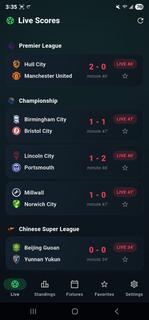

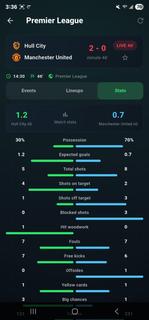
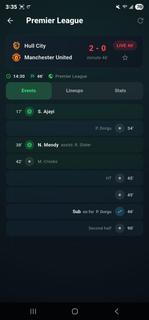
Playfy TV: LiveScores is a fast and reliable football app designed for fans who want to stay updated with live scores and match results â½Follow matches in real time, check fixtures, view final results, and explore detailed football information â all in one clean and easy-to-use app.Playfy TV: LiveScores is an app designed for those who can't get enough of watching live football games. It's easy to navigate and lets you watch all the latest live football matches. The quality of the matches varies depending on your Internet speed; for those with high-speed Internet, matches are streamed in HD, while for those with 3G, the quality is lower.Dive into the world of soccer with PlayFy TV: LiveScores. Get detailed updates and stay connected with the action from your favourite football games, no matter where you are.Whether it's league matches or international tournaments, our app ensures you never miss a moment. Designed to offer seamless usability, it provides accurate scores and match details through a user-friendly interface tailored for all fans.Key Featuresâ½ï¸ Live Score UpdatesGet instant alerts for goals, cards, substitutions, and match highlights.ð In-Depth Match StatsExplore detailed live stats like possession, shots, passes, and more.ð¥ Player LineupsCheck full starting lineups to understand each teamâs match strategy.ðLeague DetailsBrowse schedules, team info, and history from leagues worldwide.ðTables & FixturesTrack standings, past results, and upcoming matches with ease.âï¸ Favorite TeamsFollow your teams closely with personalized updates and notifications.ð¡ Data SourceAll football data, including live scores, fixtures, and results, is provided by trusted public sports data APIs.â ï¸ Disclaimer!!!PlayFy does NOT stream or broadcast live matches.The app provides scores, results, and match information only.All team names, logos, and trademarks belong to their respective owners.ð² Download PlayFy now and never miss a football score again!Disclaimer: This provides football information only and does not endorse any tournaments, teams, or betting activities.
Meer tonen

1. Download de MEmu-installatie en voltooi de setup

2. Start MEmu en open vervolgens Google Play op het bureaublad

3. Zoek Playfy Tv: Livescores in Google Play
Install
4. Download en installeer Playfy Tv: Livescores
5. Klik op het icoon om te starten na het voltooien van de installatie

6. Ervaar Playfy Tv: Livescores op pc met MEmu
MEmu Play is de beste Android-emulator, met meer dan 100 miljoen gebruikers die genieten van de superieure Android-app-ervaring. Dankzij de virtualisatietechnologie van MEmu kun je duizenden Android-apps soepel op je computer draaien, zelfs de meest veeleisende.
Groter scherm met betere graphics; Lange duur, zonder beperking van batterij of mobiele data.
Volledige Keymapping-ondersteuning voor nauwkeurige besturing van toetsenbord en muis of gamepad.
Meerdere game-accounts of taken op één PC tegelijk met Multi-Instance manager.
Gebruik Playfy Tv: Livescores op PC door de volgende stappen te volgen: