
Playfy Tv: Livescores
更新日
現在のバージョン
1.0.0
提供元

スマートフォンは不要!パソコンと同じようにキーボードとマウスで操作できます。MEmu Playは、あなたが待ち望んでいたすべての楽しみをお届けします。バッテリー残量や小さな画面を気にすることなく、Playfy Tv: Livescoresをご利用ください。最新のMEmu 9は、Playfy Tv: LivescoresをPCで体験するのに最適です!完璧なキーマッピングシステムにより、PCのようなスムーズな操作性を実現します。マルチインスタンス機能により、複数のアプリケーションを同時に実行できます。独自の仮想化エンジンがPCのパフォーマンスを最大限に引き出します。アプリを使用するだけでなく、高品質な体験を得ることができます。
もっと見る
MEmu Playを使えば、PCでPlayfy Tv: Livescoresを快適に楽しめます。何千ものAndroidアプリをデスクトップ版で利用できる、パワフルな無料Androidエミュレーターです。友達とつながり、より効率的に作品を磨き上げましょう! Playfy TV: LiveScores is a fast and reliable football app designed for fans who want to stay updated with live scores and match results â½Follow matches in real time, check fixtures, view final results, and explore detailed football information â all in one clean and easy-to-use app.
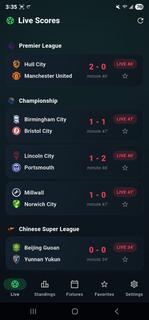

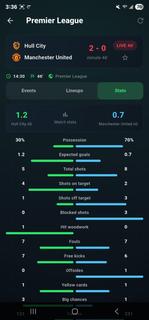
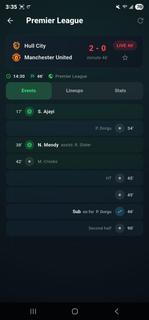
Playfy TV: LiveScores is a fast and reliable football app designed for fans who want to stay updated with live scores and match results â½Follow matches in real time, check fixtures, view final results, and explore detailed football information â all in one clean and easy-to-use app.Playfy TV: LiveScores is an app designed for those who can't get enough of watching live football games. It's easy to navigate and lets you watch all the latest live football matches. The quality of the matches varies depending on your Internet speed; for those with high-speed Internet, matches are streamed in HD, while for those with 3G, the quality is lower.Dive into the world of soccer with PlayFy TV: LiveScores. Get detailed updates and stay connected with the action from your favourite football games, no matter where you are.Whether it's league matches or international tournaments, our app ensures you never miss a moment. Designed to offer seamless usability, it provides accurate scores and match details through a user-friendly interface tailored for all fans.Key Featuresâ½ï¸ Live Score UpdatesGet instant alerts for goals, cards, substitutions, and match highlights.ð In-Depth Match StatsExplore detailed live stats like possession, shots, passes, and more.ð¥ Player LineupsCheck full starting lineups to understand each teamâs match strategy.ðLeague DetailsBrowse schedules, team info, and history from leagues worldwide.ðTables & FixturesTrack standings, past results, and upcoming matches with ease.âï¸ Favorite TeamsFollow your teams closely with personalized updates and notifications.ð¡ Data SourceAll football data, including live scores, fixtures, and results, is provided by trusted public sports data APIs.â ï¸ Disclaimer!!!PlayFy does NOT stream or broadcast live matches.The app provides scores, results, and match information only.All team names, logos, and trademarks belong to their respective owners.ð² Download PlayFy now and never miss a football score again!Disclaimer: This provides football information only and does not endorse any tournaments, teams, or betting activities.
もっと見る

1. MEmuインストーラーをダウンロードしてセットアップを完了する

2. MEmuを起動し、デスクトップでのPlayストアを開く

3. PlayストアでPlayfy Tv: Livescoresを検索する
Install
4. Playfy Tv: Livescoresをダウンロードしてインストールする
5. インストールが完了したら、アイコンをクリックしてスタート

6. MEmuを使ってパソコンでPlayfy Tv: Livescoresを体験する
MEmu Playは現在、最高の無料Androidエミュレーターであり、5,000万人のユーザーが優れたAndroidアプリ体験を楽しんでいます。MEmuの仮想化テクノロジーにより、数千ものAndroidアプリをコンピューターでスムーズに実行できます。
大画面でより精細;無限の待機、電池とドラフィックの極限を超え
キーボード・マウス・コントローラーを全力でサポート、より快適
マルチインスタンスで複数のゲームを同時に実行
Use Playfy Tv: Livescores on PC by following steps: