
LOVE ETERNAL
Aktualisiert
Aktuelle Version
Angeboten von

Bei all Ihrer Leidenschaft für das Spielen von LOVE ETERNAL sollten Ihre Hände nicht auf einen winzigen Bildschirm Ihres Telefons beschränkt sein. Spielen Sie wie ein Profi und übernehmen Sie die volle Kontrolle über Ihr Spiel mit Tastatur und Maus. MEmu bietet Ihnen all die Dinge, die Sie erwarten. Laden Sie LOVE ETERNAL herunter und spielen Sie es auf dem PC. Spielen Sie so lange, wie Sie wollen, ohne Grenzwerte für Akku, mobile Daten und störende Anrufe. Das brandneue MEmu 9 ist die beste Wahl, um LOVE ETERNAL auf dem PC zu spielen. Das exquisite voreingestellte Tastaturbelegungssystem, das mit unserem Fachwissen vorbereitet wurde, macht LOVE ETERNAL zu einem echten PC-Spiel. Der MEmu Multi-Instanz-Manager ermöglicht das Spielen von 2 oder mehr Konten auf demselben Gerät. Und das Wichtigste: Unsere exklusive Emulations-Engine kann das volle Potenzial Ihres PCs freisetzen und für reibungslose Abläufe sorgen.
Mehr anzeigen
Laden Sie Play LOVE ETERNAL auf dem PC mit MEmu Android Emulator. Viel Spaß beim Spielen auf großmundieren. LOVE ETERNAL is a psychological horror platformer that plunges players into a haunting castle constructed from bitter memories.
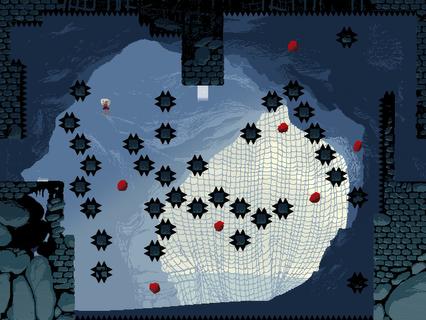
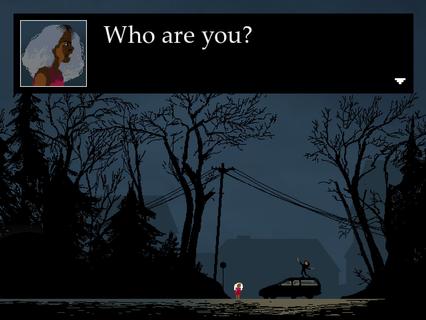
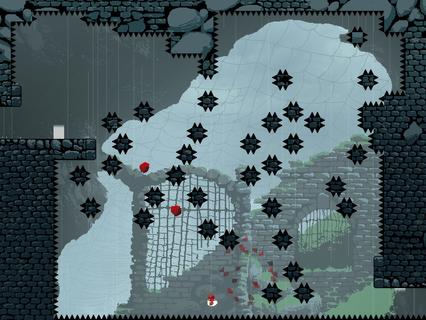

LOVE ETERNAL is a psychological horror platformer that plunges players into a haunting castle constructed from bitter memories. The game masterfully blends challenging platforming mechanics with an unsettling, experimental narrative that explores themes of trauma, family, and existential dread. Players take on the role of a young protagonist named Rona, who finds herself trapped within this eerie fortress, a place known as Shelter, where the past’s painful echoes manifest as both physical obstacles and psychological trials. The gameplay in LOVE ETERNAL draws inspiration from classic platformers like Celeste, featuring precise, gravity-defying jumps and a fluid movement system that requires timing and skill. However, unlike traditional platformers focused solely on skill, LOVE ETERNAL integrates its gameplay tightly with its narrative. The castle’s architecture and the challenges within it symbolize Rona’s internal struggles and fragmented memories, creating a deeply immersive experience where story and mechanics are inseparable. One of the game’s standout features is its gravity-flipping mechanic, which allows players to invert the direction of gravity to navigate through complex levels filled with spikes, traps, and other hazards. This mechanic not only adds a fresh layer of puzzle-solving but also reinforces the game’s themes of instability and disorientation, mirroring Rona’s mental state as she confronts her past. The narrative unfolds in a non-linear and experimental fashion, often eschewing traditional exposition for cryptic imagery, fragmented dialogue, and surreal encounters. As players progress, they piece together Rona’s story and the dark secrets behind the castle and her family. The atmosphere is thick with tension and melancholy, enhanced by a haunting soundtrack and minimalist pixel art that evokes both nostalgia and unease. LOVE ETERNAL challenges players not only with its demanding platforming but also with its emotional depth. The game explores difficult topics such as familial conflict, loss, and the struggle for self-acceptance, all wrapped in a mysterious and eerie setting. This combination of psychological horror and platforming creates a unique experience that lingers long after the game is over. With multiple checkpoints scattered throughout levels, LOVE ETERNAL balances difficulty with accessibility, encouraging players to persist through its tough trials without excessive frustration. The game’s design invites repeated playthroughs, as uncovering all the narrative fragments and secrets requires careful exploration and attention to detail. In summary, LOVE ETERNAL offers a compelling blend of challenging platform gameplay and a haunting psychological story. Its innovative use of gravity mechanics, combined with an evocative narrative and atmospheric presentation, makes it a standout title for fans of both horror and platformers. Players who enjoy games that push the boundaries of storytelling and gameplay will find LOVE ETERNAL a memorable and thought-provoking journey into the depths of memory and trauma.
Mehr anzeigen

1. Laden das MEmu-Installationsprogramm herunter und beenden die Installation

2. MEmu starten und Google Play auf der Homepage öffnen

3. Suchen LOVE ETERNAL in Google Play
Install
4. Herunterladen und Installieren LOVE ETERNAL
5. Klicken nach Abschluss der Installation auf das Symbol, um es zu starten

6. Viel Spaß beim Spielen von LOVE ETERNAL auf dem PC mit MEmu
MEmu App Player ist der beste kostenlose Android-Emulator und 50 Millionen Menschen genießen bereits seine hervorragende Android-Gaming-Erfahrung. Mit der MEmu-Virtualisierungstechnologie können Sie Tausende von Android-Spielen problemlos auf Ihrem PC spielen, selbst bei grafikintensiven Spielen.
BGrößeres Bild mit besserer Grafik; Keine unterbrechungen, keine sorgen um Akku
Komplette Tastenbelegung unterstützt mit Maus und Tastatur oder Controller
Mit dem „Multi-Instance-Manager“ können Sie mehrere Spielkonten oder Spiele gleichzeitig auf einem PC ausführen.
Play LOVE ETERNAL on PC by following steps: