One Guy, All Girls: Idle RPG
Aktualisiert
Aktuelle Version
1.0.27003
Angeboten von

Bei all Ihrer Leidenschaft für das Spielen von One Guy, All Girls: Idle RPG sollten Ihre Hände nicht auf einen winzigen Bildschirm Ihres Telefons beschränkt sein. Spielen Sie wie ein Profi und übernehmen Sie die volle Kontrolle über Ihr Spiel mit Tastatur und Maus. MEmu bietet Ihnen all die Dinge, die Sie erwarten. Laden Sie One Guy, All Girls: Idle RPG herunter und spielen Sie es auf dem PC. Spielen Sie so lange, wie Sie wollen, ohne Grenzwerte für Akku, mobile Daten und störende Anrufe. Das brandneue MEmu 9 ist die beste Wahl, um One Guy, All Girls: Idle RPG auf dem PC zu spielen. Das exquisite voreingestellte Tastaturbelegungssystem, das mit unserem Fachwissen vorbereitet wurde, macht One Guy, All Girls: Idle RPG zu einem echten PC-Spiel. Der MEmu Multi-Instanz-Manager ermöglicht das Spielen von 2 oder mehr Konten auf demselben Gerät. Und das Wichtigste: Unsere exklusive Emulations-Engine kann das volle Potenzial Ihres PCs freisetzen und für reibungslose Abläufe sorgen.
Mehr anzeigen
Laden Sie Play One Guy, All Girls: Idle RPG auf dem PC mit MEmu Android Emulator. Viel Spaß beim Spielen auf großmundieren. Me, becoming a girl?



Me, becoming a girl?
One day, I, an ordinary guy, was pulled into a strange place.
When I opened my eyes, the world looked like reality... but monsters roam around.
And somehow, I had become a woman and enrolled in a women's university?!
Campus life at Luna Women's University, a bizarre place with only girls, where students fight monsters!
Can I ever go back to my original world?
...Or maybe life at an all-girls college isn't so bad?
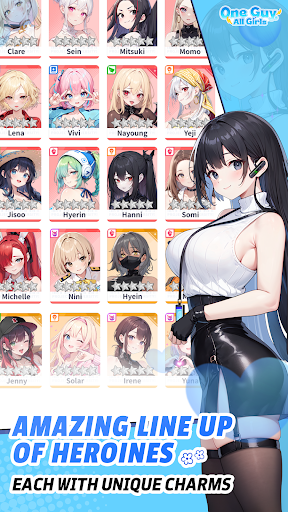
▶Stunning Character Art
Unique students with different personalities, tastes, and majors.
See the students come to life with Live2D!
▶ Charming SD Battles with the Campus Girls
Each character fights in her own unique style!
Strategically team up characters to battle!
▶Endless Growth & Infinite Stages
Face endless monsters pouring from the Dimensional Gate and grow stronger!
The closer you get to the gate, the more power and equipment you can earn to defeat!
▶Story in Webtoon Format
Follow 'my' journey with the girls in webtoon episodes!
Realistic movements and expressions will make it immersive!
▶Lighthearted When Fun, Serious When It Matters
Friendship, romance, and faction conflicts drive the main story.
Each student has their own traumas, memories, and personal journey, told through individual stories.
Enjoy both the main plot and personal tales as you build your campus life with the students!
▶Various Content to Experience Your Stronger Self
Train together to approach the Dimensional Gate.
Mutant Office with endless stages, Ultimate Trials against powerful monsters, and the Campus Arena to test each other!
Push your limits, train hard, and become an outstanding student!
Mehr anzeigen

1. Laden das MEmu-Installationsprogramm herunter und beenden die Installation

2. MEmu starten und Google Play auf der Homepage öffnen

3. Suchen One Guy, All Girls: Idle RPG in Google Play
Install
4. Herunterladen und Installieren One Guy, All Girls: Idle RPG
5. Klicken nach Abschluss der Installation auf das Symbol, um es zu starten

6. Viel Spaß beim Spielen von One Guy, All Girls: Idle RPG auf dem PC mit MEmu
MEmu App Player ist der beste kostenlose Android-Emulator und 50 Millionen Menschen genießen bereits seine hervorragende Android-Gaming-Erfahrung. Mit der MEmu-Virtualisierungstechnologie können Sie Tausende von Android-Spielen problemlos auf Ihrem PC spielen, selbst bei grafikintensiven Spielen.
BGrößeres Bild mit besserer Grafik; Keine unterbrechungen, keine sorgen um Akku
Komplette Tastenbelegung unterstützt mit Maus und Tastatur oder Controller
Mit dem „Multi-Instance-Manager“ können Sie mehrere Spielkonten oder Spiele gleichzeitig auf einem PC ausführen.
Play One Guy, All Girls: Idle RPG on PC by following steps: