
One Guy, All Girls: Idle RPG
Updated
Current Version
1.0.27003
Offered By

With your passion for One Guy, All Girls: Idle RPG, you shouldn’t have to limit yourself to the small screen of a phone. Play like a pro and take full control of the game using a keyboard and mouse. MEmu gives you everything you’re looking for. Download and play One Guy, All Girls: Idle RPG on PC. Play as long as you want — no more worries about battery life, mobile data, or unexpected calls. The all-new MEmu 9 is the best way to play One Guy, All Girls: Idle RPG on PC. With our expertly designed keymapping system, One Guy, All Girls: Idle RPG feels just like a real PC game. The MEmu multi-instance manager lets you run two or more accounts on the same device at the same time. Most importantly, our exclusive emulation engine unlocks your PC’s full potential, delivering smooth and seamless performance.
Show more
Download One Guy, All Girls: Idle RPG on PC with MEmu Android Emulator. Enjoy playing on big screen. Me, becoming a girl?



Me, becoming a girl?
One day, I, an ordinary guy, was pulled into a strange place.
When I opened my eyes, the world looked like reality... but monsters roam around.
And somehow, I had become a woman and enrolled in a women's university?!
Campus life at Luna Women's University, a bizarre place with only girls, where students fight monsters!
Can I ever go back to my original world?
...Or maybe life at an all-girls college isn't so bad?
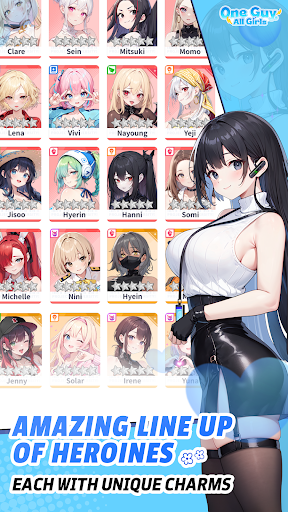
▶Stunning Character Art
Unique students with different personalities, tastes, and majors.
See the students come to life with Live2D!
▶ Charming SD Battles with the Campus Girls
Each character fights in her own unique style!
Strategically team up characters to battle!
▶Endless Growth & Infinite Stages
Face endless monsters pouring from the Dimensional Gate and grow stronger!
The closer you get to the gate, the more power and equipment you can earn to defeat!
▶Story in Webtoon Format
Follow 'my' journey with the girls in webtoon episodes!
Realistic movements and expressions will make it immersive!
▶Lighthearted When Fun, Serious When It Matters
Friendship, romance, and faction conflicts drive the main story.
Each student has their own traumas, memories, and personal journey, told through individual stories.
Enjoy both the main plot and personal tales as you build your campus life with the students!
▶Various Content to Experience Your Stronger Self
Train together to approach the Dimensional Gate.
Mutant Office with endless stages, Ultimate Trials against powerful monsters, and the Campus Arena to test each other!
Push your limits, train hard, and become an outstanding student!
Show more

1. Download MEmu installer and finish the setup

2. Start MEmu then open Google Play on the desktop

3. Search One Guy, All Girls: Idle RPG in Google Play
Install
4. Download and Install One Guy, All Girls: Idle RPG
5. On install completion click the icon to start

6. Enjoy playing One Guy, All Girls: Idle RPG on PC with MEmu
MEmu Play is the best Android emulator and 100 million people already enjoy its superb Android gaming experience. The MEmu virtualization technology empowers you to play thousands of Android games smoothly on your PC, even the most graphic-intensive ones.
Bigger screen with better graphics; Long duration, without limitation of battery or mobile data.
Full Keymapping support for precise control of keyboard and mouse or gamepad.
Multiple game accounts or tasks on single PC at one time with Multi-Instance manager.
Play One Guy, All Girls: Idle RPG on PC by following steps: