River City Survivors: Downtown of the Dead
Aktualisiert
Aktuelle Version
Angeboten von

Bei all Ihrer Leidenschaft für das Spielen von River City Survivors: Downtown of the Dead sollten Ihre Hände nicht auf einen winzigen Bildschirm Ihres Telefons beschränkt sein. Spielen Sie wie ein Profi und übernehmen Sie die volle Kontrolle über Ihr Spiel mit Tastatur und Maus. MEmu bietet Ihnen all die Dinge, die Sie erwarten. Laden Sie River City Survivors: Downtown of the Dead herunter und spielen Sie es auf dem PC. Spielen Sie so lange, wie Sie wollen, ohne Grenzwerte für Akku, mobile Daten und störende Anrufe. Das brandneue MEmu 9 ist die beste Wahl, um River City Survivors: Downtown of the Dead auf dem PC zu spielen. Das exquisite voreingestellte Tastaturbelegungssystem, das mit unserem Fachwissen vorbereitet wurde, macht River City Survivors: Downtown of the Dead zu einem echten PC-Spiel. Der MEmu Multi-Instanz-Manager ermöglicht das Spielen von 2 oder mehr Konten auf demselben Gerät. Und das Wichtigste: Unsere exklusive Emulations-Engine kann das volle Potenzial Ihres PCs freisetzen und für reibungslose Abläufe sorgen.
Mehr anzeigen
Laden Sie Play River City Survivors: Downtown of the Dead auf dem PC mit MEmu Android Emulator. Viel Spaß beim Spielen auf großmundieren. The classic River City series takes on a new survival-action style in this zombie-filled adventure.
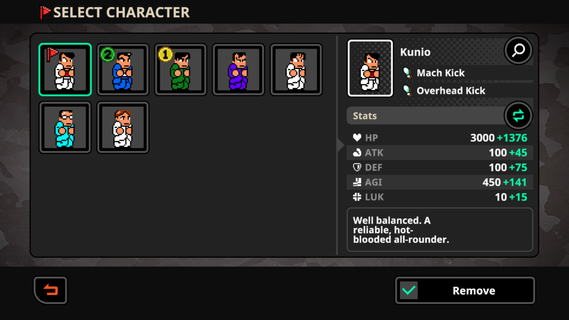
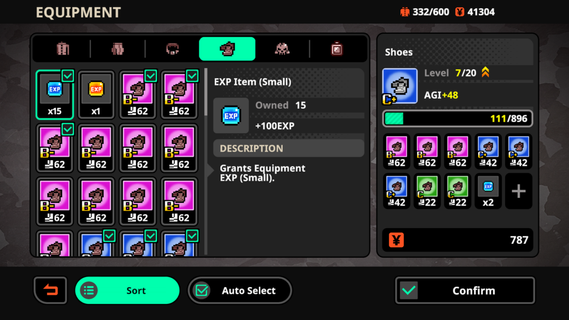
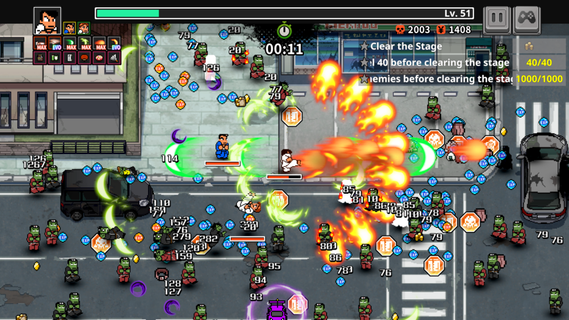
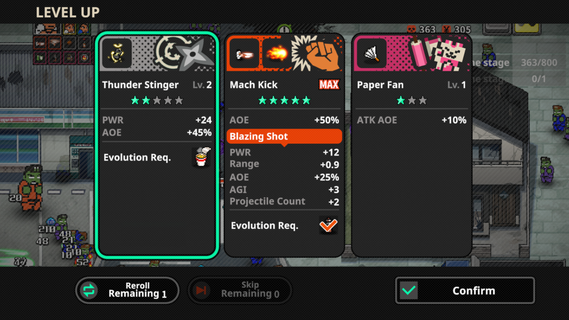
The classic River City series takes on a new survival-action style in this zombie-filled adventure. Fight through waves of undead enemies, move freely across the battlefield, and use powerful skills to survive increasingly intense encounters.StoryAfter watching a zombie movie on their way home, Hiroshi suddenly tells Kunio that real zombies have appeared. As Kunio and his friends fight their way through the city, they soon discover that the outbreak may be hiding a much bigger mystery.Key Features- Evolve Powerful Special MovesDefeat zombies to earn EXP and level up during each run. As your character grows stronger, classic Special Moves can evolve into more powerful versions with improved effects and devastating attacks.- Build a Different Setup Every RunLevel-up upgrades are randomly generated, giving each session a different progression path. Combine melee attacks, projectiles, and stat boosts to create builds that match your preferred fighting style.- Collect Gear and Improve Your StatsEquip items across six gear slots, including School Jacket, Baggy Trousers, Belt, Button, Lining Button, and Accessory. Equipment can permanently improve your stats, while random bonus effects add more variety to the gear-collecting system.- Play as 20+ CharactersMore than 20 playable characters can be unlocked as you progress, including familiar faces such as Kunio and Riki. Each character comes with different stats and abilities, allowing you to experiment with various playstyles.- Fight Alongside AI AlliesBring up to two AI-controlled companions into battle and build a team that suits your strategy. Equip your allies with useful gear and work together to survive the growing zombie outbreak.
Mehr anzeigen

1. Laden das MEmu-Installationsprogramm herunter und beenden die Installation

2. MEmu starten und Google Play auf der Homepage öffnen

3. Suchen River City Survivors: Downtown of the Dead in Google Play
Install
4. Herunterladen und Installieren River City Survivors: Downtown of the Dead
5. Klicken nach Abschluss der Installation auf das Symbol, um es zu starten

6. Viel Spaß beim Spielen von River City Survivors: Downtown of the Dead auf dem PC mit MEmu
MEmu App Player ist der beste kostenlose Android-Emulator und 50 Millionen Menschen genießen bereits seine hervorragende Android-Gaming-Erfahrung. Mit der MEmu-Virtualisierungstechnologie können Sie Tausende von Android-Spielen problemlos auf Ihrem PC spielen, selbst bei grafikintensiven Spielen.
BGrößeres Bild mit besserer Grafik; Keine unterbrechungen, keine sorgen um Akku
Komplette Tastenbelegung unterstützt mit Maus und Tastatur oder Controller
Mit dem „Multi-Instance-Manager“ können Sie mehrere Spielkonten oder Spiele gleichzeitig auf einem PC ausführen.
Play River City Survivors: Downtown of the Dead on PC by following steps: