MiniMed™ Mobile US
Aktualisiert
Aktuelle Version
2.7.0
Angeboten von

Machen Sie sich keine Sorgen mehr über überhöhte Gebühren, wenn Sie MiniMed™ Mobile US auf Ihrem Mobiltelefon verwenden, befreien Sie sich von dem winzigen Bildschirm und genießen Sie die Nutzung der App auf einem viel größeren Display. Von nun an können Sie Ihre App mit Tastatur und Maus im Vollbildmodus nutzen. MEmu bietet Ihnen all die überraschenden Funktionen, die Sie erwartet haben: schnelle Installation und einfache Einrichtung, intuitive Steuerung, keine Einschränkungen mehr durch Batterie, mobile Daten und störende Anrufe. Der brandneue MEmu 9 ist die beste Wahl für die Nutzung von MiniMed™ Mobile US auf Ihrem Computer. Mit unserer Absorption kodiert, ermöglicht der Multi-Instanz-Manager die Eröffnung von 2 oder mehr Konten zur gleichen Zeit. Und das Wichtigste, unsere exklusive Emulations-Engine kann das volle Potenzial Ihres PCs freisetzen und alles reibungslos und angenehm gestalten.
Mehr anzeigen
Laden Sie Play MiniMed™ Mobile US auf dem PC mit MEmu Android Emulator. Viel Spaß beim Spielen auf großmundieren. With the MiniMed™ Mobile app, you can view key insulin pump and CGM data right on your smartphone.
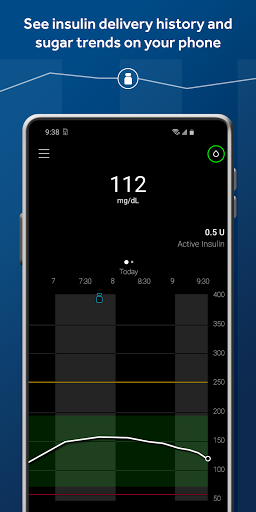
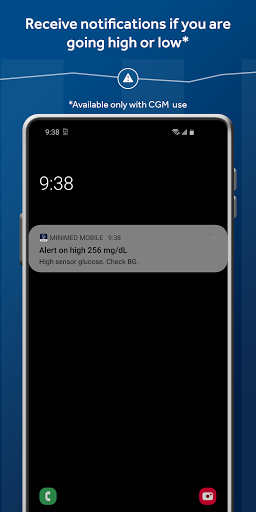
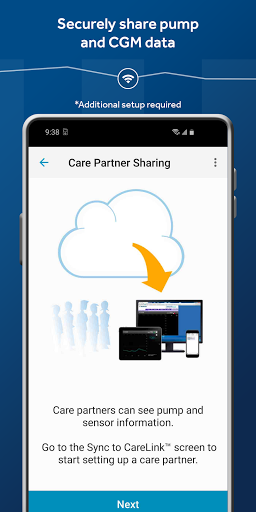
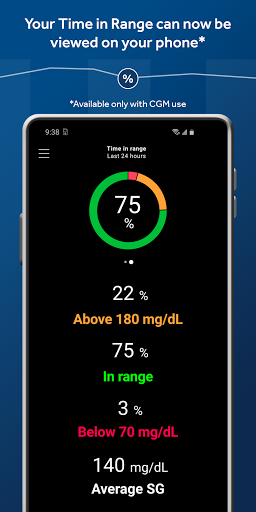
With the MiniMed™ Mobile app, you can view key insulin pump and CGM data right on your smartphone. This can help you better understand your glucose levels and review your history and easily see how your levels are trending.
Automatic data uploads to CareLink™ software make sharing your data with care partners easier than ever.
IMPORTANT: This app will only work with a MiniMed™ 700-series insulin pump systems, which was specifically designed to communicate wirelessly with compatible smart devices. To find a list of compatible devices, please visit medtronicdiabetes.com/device-compatibility. The MiniMed™ Mobile app will not work with other MiniMed™ or Paradigm™ insulin pumps. To learn more about the MiniMed™ Mobile app, visit medtronicdiabetes.com. The system is for type 1 ages 7 and over. Prescription required. WARNING: Do not use SmartGuard™ feature for people who require less than 8 units or more than 250 units of insulin/day. See bit.ly/780gRisks
The MiniMed™ Mobile app is intended to provide a secondary display for a compatible MiniMed™ insulin pump system on a suitable consumer electronic device for passive monitoring and to sync data to CareLink™ system. The MiniMed™ Mobile app is not intended to replace the real-time display of continuous glucose monitoring or insulin pump data on the primary display device (i.e., the insulin pump). All therapy decisions should be based on the primary display device.
The MiniMed™ Mobile app is not intended to analyze or modify the continuous glucose monitoring data or insulin pump data that it receives. Nor is it intended to control any function of the connected continuous glucose monitoring system or insulin pump. The MiniMed™ Mobile app is not intended to receive information directly from the sensor or transmitter of a continuous glucose monitoring system.
This app store should not be used as your first point of contact to resolve technical or customer services issues. In order to protect your privacy and personal information, and promptly resolve any technical or customer services issues you are having with any Medtronic product, please contact your local Medtronic support line.
Medtronic may be required to actively contact customers regarding complaints related to products. If Medtronic determines that your comment or complaint requires follow-up, a Medtronic team member will attempt to contact you to collect more information.
©2023 Medtronic. All rights reserved. Medtronic, Medtronic logo and Engineering the extraordinary are trademarks of Medtronic. Third party brands are trademarks of their respective owners. All other brands are trademarks of a Medtronic company.
Mehr anzeigen

1. Laden das MEmu-Installationsprogramm herunter und beenden die Installation

2. MEmu starten und Google Play auf der Homepage öffnen

3. Suchen MiniMed™ Mobile US in Google Play
Install
4. Herunterladen und Installieren MiniMed™ Mobile US
5. Klicken nach Abschluss der Installation auf das Symbol, um es zu starten

6. Verwenden Sie MEmu, um MiniMed™ Mobile US auf Ihrem PC zu nutzen
MEmu Play ist aktuell der beste kostenlose Android-Emulator und bietet 50 Millionen Nutzern ein überragendes Android-App-Erlebnis. Dank der Virtualisierungstechnologie von MEmu können Sie Tausende von Android-Apps problemlos auf Ihrem Computer nutzen, selbst solche mit hohen Grafikanforderungen.
BGrößeres Bild mit besserer Grafik; Keine unterbrechungen, keine sorgen um Akku
Komplette Tastenbelegung unterstützt mit Maus und Tastatur oder Controller
Mit dem „Multi-Instance-Manager“ können Sie mehrere Spielkonten oder Spiele gleichzeitig auf einem PC ausführen.
Use MiniMed™ Mobile US on PC by following steps: