edjing Mix - DJ Musik Mixer
Aktualisiert
Aktuelle Version
7.33.00
Angeboten von

Machen Sie sich keine Sorgen mehr über überhöhte Gebühren, wenn Sie edjing Mix - DJ Musik Mixer auf Ihrem Mobiltelefon verwenden, befreien Sie sich von dem winzigen Bildschirm und genießen Sie die Nutzung der App auf einem viel größeren Display. Von nun an können Sie Ihre App mit Tastatur und Maus im Vollbildmodus nutzen. MEmu bietet Ihnen all die überraschenden Funktionen, die Sie erwartet haben: schnelle Installation und einfache Einrichtung, intuitive Steuerung, keine Einschränkungen mehr durch Batterie, mobile Daten und störende Anrufe. Der brandneue MEmu 9 ist die beste Wahl für die Nutzung von edjing Mix - DJ Musik Mixer auf Ihrem Computer. Mit unserer Absorption kodiert, ermöglicht der Multi-Instanz-Manager die Eröffnung von 2 oder mehr Konten zur gleichen Zeit. Und das Wichtigste, unsere exklusive Emulations-Engine kann das volle Potenzial Ihres PCs freisetzen und alles reibungslos und angenehm gestalten.
Mehr anzeigen
Genieße edjing Mix - DJ Musik Mixer auf deinem PC mit MEmu Play in einer fantastischen Version. Dieser leistungsstarke, kostenlose Android-Emulator bietet dir Zugriff auf Tausende von Android-Apps für deinen Desktop. Bleib mit Freunden in Kontakt und arbeite effizienter! Wir präsentieren edjing Mix – die brandneue Version der bekanntesten DJ-App – jetzt überarbeitet, um eine noch performantere Leistung zu garantieren.
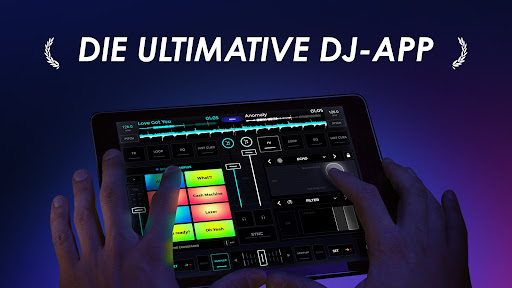
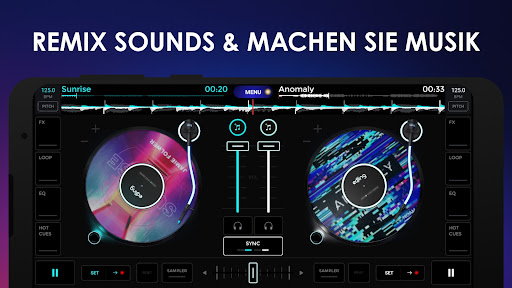
Wir präsentieren edjing Mix – die brandneue Version der bekanntesten DJ-App – jetzt überarbeitet, um eine noch performantere Leistung zu garantieren.
edjing Mix wurde in Zusammenarbeit mit Profi-DJs entwickelt, verwandelt Ihr Gerät in ein echtes DJ-Setup und bietet unbegrenzte kreative Freiheit. Diese App verschiebt die Grenzen dessen, was für DJs auf Mobilgeräten möglich ist.
Greifen Sie auf Millionen an Tracks von SoundCloud und aus all Ihren lokalen Ordnern zu und erstellen Sie im Handumdrehen Remixes mit mehr als 20 DJ-Effekten und -Funktionen. Ganz zu schweigen vom brandneuen Sampler und der Hardware-Integration, die die Möglichkeiten des mobilen DJings sogar noch einmal erweitern.
* ‘edjing Mix offers the same capability of a pro DJ software except with the convenience of being on a device that fits in a pocket.’ - DJ Tech Tools
* 'A super portable digital setup' - DJ Worx
Remix +50 million tracks
- Music library (access to all your local music)
- Soundcloud integration (requires a Soundcloud premium account)
- create multisource playlists with songs from both your local and streaming sources
- smart search feature that displays results for all your music sources on the same screen
- queue system to prepare the upcoming songs
- advanced sorting: browse by alphabetical order, BPM, or Time
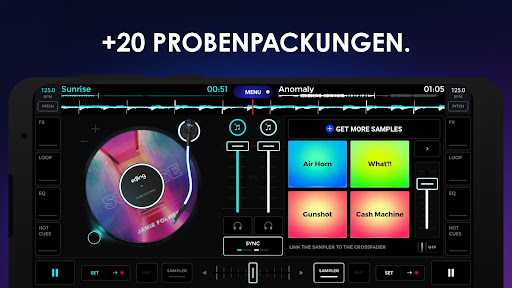
A new major feature: the sampler
- access 16 free samples: siren, gunshot, kick, snare...
- possibility to link the sampler to the crossfader to cut the pads' samples sound depending on your crossfader's position.
- +20 sample Packs (EDM, Hip-Hop, dubstep...), created by Pro DJs, in partnership with Future Loops
All the must-have DJ tools
- automatic BPM detection for all your songs
- Tap BPM to manually adjust the BPM of your tracks
- continuous sync between your tracks
- little audio spectrum to navigate in your music
- wide audio spectrum for optimised beats detection
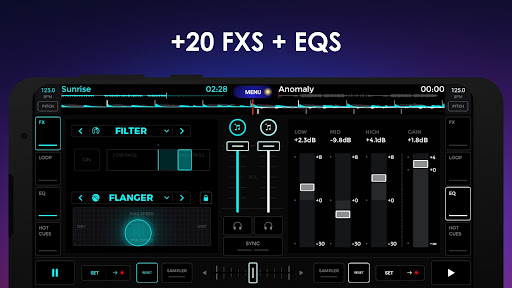
- pro audio FX: Echo, Flanger, Reverse, Filter
- audio FX expansion (in-app purchase): Roll, Roll Filter, Steel, Gate, Double Beat, Phaser, Color Noise, Beatgrid, Band pass, Band stop, Reverb
- automated audio FX sync on the BPM (loop, cue, seek)
- loops: from 1/64 to 128, or customizable
- set up to 8 Hot Cues on each deck
- EQ three bands and Gain
- Pre-cueing stereo with headphones (in-app purchase)
- Automix mode to let edjing mix and do seamless transitions between your tracks
- ultra precise scratch
- set the vinyl inertia, and the starting speed of the vinyl
- a 'Slip' mode for Loops and Scratch
- HD recording of your mixes and scratch routines in .wav format
- 4 skins to customize your turntables (in-app purchase): Diamond, Gold, Neon, Metal
Designed by pro DJs
- intuitive interface with direct and quick access to all the essential features
- apply two audio FX at the same time on each deck
- reorder the FX lists to customize the panel as it suits you best
Hardware integration
- control edjing with the best portable fader: Mixfader
(Mixfader requires Bluetooth LE and Android 4.3 onwards)
- compatible with your time coded and standard audio vinyls
- MIDI controller support: Pioneer DDJ-200
Remix songs from your Android Wear
- access your set key information
- sync your songs
- manage 4 DJ effects
About edjing Mix
To keep up-to-date on our latest news, follow us on:
www.edjing.com
Facebook: http://www.facebook.com/edjingApp
Instagram: http://instagram.com/edjingofficial/
Twitter : http://twitter.com/edjing
Contact our Team: support@edjing.com
Mehr anzeigen

1. Laden das MEmu-Installationsprogramm herunter und beenden die Installation

2. MEmu starten und Google Play auf der Homepage öffnen

3. Suchen edjing Mix - DJ Musik Mixer in Google Play
Install
4. Herunterladen und Installieren edjing Mix - DJ Musik Mixer
5. Klicken nach Abschluss der Installation auf das Symbol, um es zu starten

6. Verwenden Sie MEmu, um edjing Mix - DJ Musik Mixer auf Ihrem PC zu nutzen
MEmu Play ist aktuell der beste kostenlose Android-Emulator und bietet 50 Millionen Nutzern ein überragendes Android-App-Erlebnis. Dank der Virtualisierungstechnologie von MEmu können Sie Tausende von Android-Apps problemlos auf Ihrem Computer nutzen, selbst solche mit hohen Grafikanforderungen.
BGrößeres Bild mit besserer Grafik; Keine unterbrechungen, keine sorgen um Akku
Komplette Tastenbelegung unterstützt mit Maus und Tastatur oder Controller
Mit dem „Multi-Instance-Manager“ können Sie mehrere Spielkonten oder Spiele gleichzeitig auf einem PC ausführen.
Use edjing Mix - DJ Musik Mixer on PC by following steps: