Beat Maker Pro - Drum Pad
Aktualisiert
Aktuelle Version
2
Angeboten von

Machen Sie sich keine Sorgen mehr über überhöhte Gebühren, wenn Sie Beat Maker Pro - Drum Pad auf Ihrem Mobiltelefon verwenden, befreien Sie sich von dem winzigen Bildschirm und genießen Sie die Nutzung der App auf einem viel größeren Display. Von nun an können Sie Ihre App mit Tastatur und Maus im Vollbildmodus nutzen. MEmu bietet Ihnen all die überraschenden Funktionen, die Sie erwartet haben: schnelle Installation und einfache Einrichtung, intuitive Steuerung, keine Einschränkungen mehr durch Batterie, mobile Daten und störende Anrufe. Der brandneue MEmu 9 ist die beste Wahl für die Nutzung von Beat Maker Pro - Drum Pad auf Ihrem Computer. Mit unserer Absorption kodiert, ermöglicht der Multi-Instanz-Manager die Eröffnung von 2 oder mehr Konten zur gleichen Zeit. Und das Wichtigste, unsere exklusive Emulations-Engine kann das volle Potenzial Ihres PCs freisetzen und alles reibungslos und angenehm gestalten.
Mehr anzeigen
Laden Sie Play Beat Maker Pro - Drum Pad auf dem PC mit MEmu Android Emulator. Viel Spaß beim Spielen auf großmundieren. Beat Maker Pro is the easiest way to master the art of DJ beat making in no time!
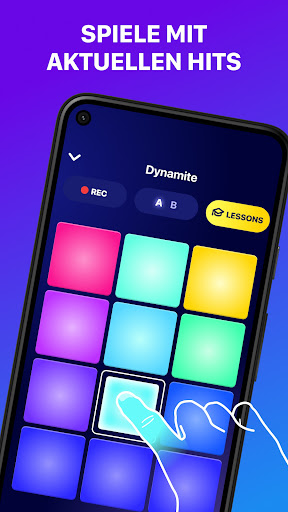
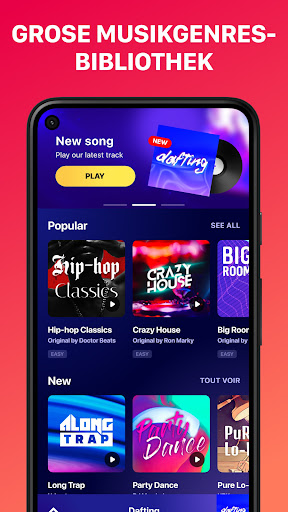
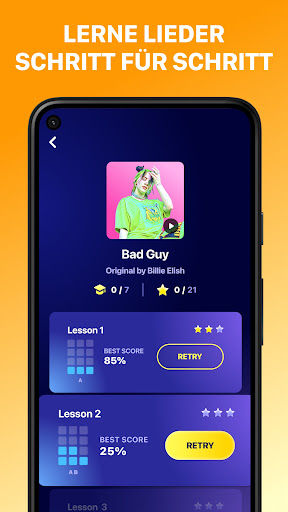
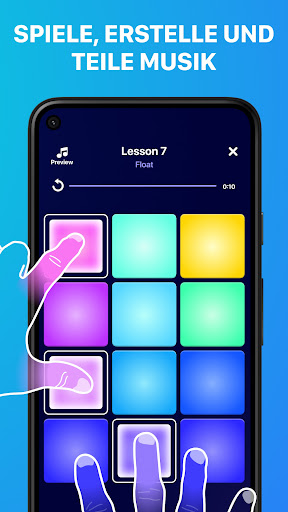
Beat Maker Pro is the easiest way to master the art of DJ beat making in no time!
You're a beats music maker? Meet Beat Maker Pro, your new favorite drum pad app to make music and create beats directly on your device, like a real DJ. Mix loops and record all your melodies with our intuitive pads and launchpad!
**Discover the freedom to make music and create beats**
This pro app will teach you all the secrets to create your own songs on the go and play tracks from all genres (dubstep, trap, EDM...), and also become a beatbox maker.
Beat Maker Pro is a real drum pad machine app very easy to use for everyone. Make super fun production easily! Play with thousands of sounds and get tutorials for quicker learning in this mini studio to remix music beats! And let’s enjoy all the music creation effects.
**What can you do with our amazing DJ mixer app:**
- Simply tap on the pads to create sounds and make music with this cool drum machine
- Like in a pro studio, perfect your skills as music maker and beat maker thanks to tons of lessons to play and learn awesome songs!
- Compose tracks and make beats like a real beatbox maker
- Beat Maker Pro will also help you train your rhythm skills to become a real pro
- The lessons provide a rhythm feedback: the more precise you are the more points you'll get.
- Record and share your musics around the world
- Make sure to learn all songs if you want to be a true beat maker!!
**How does Beat Maker Pro, the best drum pad machine app, work?**
- Whether you are a beginner in music making or a pro beatmaker, you can take beatmaker pro in hand in few minutes
- Enjoy the lessons to increase your level and learn how to use pads with our tutorials
- See a colorful interface with intuitive drum pads
- Increase your beat making skills and create your own sounds!
- Many sound packs are available to create beats
- Do beatboxing easily
MAIN FEATURES: *NEW sound packs added every week as it’s a pro beat maker app *all musical genres are represented: EDM, pop, funk, dubstep, electro...and more to make beats you prefer like in a real studio*colorful drum pads design *rhythm feedback on drum machine*thousands songs with lessons to learn on-the-go *HD studio audio quality *easy-to-use
With Beat Maker Pro no need to play on an expensive drum pad machine to feel like a real DJ, it's like a mini studio in your pocket to remix music anywhere anytime. The app suits both pro beat makers and music lovers thanks to our detailed lessons that will teach you step by step how to play songs.
Have any question or suggestion regarding the app? Our support team is ready to help at support-drumpad@mwmapps.com.
Mehr anzeigen

1. Laden das MEmu-Installationsprogramm herunter und beenden die Installation

2. MEmu starten und Google Play auf der Homepage öffnen

3. Suchen Beat Maker Pro - Drum Pad in Google Play
Install
4. Herunterladen und Installieren Beat Maker Pro - Drum Pad
5. Klicken nach Abschluss der Installation auf das Symbol, um es zu starten

6. Verwenden Sie MEmu, um Beat Maker Pro - Drum Pad auf Ihrem PC zu nutzen
MEmu Play ist aktuell der beste kostenlose Android-Emulator und bietet 50 Millionen Nutzern ein überragendes Android-App-Erlebnis. Dank der Virtualisierungstechnologie von MEmu können Sie Tausende von Android-Apps problemlos auf Ihrem Computer nutzen, selbst solche mit hohen Grafikanforderungen.
BGrößeres Bild mit besserer Grafik; Keine unterbrechungen, keine sorgen um Akku
Komplette Tastenbelegung unterstützt mit Maus und Tastatur oder Controller
Mit dem „Multi-Instance-Manager“ können Sie mehrere Spielkonten oder Spiele gleichzeitig auf einem PC ausführen.
Use Beat Maker Pro - Drum Pad on PC by following steps: