Collage Maker & Photo Editor
Aktualisiert
Aktuelle Version
7.12.1.3
Angeboten von

Machen Sie sich keine Sorgen mehr über überhöhte Gebühren, wenn Sie Collage Maker & Photo Editor auf Ihrem Mobiltelefon verwenden, befreien Sie sich von dem winzigen Bildschirm und genießen Sie die Nutzung der App auf einem viel größeren Display. Von nun an können Sie Ihre App mit Tastatur und Maus im Vollbildmodus nutzen. MEmu bietet Ihnen all die überraschenden Funktionen, die Sie erwartet haben: schnelle Installation und einfache Einrichtung, intuitive Steuerung, keine Einschränkungen mehr durch Batterie, mobile Daten und störende Anrufe. Der brandneue MEmu 9 ist die beste Wahl für die Nutzung von Collage Maker & Photo Editor auf Ihrem Computer. Mit unserer Absorption kodiert, ermöglicht der Multi-Instanz-Manager die Eröffnung von 2 oder mehr Konten zur gleichen Zeit. Und das Wichtigste, unsere exklusive Emulations-Engine kann das volle Potenzial Ihres PCs freisetzen und alles reibungslos und angenehm gestalten.
Mehr anzeigen
Laden Sie Play Collage Maker & Photo Editor auf dem PC mit MEmu Android Emulator. Viel Spaß beim Spielen auf großmundieren. FotoCollage Photo Editor is a powerful and easy-to-use photo collage maker and photo editing app.
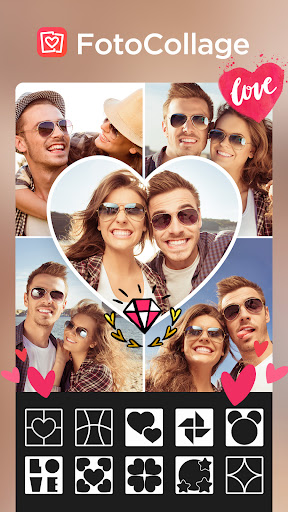
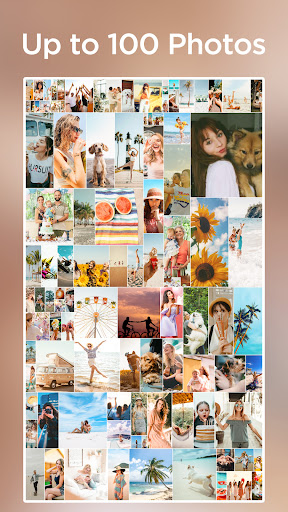

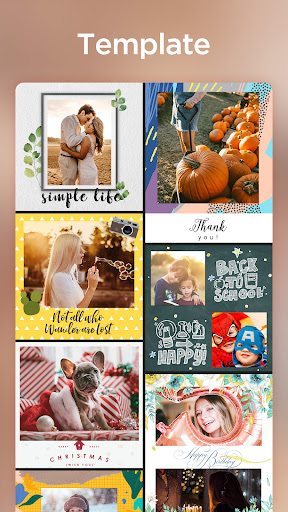
FotoCollage Photo Editor is a powerful and easy-to-use photo collage maker and photo editing app. Just select some images you love and easily arrange them in a perfect layout. Add a variety of backgrounds, text, stickers, and frames to create unique and awesome collages of your own.
FotoCollage will be your favorite Photo Editor.
Key Features:
● Combine photos with amazing layouts into beautiful collages
● Remix up to 100 photos to create stunning layouts and collages
● Change the photo layout, including rounded corners
● Photo editing tools, allowing you to adjust sharpness and shadow
● Create various kinds of backgrounds for your photos, such as blur
● 37 unique photo effects for making a distinctive photo collage
● Stickers, tags, emojis, texts, tens of photo borders and frames
● Rotate, mirror, flip images, drag or swap them, pinch to zoom in or out
● Add emojis and tags to make your photos more stylish
● Transform your pics into art with perfect filters, effects, and photo editing tools
⭐ 500+ layouts
There are over 100 popular design templates in the fascinating pic collage tool. With these templates, you can mix up to 100 images, flexibly create collaged photos, and make a shaped collage, such as a heart or diamond. Show your style with your attractive collages!
⭐ Text
You can enjoy a range of features, including font sizes, colors, gradients, outlines, shadows, spacing, and background edition in a free manner. Insert words anywhere in the collage to record your wonderful mood, share your experience, and make the collaged photos look even better.
⭐ Emoji Stickers
Choose from over 500 funny stickers that can lend a festive touch to your photos. They are regularly updated to stay on trend. Besides, there are a variety of amazing makeup stickers, such as neon, muscle, wing, hair and more. Try adding emojis or makeup stickers to your collage, and see how it can enhance your creation.
⭐ Background & Pattern
You can choose a wide range of cute patterns as backgrounds, such as love, dot, xoxo, texture, and more. You can adjust their opacity, space, size, and angle. Subvert the traditional dull and boring styles with lively backgrounds that make your photos look more sophisticated. You can also add solid color, blur, and gradient color backgrounds to make your collage even more elegant.
⭐ Filter with Advanced Looks
Photo Filter can revolutionize your photos with just one tap. Lots of great filter effects can make people, pets, and food in your pics look perfect. You can also adjust the details of brightness, contrast, and warmth. Try out our filters and see how they can enhance your photos.
⭐ Graffiti Brush
Enjoy FotoCollage with our cool customizable brushes. Doodle on pictures with many different brush types and get surprising effects, including enriched colors and adjustable strokes, such as patterns, solid lines, dotted lines, fluorescent brushes, and decorative brushes.
With FotoCollage photo editor, create your perfect photo collage with a wide variety of layouts, stickers, frames, and backgrounds, and become the focus of attention among friends on TikTok, WhatsApp, Instagram, Facebook, and more. Try it out and have a wonderful time with FotoCollage!
Enjoy making amazing photo collages and editing your photos with the best FotoCollage.
If you have any suggestions, feel free to contact us at connect.fotocollage@outlook.com
Mehr anzeigen

1. Laden das MEmu-Installationsprogramm herunter und beenden die Installation

2. MEmu starten und Google Play auf der Homepage öffnen

3. Suchen Collage Maker & Photo Editor in Google Play
Install
4. Herunterladen und Installieren Collage Maker & Photo Editor
5. Klicken nach Abschluss der Installation auf das Symbol, um es zu starten

6. Verwenden Sie MEmu, um Collage Maker & Photo Editor auf Ihrem PC zu nutzen
MEmu Play ist aktuell der beste kostenlose Android-Emulator und bietet 50 Millionen Nutzern ein überragendes Android-App-Erlebnis. Dank der Virtualisierungstechnologie von MEmu können Sie Tausende von Android-Apps problemlos auf Ihrem Computer nutzen, selbst solche mit hohen Grafikanforderungen.
BGrößeres Bild mit besserer Grafik; Keine unterbrechungen, keine sorgen um Akku
Komplette Tastenbelegung unterstützt mit Maus und Tastatur oder Controller
Mit dem „Multi-Instance-Manager“ können Sie mehrere Spielkonten oder Spiele gleichzeitig auf einem PC ausführen.
Use Collage Maker & Photo Editor on PC by following steps: