Collage Maker & Photo Editor
Actualizada
Versión actual
7.12.1.3
Ofrecida por

Deje de preocuparse por los recargos cuando use Collage Maker & Photo Editor en su teléfono celular, libérese de la pequeña pantalla y disfrute usando la aplicación en una pantalla mucho más grande. A partir de ahora, obtenga una experiencia de pantalla completa de su aplicación con teclado y mouse. MEmu le ofrece todas las características sorprendentes que esperaba: instalación rápida y configuración fácil, controles intuitivos, no más limitaciones de batería, datos móviles y llamadas molestas. El nuevo MEmu 9 es la mejor opción para usar Collage Maker & Photo Editor en su computadora. Codificado con nuestra absorción, el administrador de instancias múltiples hace posible abrir 2 o más cuentas al mismo tiempo. Y lo más importante, nuestro exclusivo motor de emulación puede liberar todo el potencial de su PC, hacer que todo sea fluido y agradable.
Más detalles
Descargar Collage Maker & Photo Editor en PC con MEmu Android Emulador. Disfruta jugando en la pentalla grande. FotoCollage Photo Editor is a powerful and easy-to-use photo collage maker and photo editing app.
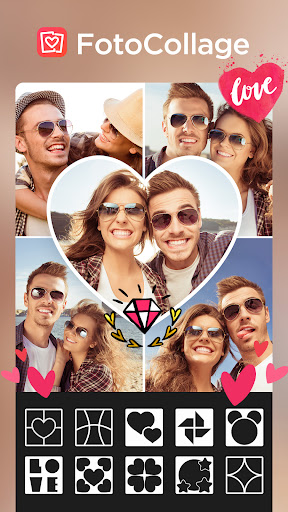

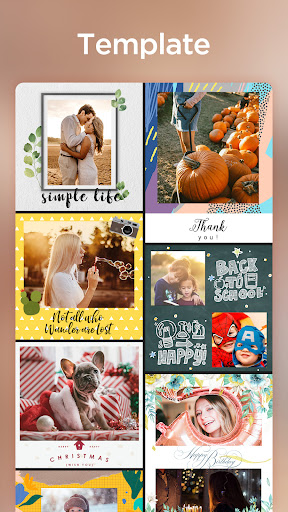
FotoCollage Photo Editor is a powerful and easy-to-use photo collage maker and photo editing app. Just select some images you love and easily arrange them in a perfect layout. Add a variety of backgrounds, text, stickers, and frames to create unique and awesome collages of your own.
FotoCollage will be your favorite Photo Editor.
Key Features:
● Combine photos with amazing layouts into beautiful collages
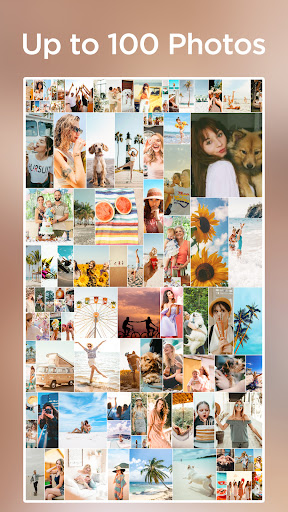
● Remix up to 100 photos to create stunning layouts and collages
● Change the photo layout, including rounded corners
● Photo editing tools, allowing you to adjust sharpness and shadow
● Create various kinds of backgrounds for your photos, such as blur
● 37 unique photo effects for making a distinctive photo collage
● Stickers, tags, emojis, texts, tens of photo borders and frames
● Rotate, mirror, flip images, drag or swap them, pinch to zoom in or out
● Add emojis and tags to make your photos more stylish
● Transform your pics into art with perfect filters, effects, and photo editing tools
⭐ 500+ layouts
There are over 100 popular design templates in the fascinating pic collage tool. With these templates, you can mix up to 100 images, flexibly create collaged photos, and make a shaped collage, such as a heart or diamond. Show your style with your attractive collages!
⭐ Text
You can enjoy a range of features, including font sizes, colors, gradients, outlines, shadows, spacing, and background edition in a free manner. Insert words anywhere in the collage to record your wonderful mood, share your experience, and make the collaged photos look even better.
⭐ Emoji Stickers
Choose from over 500 funny stickers that can lend a festive touch to your photos. They are regularly updated to stay on trend. Besides, there are a variety of amazing makeup stickers, such as neon, muscle, wing, hair and more. Try adding emojis or makeup stickers to your collage, and see how it can enhance your creation.
⭐ Background & Pattern
You can choose a wide range of cute patterns as backgrounds, such as love, dot, xoxo, texture, and more. You can adjust their opacity, space, size, and angle. Subvert the traditional dull and boring styles with lively backgrounds that make your photos look more sophisticated. You can also add solid color, blur, and gradient color backgrounds to make your collage even more elegant.
⭐ Filter with Advanced Looks
Photo Filter can revolutionize your photos with just one tap. Lots of great filter effects can make people, pets, and food in your pics look perfect. You can also adjust the details of brightness, contrast, and warmth. Try out our filters and see how they can enhance your photos.
⭐ Graffiti Brush
Enjoy FotoCollage with our cool customizable brushes. Doodle on pictures with many different brush types and get surprising effects, including enriched colors and adjustable strokes, such as patterns, solid lines, dotted lines, fluorescent brushes, and decorative brushes.
With FotoCollage photo editor, create your perfect photo collage with a wide variety of layouts, stickers, frames, and backgrounds, and become the focus of attention among friends on TikTok, WhatsApp, Instagram, Facebook, and more. Try it out and have a wonderful time with FotoCollage!
Enjoy making amazing photo collages and editing your photos with the best FotoCollage.
If you have any suggestions, feel free to contact us at connect.fotocollage@outlook.com
Más detalles

1. Descargar el instalador de MEmu y finalice la instalación

2. Iniciar MEmu y abrir Google Play en la página de inicio

3. Buscar Collage Maker & Photo Editor en Google Play
Install
4. Descargar y instalar Collage Maker & Photo Editor
5. Hacer click al icono para iniciar

6. Experiencia Collage Maker & Photo Editor en PC con MEmu
MEmu App Player es el mejor emulador de Android gratuito y 50 millones de personas ya están disfrutando su magnífica experiencia de aplicación en Android. La tecnología de virtualización de MEmu te permite jugar a miles de aplicaciones Android suavemente en tu PC, incluso los más intensivos gráficamente.
Pantalla más grande con mejores gráficos; Larga duración, sin limitación de batería o datos móviles.
Soporte completo de keymapping para un control preciso del teclado y el mouse o gamepad.
Múltiples cuentas de juegos o tareas en una sola PC a la vez con el administrador de instancias múltiples.
Use Collage Maker & Photo Editor on PC by following steps: