OBDATA - Auto Repair Manual
Aktualisiert
Aktuelle Version
1.0.4
Angeboten von

Machen Sie sich keine Sorgen mehr über überhöhte Gebühren, wenn Sie OBDATA - Auto Repair Manual auf Ihrem Mobiltelefon verwenden, befreien Sie sich von dem winzigen Bildschirm und genießen Sie die Nutzung der App auf einem viel größeren Display. Von nun an können Sie Ihre App mit Tastatur und Maus im Vollbildmodus nutzen. MEmu bietet Ihnen all die überraschenden Funktionen, die Sie erwartet haben: schnelle Installation und einfache Einrichtung, intuitive Steuerung, keine Einschränkungen mehr durch Batterie, mobile Daten und störende Anrufe. Der brandneue MEmu 9 ist die beste Wahl für die Nutzung von OBDATA - Auto Repair Manual auf Ihrem Computer. Mit unserer Absorption kodiert, ermöglicht der Multi-Instanz-Manager die Eröffnung von 2 oder mehr Konten zur gleichen Zeit. Und das Wichtigste, unsere exklusive Emulations-Engine kann das volle Potenzial Ihres PCs freisetzen und alles reibungslos und angenehm gestalten.
Mehr anzeigen
Genieße OBDATA - Auto Repair Manual auf deinem PC mit MEmu Play in einer fantastischen Version. Dieser leistungsstarke, kostenlose Android-Emulator bietet dir Zugriff auf Tausende von Android-Apps für deinen Desktop. Bleib mit Freunden in Kontakt und arbeite effizienter! Obdata is the ultimate solution for automotive professionals seeking detailed, accurate, and up-to-date vehicle data.
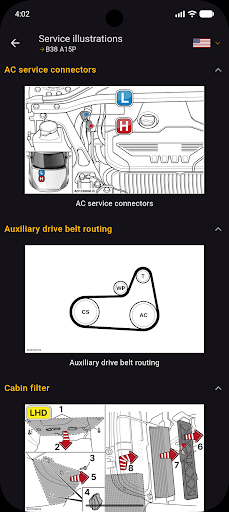
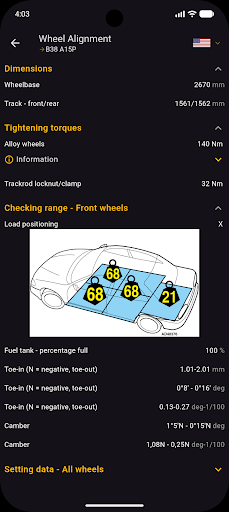
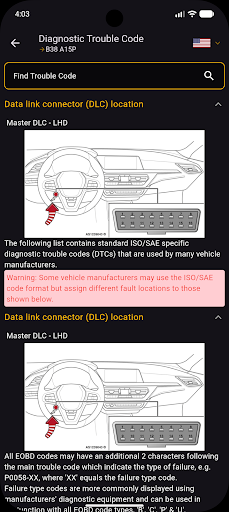
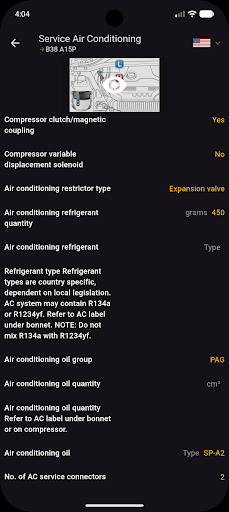
Obdata is the ultimate solution for automotive professionals seeking detailed, accurate, and up-to-date vehicle data. With a vast library covering cars, light commercial vehicles, and motorcycles, Obdata offers a comprehensive suite of tools and information designed to support maintenance, repair, and diagnostics, making it a must-have for any service shop or mechanic.
Obdata’s powerful platform includes a wide range of features that streamline the repair and service process, such as:
Service Transmission
Service Summary
Air Conditioning Service
Powertrain
Engine Management
Camshaft Drive System
Clutches
Chassis
Anti-lock Brake Systems
Wheel Alignment
Tyre Pressures
Tyres
Body & Interior
Airbags
Key Programming
Electrical
Battery Disconnection and Reconnection
Wiring Diagrams
Diagnostic Trouble Codes (DTCs)
VIN Plate Location: Easily find the location of a vehicle’s VIN plate for identification purposes.
Warning Lamps and Symbols: A complete guide to understanding warning lamps and symbols on the dashboard, ensuring prompt action when needed.
Obdata’s platform is trusted by automotive professionals worldwide and is recognized as an essential tool for vehicle servicing and repair. Whether you're working on routine maintenance, advanced diagnostics, or complex repairs, Obdata provides you with the essential data you need to get the job done right. Join thousands of satisfied users who rely on Obdata, HaynesPro, Mitchell ProDemand, and Alldata for the most comprehensive and up-to-date automotive information available.
Key features:
AllData, Haynespro, Workshopdata, AutoData, OBD Data, Gds, Kds, Professional car repair
Comprehensive technical data for cars, commercial vehicles, and motorcycles
Wiring diagrams, diagnostic trouble codes, and repair times
Service schedules, service advisor, and repair procedures
Real-time updates and support for the latest vehicle models
Download Obdata today and enhance your automotive service capabilities!
Mehr anzeigen

1. Laden das MEmu-Installationsprogramm herunter und beenden die Installation

2. MEmu starten und Google Play auf der Homepage öffnen

3. Suchen OBDATA - Auto Repair Manual in Google Play
Install
4. Herunterladen und Installieren OBDATA - Auto Repair Manual
5. Klicken nach Abschluss der Installation auf das Symbol, um es zu starten

6. Verwenden Sie MEmu, um OBDATA - Auto Repair Manual auf Ihrem PC zu nutzen
MEmu Play ist aktuell der beste kostenlose Android-Emulator und bietet 50 Millionen Nutzern ein überragendes Android-App-Erlebnis. Dank der Virtualisierungstechnologie von MEmu können Sie Tausende von Android-Apps problemlos auf Ihrem Computer nutzen, selbst solche mit hohen Grafikanforderungen.
BGrößeres Bild mit besserer Grafik; Keine unterbrechungen, keine sorgen um Akku
Komplette Tastenbelegung unterstützt mit Maus und Tastatur oder Controller
Mit dem „Multi-Instance-Manager“ können Sie mehrere Spielkonten oder Spiele gleichzeitig auf einem PC ausführen.
Use OBDATA - Auto Repair Manual on PC by following steps: