
STIB-MIVB
Aktualisiert
Aktuelle Version
2.9.1
Angeboten von

Machen Sie sich keine Sorgen mehr über überhöhte Gebühren, wenn Sie STIB-MIVB auf Ihrem Mobiltelefon verwenden, befreien Sie sich von dem winzigen Bildschirm und genießen Sie die Nutzung der App auf einem viel größeren Display. Von nun an können Sie Ihre App mit Tastatur und Maus im Vollbildmodus nutzen. MEmu bietet Ihnen all die überraschenden Funktionen, die Sie erwartet haben: schnelle Installation und einfache Einrichtung, intuitive Steuerung, keine Einschränkungen mehr durch Batterie, mobile Daten und störende Anrufe. Der brandneue MEmu 9 ist die beste Wahl für die Nutzung von STIB-MIVB auf Ihrem Computer. Mit unserer Absorption kodiert, ermöglicht der Multi-Instanz-Manager die Eröffnung von 2 oder mehr Konten zur gleichen Zeit. Und das Wichtigste, unsere exklusive Emulations-Engine kann das volle Potenzial Ihres PCs freisetzen und alles reibungslos und angenehm gestalten.
Mehr anzeigen
Laden Sie Play STIB-MIVB auf dem PC mit MEmu Android Emulator. Viel Spaß beim Spielen auf großmundieren. About this app.
About this app
The STIB-MIVB app is all you need to get around Brussels by metro, bus, tram or train. Buy your tickets in just one click and get real-time info.
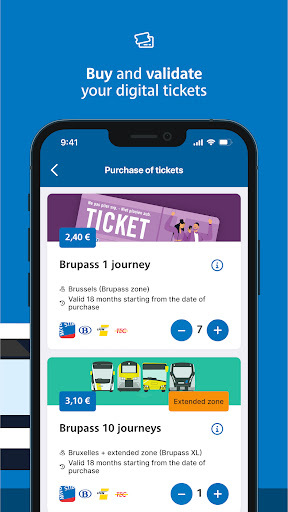
Brupass (XL) tickets at your fingertips
- Your ticket is immediately available on the app. That will save you precious time!
- No need to look for a vending machine, buy your ticket wherever and whenever you want.
- You can purchase Brupass (XL) 1 or 10 journeys via the app. Opt for the 10 journey ticket and save money. This way, you can travel hassle-free at a reduced price!
Real-time info
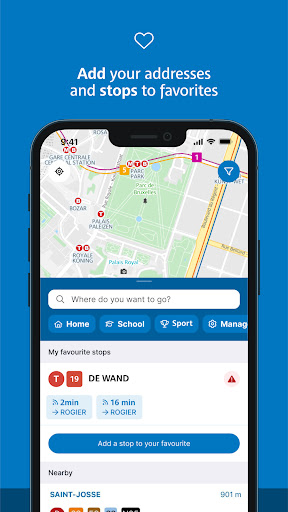
- Keep up to date with the app: you'll find real-time info not only on the STIB-MIVB network, but also on SNCB-NMBS trains and TEC and De Lijn buses.
- Mark your most frequently used lines or stops as favourites to get an updated overview of your usual route.
A personalised route planner
- Plan your journey from A to Z and choose your own departure date and time.
- Make a connection very easily thanks to the STIB-MIVB app. The interactive map also indicates De Lijn, SNCB-NMBS and TEC stops with real-time departure times.
- Are you looking for the shortest route? The one with the fewest connections? Or with the least walking? The app takes your preferences into account.
Content of your MOBIB card
- Want to know how many journeys you have left on your MOBIB card? Connect your card to the app via NFC and you'll find out.
- Whether you have a season ticket or a ticket, you can simply reload your MOBIB card via the app. Please note that it will take at least 24 hours before your ticket or season ticket is available on your MOBIB card.
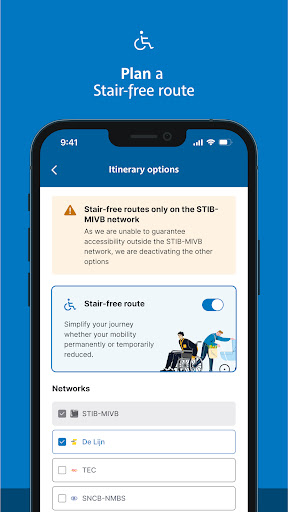
Everyone deserves to travel comfortably
- Need an escalator or lift? Use the ""Info"" tab to see in real time for each station whether all escalators and lifts are working.
- For buses and tram lines 7 and 9, the app tells you the degree to which a stop is accessible.
Download the STIB-MIVB app now and enjoy worry-free travel in and around Brussels!
Mehr anzeigen

1. Laden das MEmu-Installationsprogramm herunter und beenden die Installation

2. MEmu starten und Google Play auf der Homepage öffnen

3. Suchen STIB-MIVB in Google Play
Install
4. Herunterladen und Installieren STIB-MIVB
5. Klicken nach Abschluss der Installation auf das Symbol, um es zu starten

6. Verwenden Sie MEmu, um STIB-MIVB auf Ihrem PC zu nutzen
MEmu Play ist aktuell der beste kostenlose Android-Emulator und bietet 50 Millionen Nutzern ein überragendes Android-App-Erlebnis. Dank der Virtualisierungstechnologie von MEmu können Sie Tausende von Android-Apps problemlos auf Ihrem Computer nutzen, selbst solche mit hohen Grafikanforderungen.
BGrößeres Bild mit besserer Grafik; Keine unterbrechungen, keine sorgen um Akku
Komplette Tastenbelegung unterstützt mit Maus und Tastatur oder Controller
Mit dem „Multi-Instance-Manager“ können Sie mehrere Spielkonten oder Spiele gleichzeitig auf einem PC ausführen.
Use STIB-MIVB on PC by following steps: