Tamasha: Live TV, Movies
Aktualisiert
Aktuelle Version
4.0.4
Angeboten von

Machen Sie sich keine Sorgen mehr über überhöhte Gebühren, wenn Sie Tamasha: Live TV, Movies auf Ihrem Mobiltelefon verwenden, befreien Sie sich von dem winzigen Bildschirm und genießen Sie die Nutzung der App auf einem viel größeren Display. Von nun an können Sie Ihre App mit Tastatur und Maus im Vollbildmodus nutzen. MEmu bietet Ihnen all die überraschenden Funktionen, die Sie erwartet haben: schnelle Installation und einfache Einrichtung, intuitive Steuerung, keine Einschränkungen mehr durch Batterie, mobile Daten und störende Anrufe. Der brandneue MEmu 9 ist die beste Wahl für die Nutzung von Tamasha: Live TV, Movies auf Ihrem Computer. Mit unserer Absorption kodiert, ermöglicht der Multi-Instanz-Manager die Eröffnung von 2 oder mehr Konten zur gleichen Zeit. Und das Wichtigste, unsere exklusive Emulations-Engine kann das volle Potenzial Ihres PCs freisetzen und alles reibungslos und angenehm gestalten.
Mehr anzeigen
Genieße Tamasha: Live TV, Movies auf deinem PC mit MEmu Play in einer fantastischen Version. Dieser leistungsstarke, kostenlose Android-Emulator bietet dir Zugriff auf Tausende von Android-Apps für deinen Desktop. Bleib mit Freunden in Kontakt und arbeite effizienter! Looking to watch live TV channels, sports highlights, entertainment shows, podcasts, and short-form videos online on the go?
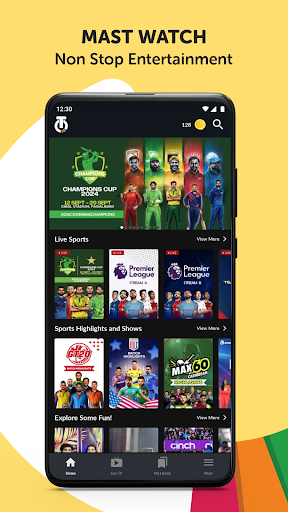
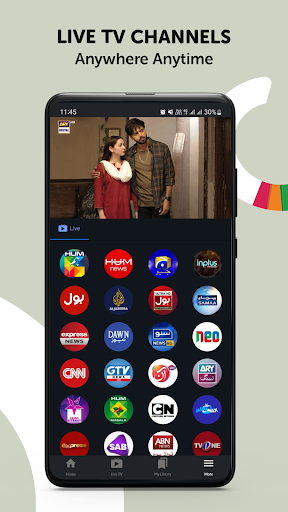
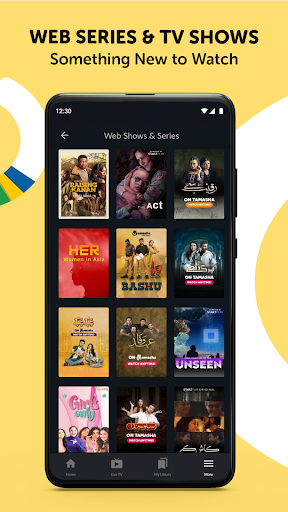
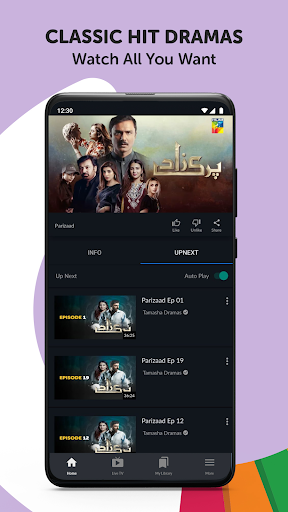
Looking to watch live TV channels, sports highlights, entertainment shows, podcasts, and short-form videos online on the go? Tamasha has all of that and much more. On Tamasha, you can enjoy a wide variety of live TV channels, curated sports content, original digital shows, informative videos, and engaging podcasts all in one seamless streaming experience.
Stream your favorite content on the go with convenience anywhere, anytime. Access content over Wi-Fi as well as mobile data (3G/4G), with a smooth and user-friendly viewing experience designed for all kinds of audiences.
Catalogue of content you can stream on Tamasha:
Live TV Channels:
Enjoy 24/7 live television streaming across news, sports, entertainment, religious, and regional content. Stay connected with global and regional perspectives through trusted networks such as Al Jazeera, DW News, CGTN, PTV Sports, PTV News, and more. From breaking news and sports coverage to cultural and religious programming, Tamasha brings live television together in one place.
Sports Highlights & Shows:
Catch up on the biggest sporting moments with curated highlights, analysis, and sports shows. From international cricket tournaments and franchise leagues to football and other global sporting events, Tamasha delivers key moments and expert insights in an easy-to-watch format.
Entertainment & On-Demand Content:
Explore a growing library of original digital shows, documentaries, interviews, and on-demand videos. Discover stories across culture, lifestyle, education, and entertainment created for modern viewers who want flexible, anytime access.
Podcasts & Talk Shows:
Listen to engaging conversations and thought-provoking discussions across sports, current affairs, lifestyle, technology, and culture. Tamasha brings together creators, experts, and storytellers in one place for meaningful audio-visual content.
Short-Form Video (Tamasha Shots):
Enjoy bite-sized videos featuring highlights, trending moments, sports clips, entertainment content, and user-generated content (UGC), designed for quick and engaging viewing on the go.
Awareness & Informative Content:
Access educational, awareness-driven, and informative content that highlights digital initiatives, social topics, and meaningful stories aimed at informing and inspiring audiences.
That’s not all, here is why you will love Tamasha:
• Hassle-free and quick sign-in process to access content
• 24/7 live TV streaming across multiple categories
• Sports highlights, shows, and global sports coverage
• Podcasts, talk shows, and original digital content
• Short-form videos for quick entertainment on the go
• Easy access to both live and on-demand content in one app
• Smooth streaming experience over Wi-Fi and mobile data
Look no further for your entertainment needs — whether you want live TV, sports highlights, podcasts, or short videos, Tamasha is your all-in-one streaming platform built for global audiences.
Download Tamasha today and start streaming anytime, anywhere.
Mehr anzeigen

1. Laden das MEmu-Installationsprogramm herunter und beenden die Installation

2. MEmu starten und Google Play auf der Homepage öffnen

3. Suchen Tamasha: Live TV, Movies in Google Play
Install
4. Herunterladen und Installieren Tamasha: Live TV, Movies
5. Klicken nach Abschluss der Installation auf das Symbol, um es zu starten

6. Verwenden Sie MEmu, um Tamasha: Live TV, Movies auf Ihrem PC zu nutzen
MEmu Play ist aktuell der beste kostenlose Android-Emulator und bietet 50 Millionen Nutzern ein überragendes Android-App-Erlebnis. Dank der Virtualisierungstechnologie von MEmu können Sie Tausende von Android-Apps problemlos auf Ihrem Computer nutzen, selbst solche mit hohen Grafikanforderungen.
BGrößeres Bild mit besserer Grafik; Keine unterbrechungen, keine sorgen um Akku
Komplette Tastenbelegung unterstützt mit Maus und Tastatur oder Controller
Mit dem „Multi-Instance-Manager“ können Sie mehrere Spielkonten oder Spiele gleichzeitig auf einem PC ausführen.
Use Tamasha: Live TV, Movies on PC by following steps: