Tamasha: Live TV, Movies
อัปเดตเมื่อ
เวอร์ชันปัจจุบัน
4.0.3
ให้บริการโดย

เมื่อใช้ Tamasha: Live TV, Movies บนโทรศัพท์ของคุณไม่ต้องกังวลกับการชาร์จไฟมากเกินไปปลดปล่อยตัวคุณเองจากหน้าจอขนาดเล็กและสนุกกับการใช้แอพนี้บนหน้าจอขนาดใหญ่ จากนี้ไปรับประสบการณ์เต็มหน้าจอของแอปพลิเคชันของคุณด้วยคีย์บอร์ดและเมาส์ MEmu มีคุณสมบัติที่น่าแปลกใจที่คุณคาดหวัง: การติดตั้งที่รวดเร็วและการตั้งค่าที่ง่ายควบคุมได้ง่ายไม่ จำกัด แบตเตอรี่ข้อมูลมือถือและการโทรที่รบกวน MEmu 9 ใหม่ล่าสุดเป็นตัวเลือกที่ดีที่สุดสำหรับการใช้ Meitu – โปรแกรมแก้ไขภาพแนวธรรมชาติ บนคอมพิวเตอร์ของคุณ ด้วยรหัสการดูดซึมของเราผู้จัดการหลายอินสแตนซ์ทำให้สามารถเปิดบัญชี 2 บัญชีขึ้นไปในเวลาเดียวกันได้ และที่สำคัญที่สุดเอ็นจิ้นจำลองพิเศษของเราสามารถปลดปล่อยศักยภาพของPCของคุณและทำให้ทุกอย่างราบรื่นและสนุกสนาน
แสดงเพิ่มเติม
สัมผัสประสบการณ์สุดยอดการใช้งาน Tamasha: Live TV, Movies บนพีซีด้วย MEmu Play นี่คือโปรแกรมจำลอง Android ฟรีที่ทรงพลัง ให้คุณใช้งานแอป Android นับพันบนเดสก์ท็อป สนุกกับการเชื่อมต่อกับเพื่อนๆ และขัดเกลาผลงานของคุณอย่างมีประสิทธิภาพยิ่งขึ้น! Looking to watch live TV channels, sports highlights, entertainment shows, podcasts, and short-form videos online on the go?
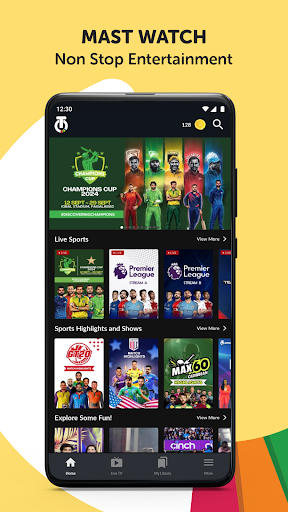
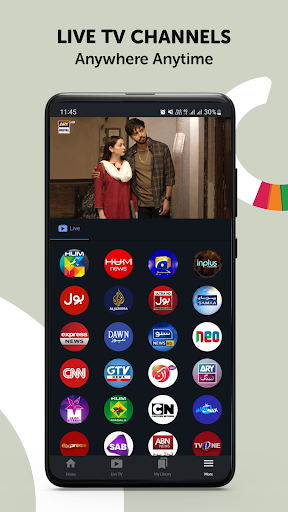
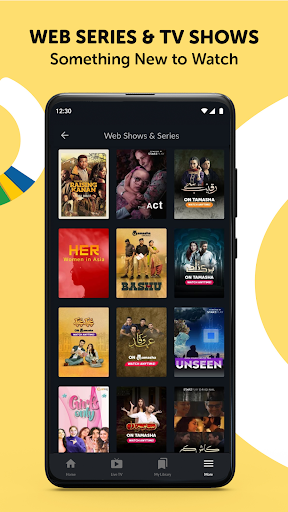
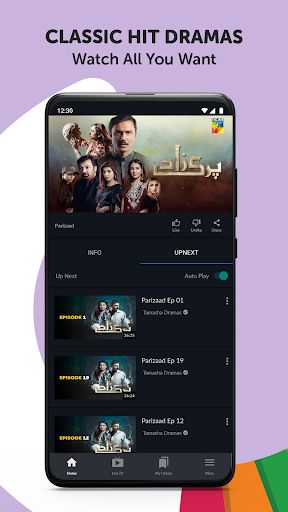
Looking to watch live TV channels, sports highlights, entertainment shows, podcasts, and short-form videos online on the go? Tamasha has all of that and much more. On Tamasha, you can enjoy a wide variety of live TV channels, curated sports content, original digital shows, informative videos, and engaging podcasts all in one seamless streaming experience.
Stream your favorite content on the go with convenience anywhere, anytime. Access content over Wi-Fi as well as mobile data (3G/4G), with a smooth and user-friendly viewing experience designed for all kinds of audiences.
Catalogue of content you can stream on Tamasha:
Live TV Channels:
Enjoy 24/7 live television streaming across news, sports, entertainment, religious, and regional content. Stay connected with global and regional perspectives through trusted networks such as Al Jazeera, DW News, CGTN, PTV Sports, PTV News, and more. From breaking news and sports coverage to cultural and religious programming, Tamasha brings live television together in one place.
Sports Highlights & Shows:
Catch up on the biggest sporting moments with curated highlights, analysis, and sports shows. From international cricket tournaments and franchise leagues to football and other global sporting events, Tamasha delivers key moments and expert insights in an easy-to-watch format.
Entertainment & On-Demand Content:
Explore a growing library of original digital shows, documentaries, interviews, and on-demand videos. Discover stories across culture, lifestyle, education, and entertainment created for modern viewers who want flexible, anytime access.
Podcasts & Talk Shows:
Listen to engaging conversations and thought-provoking discussions across sports, current affairs, lifestyle, technology, and culture. Tamasha brings together creators, experts, and storytellers in one place for meaningful audio-visual content.
Short-Form Video (Tamasha Shots):
Enjoy bite-sized videos featuring highlights, trending moments, sports clips, entertainment content, and user-generated content (UGC), designed for quick and engaging viewing on the go.
Awareness & Informative Content:
Access educational, awareness-driven, and informative content that highlights digital initiatives, social topics, and meaningful stories aimed at informing and inspiring audiences.
That’s not all, here is why you will love Tamasha:
• Hassle-free and quick sign-in process to access content
• 24/7 live TV streaming across multiple categories
• Sports highlights, shows, and global sports coverage
• Podcasts, talk shows, and original digital content
• Short-form videos for quick entertainment on the go
• Easy access to both live and on-demand content in one app
• Smooth streaming experience over Wi-Fi and mobile data
Look no further for your entertainment needs — whether you want live TV, sports highlights, podcasts, or short videos, Tamasha is your all-in-one streaming platform built for global audiences.
Download Tamasha today and start streaming anytime, anywhere.
แสดงเพิ่มเติม

1. ดาวน์โหลดตัวติดตั้ง MEmu และสิ้นสุดการติดตั้ง

2. เริ่ม MEmu จากนั้นเปิด Google Play บนหน้าแรก

3. ค้นหา Tamasha: Live TV, Movies ใน Google Play
Install
4. ดาวน์โหลดและติดตั้ง Tamasha: Live TV, Movies
5. เมื่อติดตั้งเสร็จให้คลิกที่ไอคอนเพื่อเริ่มใช้งาน

6. ใช้ MEmu เพื่อสัมผัสประสบการณ์ Tamasha: Live TV, Movies บนคอมพิวเตอร์ของคุณ
MEmu Play คือโปรแกรมจำลอง Android ที่ดีที่สุด มีผู้ใช้มากกว่า 50 ล้านคน มอบประสบการณ์การใช้งานแอป Android ขั้นสุดยอดให้กับคุณ เทคโนโลยีจำลองเสมือนของ MEmu ช่วยให้คุณรันแอป Android หลายพันแอปบนคอมพิวเตอร์ได้อย่างราบรื่น แม้แอปที่กินทรัพยากรเครื่องสูงที่สุด
จอใหญ่และกราฟฟิกสวยกว่า; เล่นได้นาน, ไม่ต้องใช้แบตเตอรี่โทรศัพท์หรือเน็ตโทรศัพท์.
ระบบปรับแต่งปุ่มคีย์บอร์ดและเม้าส์ตามที่คุณเลือก
เล่นมากกว่าหนึ่งเกมบน PC ในเวลาเดียวกันด้วยระบบหลายจอหรือ Multi-Instance manager.
Use Tamasha: Live TV, Movies on PC by following steps: