
Atome PH - Buy Now Pay Later
Actualizada
Versión actual
2.111.0
Ofrecida por

Deje de preocuparse por los recargos cuando use Atome PH - Buy Now Pay Later en su teléfono celular, libérese de la pequeña pantalla y disfrute usando la aplicación en una pantalla mucho más grande. A partir de ahora, obtenga una experiencia de pantalla completa de su aplicación con teclado y mouse. MEmu le ofrece todas las características sorprendentes que esperaba: instalación rápida y configuración fácil, controles intuitivos, no más limitaciones de batería, datos móviles y llamadas molestas. El nuevo MEmu 9 es la mejor opción para usar Atome PH - Buy Now Pay Later en su computadora. Codificado con nuestra absorción, el administrador de instancias múltiples hace posible abrir 2 o más cuentas al mismo tiempo. Y lo más importante, nuestro exclusivo motor de emulación puede liberar todo el potencial de su PC, hacer que todo sea fluido y agradable.
Más detalles
Descargar Atome PH - Buy Now Pay Later en PC con MEmu Android Emulador. Disfruta jugando en la pentalla grande. Buy now, pay later just got better through Atome's credit and cash loan services.
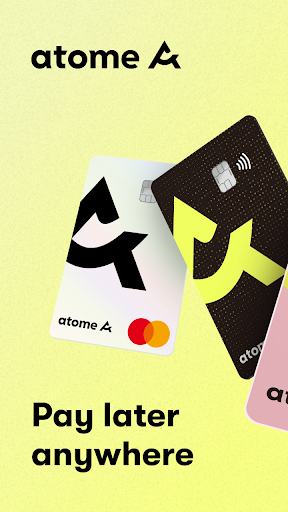
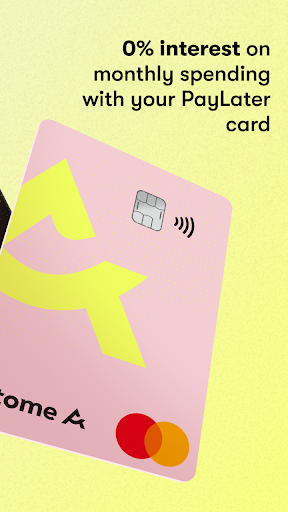
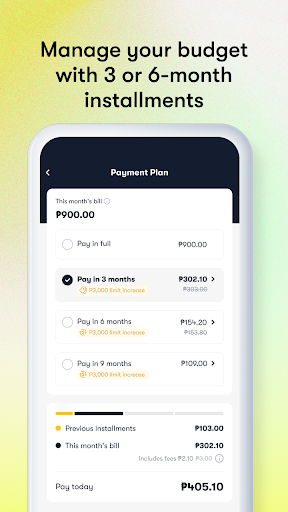
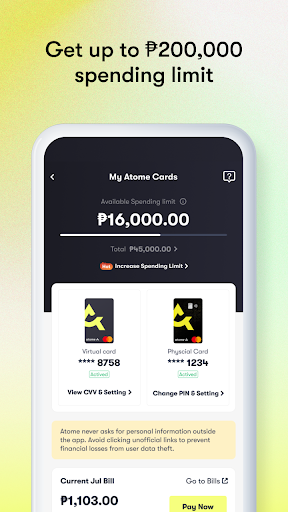
Buy now, pay later just got better through Atome's credit and cash loan services.
Say hello to one of Southeast Asia's leading digital consumer financing platforms. Split your bills into 3 or 6-month installments with 0% interest on monthly purchases with the Atome Card.
Get quick cash loans via Atome Cash with interest rates as low as 1.75% and installment plans of up to 12 months.
Pay your SPayLater, SLoan, BillEase, Home Credit, and TendoPay bills using your Atome Card on GrabPay and Bayad Center.
►What you'll love about Atome
✊ Atome Card
1. Better budgeting with flexible payment and installment options
- Stretch your budget and pay later at 0% interest on monthly purchases. Enjoy installment plans for up to 6 months.
2. Easy application
- Simply apply on the app in minutes. No paperwork is needed.
3. Convenient for your needs
- Shop more of what you love with up to a ₱200,000 spending limit.
4. Pay later anywhere that accepts Mastercard
▻ For online and in-store shopping, even overseas:
- Link your physical or virtual/digital card to e-commerce platforms like Lazada, Shopee, Grab, FoodPanda, and TikTok Shop.
- Tap-to-pay using Atome Card at SM Store, Robinsons, and even overseas.
▻ For your utility bills:
- Pay your utilities on time at Meralco, Maynilad, Globe, Smart, or on online apps such as BillEase via GrabPay, and Home Credit and TendoPay via Bayad Center.
5. Card Bills Payment
- Choose your preferred payment method: credit/debit card, InstaPay via your bank's mobile app, like BPI, BDO, and UnionBank, e-wallets such as Maya & GCash, or over-the-counter payment.
✊ Atome Cash
1. Looking for an easy, fast cash loan? Applying for personal loans with Atome Cash is convenient with quick approval and disbursement for up to ₱50,000.
Repay loans in installments of up to 12 months with 1.75% interest. Apply on the Atome app if you are:
- A registered Atome user with past in-app transactions
- At least 18 years old with a valid ID
- - Has a bank account, such as BPI, BDO, UnionBank, and more.
Download the Atome app today for a better, savvier lifestyle!
►ATOME CARD APPLICATION ELIGIBILITY
- Valid PH ID
- 18 years old and above
- No minimum income requirement
- No paperwork
►HOW TO APPLY FOR THE ATOME CARD
1. Download the Atome app and tap the 'Card' tab on the home page
2. Tap "Apply for free" and choose your preferred Atome Card
3. Fill in your personal information and upload your ID
4. Get approved in 1-2 days
5. Receive your Atome Card via mail
►HOW TO SHOP WITH THE ATOME CARD
1. Activate your physical card on the Atome app
2. Use virtual card to shop online
3. Use physical card to shop online and in-store
►INFORMATION ABOUT ATOME CARD'S INSTALLMENT PLANS
- Monthly interest rates for as low as 2%
- Annual Percentage Rate (APR) ranging from 0%-46 %
- No service charges
- Installment plans are available in 3 or 6 months
►Total loan cost illustration:
- Total monthly bill: ₱2,000
- Bill amount: ₱2,000
- Repayment term: 3 months
- Monthly interest rate: 2% (₱40)
- Total payment: ₱2,120 at ₱706.67/month
►INFORMATION ABOUT ATOME CASH'S LOAN TERMS:
- Monthly interest rates for as low as 1.75%
- Annual Percentage Rate (APR) not more than 36%
- No service charges
- Installment plans for up to 12 months
►Total loan cost illustration:
- Total loan amount: ₱3,000
- Repayment term: 6 months
- Monthly interest rate: 1.75% (₱52.50)
- Total payment: ₱3,052.50 at ₱508.75/month
Business Name: Atome PH
Corporate Name: Neuroncredit Financing Company Inc.
SEC Registration Number: CS201816338
Certificate of Authority No.: 1178
Bangko Sentral ng Pilipinas OPS Registration No.: OPSCOR-2021-0040
Connect with us via:
Web: https://www.atome.ph/atome-card
Help Center:
support@atome.ph
https://help.atome.ph/hc/en-gb/categories/4439682039065-Atome-Card
Social media:
https://web.facebook.com/atomecardph
https://www.instagram.com/atome.ph/
Más detalles

1. Descargar el instalador de MEmu y finalice la instalación

2. Iniciar MEmu y abrir Google Play en la página de inicio

3. Buscar Atome PH - Buy Now Pay Later en Google Play
Install
4. Descargar y instalar Atome PH - Buy Now Pay Later
5. Hacer click al icono para iniciar

6. Experiencia Atome PH - Buy Now Pay Later en PC con MEmu
MEmu App Player es el mejor emulador de Android gratuito y 50 millones de personas ya están disfrutando su magnífica experiencia de aplicación en Android. La tecnología de virtualización de MEmu te permite jugar a miles de aplicaciones Android suavemente en tu PC, incluso los más intensivos gráficamente.
Pantalla más grande con mejores gráficos; Larga duración, sin limitación de batería o datos móviles.
Soporte completo de keymapping para un control preciso del teclado y el mouse o gamepad.
Múltiples cuentas de juegos o tareas en una sola PC a la vez con el administrador de instancias múltiples.
Use Atome PH - Buy Now Pay Later on PC by following steps: