
Atome PH - Card, Loans & Save
Updated
Current Version
2.178.0
Offered By

Stop worrying about high battery drain when using Atome PH - Card, Loans & Save on your phone. Free yourself from the tiny screen and enjoy the app on a much larger display. From now on, get a full-screen experience of your app with the convenience of a keyboard and mouse. MEmu offers you all the surprising features you’d expect: quick installation and easy setup, intuitive controls, and no more worries about battery life, mobile data, or unexpected calls. The all-new MEmu 9 is the choice for using Atome PH - Card, Loans & Save on your computer. With the MEmu multi-instance manager, you can run two or more accounts at the same time. Most importantly, our exclusive emulation engine unlocks your PC’s full potential, delivering smooth and enjoyable performance.
Show more
Enjoy superb experience of using Atome PH - Card, Loans & Save on PC with MEMU App Player. It's a powerful free Android emulator which provides you with thousands of android apps for their desktop version. Enjoy connecting with friends and polishing your work with higher efficiency! For eligible residents of the Philippines only.
For eligible residents of the Philippines only.
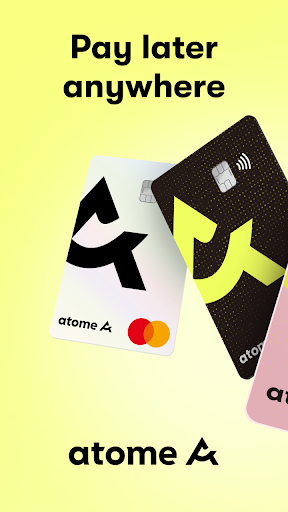
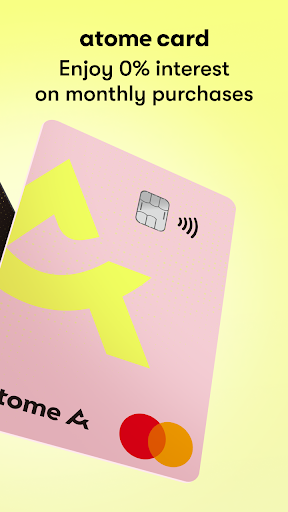
Atome, Southeast Asia's leading financial platform, offers solutions to empower your financial journey. Buy Now Pay Later! Shop smarter with the Atome Card—scan to pay with QR Ph, enjoy 3- or 6-month installments, and get 0% interest on monthly purchases. Access quick cash with Atome Cash, starting at just 1.75% interest. Grow your money with Atome Savings, earning 3.25%* p.a. daily interest with no minimum balance required.
* Rates may adjust based on Netbank policies.
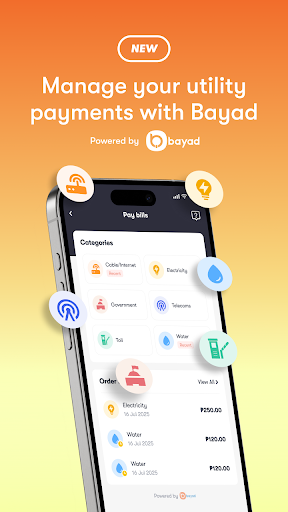
As e-wallets and PayLater apps grow, Atome now goes beyond shopping and financing by offering a seamless one-stop bill payment experience for utilities such as water, electricity, telecom, broadband, internet, mobile, and postpaid bills.
Atome Card
1. Flexible payment and installment options
- Stretch your budget and pay later at 0% interest. Enjoy installment plans of up to 6 months.
2. Easy application
- Apply in minutes—no paperwork needed.
3. Convenient for your needs
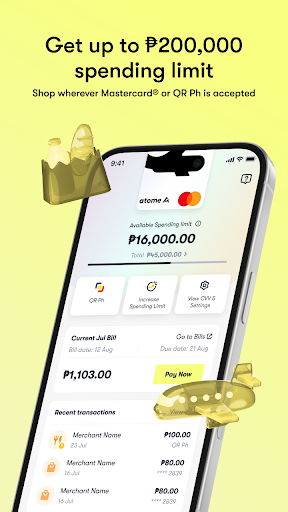
- Shop with up to a ₱200,000 spending limit.
4. Pay later anywhere that accepts Mastercard
- Use your physical or virtual Atome Card to shop online on Lazada, Shopee, Grab, and more.
- Tap-to-pay in stores and even overseas.
- Also compatible with apps like BillEase (via GrabPay), Home Credit, and TendoPay via Bayad and PayMongo.
5. Pay bills easily
- Square up your monthly essentials in one place. Atome now supports water, electricity, internet, and mobile bill payments through major providers, including Maynilad, Manila Water, PrimeWater, Meralco, Globe One, Smart, Converge, and more.
6. Settle your monthly card bills
- Pay using credit/debit card, InstaPay via bank apps such as BPI, BDO, UnionBank, or e-wallets like GCash and Maya.
Atome Savings
Atome Card users can open a secure savings account built for everyday growth.
- Earn up to 3.25% p.a. interest, credited daily
- No minimum balance, no lock-in period, and zero fees
- Deposits are protected with PDIC insurance coverage up to ₱1M
Atome Cash
Access fast, reliable cash loans when you need them most.
- Borrow up to ₱55,000
- Quick approval and seamless disbursement
- Repay in up to 12 months with low 1.75% monthly interest
- Simple requirements: valid ID, Atome account, and a bank account (BPI, BDO, UnionBank, etc.)
Download Atome today for a savvier lifestyle!
ATOME CARD APPLICATION ELIGIBILITY
- Valid PH ID
- At least 18 years old
- No minimum income
- No paperwork required
HOW TO APPLY
1. Download the Atome app and open the Card tab
2. Tap “Apply for free”
3. Fill in personal info and upload your ID
4. Get approved in 1–2 days
5. Receive your Atome Card via mail
HOW TO SHOP
1. Activate your card in-app
2. Use virtual card online
3. Use physical card online and in-store
ATOME CARD INSTALLMENT PLANS:
- Monthly interest rates as low as 2%
- Annual Percentage Rate (APR) ranging from 0%-36 %
- No service charges
- Installment plans are available in 3 or 6 mos.
Example total loan cost:
- Total monthly bill: ₱2,000
- Bill amount: ₱2,000
- Repayment term: 3 months
- Monthly interest rate: 2% (₱40)
- Total payment: ₱2,120 at ₱706.67/month
ATOME CASH LOAN TERMS:
- Monthly interest rates as low as 1.75%
- Annual Percentage Rate (APR) not more than 36%
- No service charges
- Installment plans for up to 12 mos.
Example total loan cost:
- Total loan amount: ₱3,000
- Repayment term: 6 mos.
- Monthly interest rate: 1.75% (₱52.50)
- Total payment: ₱3,052.50 at ₱508.75/month
Business Name: Atome and Atome Ph
Corporate Name: NeuronCredit Financing Company Inc.
SEC Registration Number: CS201816338
Certificate of Authority No.: 1178
Bangko Sentral ng Pilipinas OPS Registration No.: OPSCOR-2021-0040
Web: https://www.atome.ph/atome-card
https://www.atome.ph/atome-cash
https://www.atome.ph/atome-savings
Help: support@atome.ph
https://help.atome.ph/hc/en-gb/categories/4439682039065-Atome-Card
https://web.facebook.com/atomecardph
https://www.instagram.com/atome.ph/
Show more

1. Download MEmu installer and finish the setup

2. Start MEmu then open Google Play on the desktop

3. Search Atome PH - Card, Loans & Save in Google Play
Install
4. Download and Install Atome PH - Card, Loans & Save
5. On install completion click the icon to start

6. Enjoy using Atome PH - Card, Loans & Save on PC with MEmu
MEmu Play is the best Android emulator, and 100 million users already enjoy its superb Android app experience. Powered by advanced virtualization technology, it lets you enjoy thousands of Android apps smoothly on your PC—including the most graphics-intensive ones.
Bigger screen with better graphics; Long duration, without limitation of battery or mobile data.
Full Keymapping support for precise control of keyboard and mouse or gamepad.
Multiple game accounts or tasks on single PC at one time with Multi-Instance manager.
Use Atome PH - Card, Loans & Save on PC by following steps: