Demus
Actualizada
Versión actual
1.0.0
Ofrecida por

Deje de preocuparse por los recargos cuando use Demus en su teléfono celular, libérese de la pequeña pantalla y disfrute usando la aplicación en una pantalla mucho más grande. A partir de ahora, obtenga una experiencia de pantalla completa de su aplicación con teclado y mouse. MEmu le ofrece todas las características sorprendentes que esperaba: instalación rápida y configuración fácil, controles intuitivos, no más limitaciones de batería, datos móviles y llamadas molestas. El nuevo MEmu 9 es la mejor opción para usar Demus en su computadora. Codificado con nuestra absorción, el administrador de instancias múltiples hace posible abrir 2 o más cuentas al mismo tiempo. Y lo más importante, nuestro exclusivo motor de emulación puede liberar todo el potencial de su PC, hacer que todo sea fluido y agradable.
Más detalles
Disfruta de una experiencia increíble usando Demus en tu PC con MEmu Play. Es un potente emulador de Android gratuito que te ofrece miles de aplicaciones de Android en su versión de escritorio. ¡Conéctate con tus amigos y optimiza tu trabajo! Demus — Playful Music Player, Streaming & Offline.
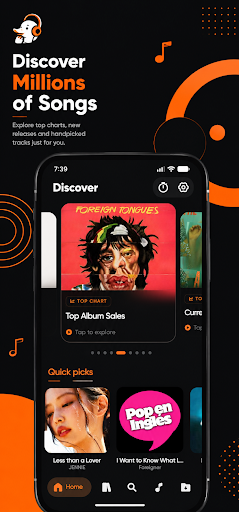
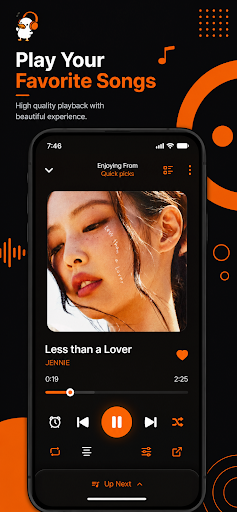
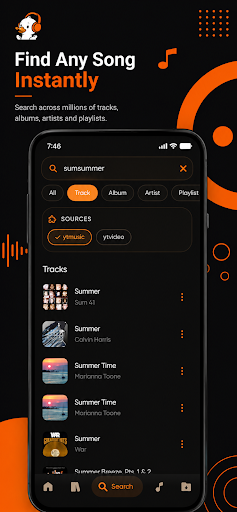
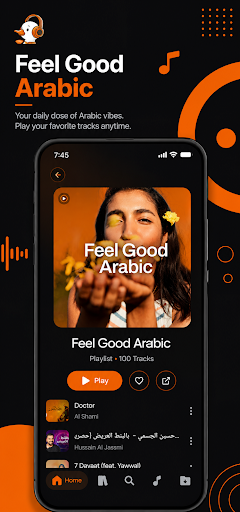
Demus — Playful Music Player, Streaming & Offline
Meet Demus: a friendly, playful music player designed to make music
feel easy. Search, tap, play. Save songs for offline listening.
Follow along with synced lyrics. Fine-tune every mix with a
built-in equalizer. No sign-up, no accounts, no bloat — just the
music, and a little friend along for the ride.
Whether you're commuting, working out, cooking, or unwinding at
night, Demus keeps your music playing beautifully — online or
completely offline.
WHY DEMUS
• A friendly, playful interface designed for daily listening
• Fast, snappy playback — tap and go
• Full offline mode once your tracks are downloaded
• Built-in 10-band equalizer with genre presets
• Synced lyrics that follow every song in real time
• 100 % free — no sign-up, no account, no dark patterns
• Small install size, gentle on your battery
A REAL MUSIC PLAYER
• Silky-smooth playback with a modern audio engine
• Gapless playback and crossfade for seamless listening
• Background music player with lock-screen and notification controls
• Bluetooth, headphone, and car audio support
• Full-screen now-playing view with album artwork
• Shuffle, repeat one, repeat all
• Smart queue and easy Up Next management
• Sleep timer for late-night music sessions
STREAM + DOWNLOAD FOR OFFLINE
• Search millions of songs by title, artist, or album
• Stream music instantly with a single tap
• One-tap MP3 download to your device
• Multiple audio quality options
• Download queue with pause, resume, and retry
• Zero buffering after download — perfect for travel and commutes
LYRICS THAT KEEP UP
• Synced, line-by-line lyrics that follow the song in real time
• Plain-text lyrics fallback when synced isn't available
• Full-screen lyric view — perfect for sing-alongs
• Manual lyric search when you want a specific version
TUNE YOUR SOUND
• Built-in graphic equalizer with fine per-band control
• Genre presets: rock, jazz, classical, electronic, vocal, bass boost
• Save your own custom EQ profiles
• Volume-per-track control
• Live audio spectrum on the now-playing screen
BUILD YOUR MUSIC LIBRARY
• Auto-scans and organises music already on your phone
• Create unlimited playlists — reorder tracks freely
• Favourites, recently played, most played, and full history
• Import and export playlists for easy backup
• Powerful search across your entire music library
DISCOVER MORE MUSIC
• Trending charts and curated collections
• Explore by artist, album, and genre
• Related songs and smart recommendations
• Multi-source search brings the best matches in one tap
LITTLE DETAILS
• Warm dark interface with a friendly mascot at the heart of it
• Last.fm scrobbling for listeners who track their taste
• Discord Rich Presence — show friends what you're playing
• Share songs and playlists with friends in one tap
• Available in English, Spanish, German, Hindi, Japanese,
Korean, Chinese and more
PRIVACY & PERMISSIONS — SIMPLE AND FAIR
Demus only requests what it actually needs: storage for your
downloads and local music library, notifications for background-
playback controls, and network access for search and streaming.
No hidden tracking, no personal-data harvesting. Your music
library stays yours, on your device.
IMPORTANT
Demus is a general-purpose music player. Please use it only to
play or download content you own or that is legally free to enjoy
in your country. Always respect artists, labels and copyright law.
Demus is an independent application and is not affiliated with,
endorsed by, or sponsored by any third-party streaming service,
video platform, or music brand.
READY TO PLAY?
Install Demus, tap search, hit play. Music, made a little friendlier
— clean, offline, and always ready.
Have feedback or a feature request? We read every review — leave
one and help shape the next update.
Más detalles

1. Descargar el instalador de MEmu y finalice la instalación

2. Iniciar MEmu y abrir Google Play en la página de inicio

3. Buscar Demus en Google Play
Install
4. Descargar y instalar Demus
5. Hacer click al icono para iniciar

6. Experiencia Demus en PC con MEmu
MEmu App Player es el mejor emulador de Android gratuito y 50 millones de personas ya están disfrutando su magnífica experiencia de aplicación en Android. La tecnología de virtualización de MEmu te permite jugar a miles de aplicaciones Android suavemente en tu PC, incluso los más intensivos gráficamente.
Pantalla más grande con mejores gráficos; Larga duración, sin limitación de batería o datos móviles.
Soporte completo de keymapping para un control preciso del teclado y el mouse o gamepad.
Múltiples cuentas de juegos o tareas en una sola PC a la vez con el administrador de instancias múltiples.
Use Demus on PC by following steps: